DIY Website Builders – Friend or Foe?


diy-website-builder

There has been a lot of chatter in our industry over the last couple of years due to the growth in popularity and usability of DIY Website Builders.

What is a DIY Website Builder? These are websites where you can go and build your own website for free or very inexpensively without any coding. You know, I’m sure you’ve seen the commercials for Squarespace, GoDaddy Website Builder, ShopifyVirb, Jimdo, Weebly, and even WIX flooding your television. As you can guess, some people within our industry have seen this a threat to their livelihoods and have been trashing these services endlessly since they began to grow. Not us…

We like the growth of DIY Website Builders

We think of these things differently. We’re small business owners and we care about small businesses. We started out building websites primarily for small business a few years back because there really wasn’t a quality alternative.

However, that is changing. Are these DIY website builders for every small business owner? Absolutely not. Could they be a huge money saver for others? Absolutely. And we love any tool that helps a small business owner manage key areas of their business in better, easier, and affordable ways.

website-builders

Which is the right approach for me?

If you’re just needing a great looking site to promote your local business in an online brochure fashion, you’re probably the perfect candidate for one of these DIY website building sites. Even if you’re not in the mood to do it yourself, there are plenty of designers out there with the necessary skills to bring the site together for you to look great at a very reduced rate from a custom website.

If you’re someone that actually needs your website to DO SOMETHING, a DIY website builder is probably not your best option. Sure these tools are becoming much more powerful, however that growth is mainly towards how you build the site. This means you can have a lot of flexibility when designing but not when it comes to how you manage your site or how users will use the site. DIY builders can be great when they have the ability to do what you want but if they don’t then you are completely out of luck. So make sure Squarespace, etc. do all that you will need it to do in the foreseeable future so you don’t find yourself having to migrate your site not long after building it.

If you need complex forms, access control, customer/client management activities, custom functionality and third-party API integrations – these solutions are definitely not for you at this time and will probably never be a viable solution for your business. If this is something you’re looking for, these are right in our wheelhouse and we’d love to talk to you.

Things to look out for…

As a bit of a footnote to this article we did want to do a bit of warning about some of these systems.

1. Can you make it look how you want?

2. Will it have all the features you really need?

3. Advertisements

With some of them being “Free”, there is a bit of a conflict of interest that arises when it comes to the purpose of your website.

The website for your small business should be designed to advertise and promote your small business (novel idea right?). Be sure to watch out when building your DIY website that the company isn’t using valuable space on the site to promote their service (the free website builder that you’re using). I’ve seen a few sites with fixed content at the top and bottom of websites promoting the DIY website service that completely distracted from the main content of the site. It does not leave a great first impression about the strength of your business if there are ads all over it.

No matter how much money you save, you’ll never be properly served by a website that promotes someone else’s business over your own.

4. SEO

These have made huge progress in the last 3 years but still if ranking and proper SEO is a big component of your online success, the control you have with WordPress still has the upper hand.

Things to look out for:

  • Ability to have SEO-friendly URLs and to modify them. So you can end up with something like https://limecuda.wpenginepowered.com/diy-website-builders
  • Automatic XML sitemap. This is the sitemap you submit to Google Search Console. Ideally the sitemap automatically adds any new posts or pages as you create them. Then the pages have the best chance of quickly being added to Google’s index.
  • Mobile-friendly. This is now a ranking factor – your site should be
  • Quick loading. Your site won’t have good success with rankings if it loads slowly, besides it ends up being a terrible experience for the user – and you don’t want that!

5. Can you export the content or move easily in the future?


Got any questions about DIY Website Builders? Leave us a comment or send us a line. We’d be happy to chat. 

User Experience! Why Everyone Hates Your Website

At its most basic, User Experience (UX) design is exactly what it sounds like. You’re designing and working towards users having the best possible experience using your website or application.

This means they can quickly determine what your website is about, finding the information they’re looking for is a breeze, and accomplishing necessary tasks takes very little mental exertion. At the end of the process, the best UX allows for users to accomplish the primary purpose of your website with as little mental exertion as possible.

This is why one of the greatest books on the topic is called “Don’t Make Me Think“, users don’t want to have to think about what they’re doing. They just want to do it!

Where to start when thinking about UX?

UX design is a great field with many different techniques that can be employed to help in understanding how well users are able to interact with your website or application.

But, as a starting point for most people, the simplest step is to get out of your own head and think about your users – your potential clients.

Particularly if it is your own business, you’ve probably had your mind wrapped up in a lot of things that most clients don’t care about.

For example, you may take great pride in the interesting story behind the founding of your business. However, potential clients looking for your core service may find your story to be a hindrance if it gets in the way of them completing their main objective.

Align your objectives

If you’ve ever had a conversation with us you know we’re big on having a clear, and usually solitary, intention for your website. What do you want to accomplish? What is your objective?

So, when building a website you should have a clear objective. Your site is subsequently designed to meet and promote this clear objective.

So, at its core, I believe a great UX can only exist when the objective you set for your website is aligned to the objective a potential client has when visiting your website.

For a successful website, the two objectives must match.

This can only happen when you first take a step back and think about your user and not your business.

What are your potential customers looking for when they land on your website? Do they find it?

LimeCuda is now in East Lansing, Michigan

WordPress design East Lansing

Big news for LimeCuda and myself (Blake): We’ve relocated to East Lansing, Michigan! We’re looking forward to using our WordPress expertise to help businesses in the East Lansing / Mid Michigan area.
Most of you are probably already aware of this as technically we moved a few months ago. But consider this the official announcement post.

This really won’t affect most of our customers or the way we serve you, except our mailing address has changed to:

[wpseo_address show_phone=”false” show_state=”1″ show_country=”1″ show_email=”0″]

LimeCuda will be turning 5 years old this coming January. We’ve seen a lot of change in ourselves, in the industry, and how we create web-solutions. We’re as excited as ever about helping organizations better harness the power of the web and we still truly love what we do.

WordPress All Over the World

wordpress

We began in Pennsylvania, moved to Florida, then Georgia, and now to Michigan. We have clients in 16 US states and 11 countries. The magic of the Internet age is we’re able to provide WordPress-centric solutions to clients all around the world – but if you are in our new neighborhood of East Lansing, Michigan we’d love to meet you!


The Mallard Family is Growing!

A couple of weeks ago, my wife and I welcomed our second son into the world, Hudson Forrester Mallard. We’re excited about the growing family and our 2 year old is happy to have “BABY!” around. He’s already started talking to him and reading him books 🙂

Hudson Forrester Mallard

Brothers

Family

Not Annotating in Google Analytics? You’re Missing Out

Have you ever made a change to your website hoping it will increase your traffic or specific conversions? How do you track the effectiveness of this change? One simple way to track your efforts is to take advantage of annotations within your Google Analytics account.

What are Annotations in Google Analytics?

google-annotation

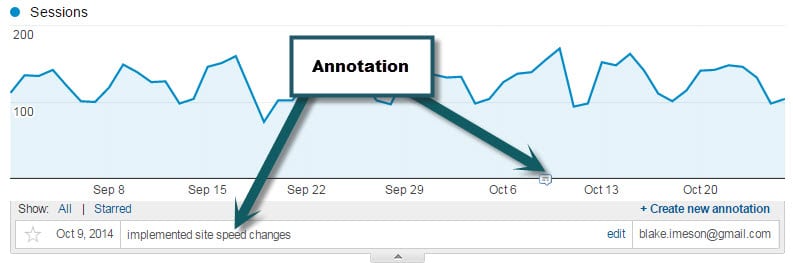
Annotating in Google Analytics is simply recording a note that will always be visible. Simple but powerful. Take a look for yourself in the following screenshot.

What would be worth annotating?

  • Site re-launch
  • Major content changes
  • Email campaigns
  • Adding a new plugin

Basically, anything that could  in a meaningful way positively or negatively affect the traffic is worth adding. That way if you are going through your analytics history you might be able to trace back upswings or downswings to things that were done.

How do you annotate?

Super easy, just select the date range in Google Analytics that will encompass the date you want to annotate on and then click the “+ Create new Annotation” button.If you choose the option “shared” then your note will be visible to other users on the Analytics account which can be helpful for the team and for those that may follow after you.


Why Redirect Pages from Your Old Site?

404-not-found

Say you had a page on Blue Widgets on your old site – when you go live with a new site maybe you decided to delete that page or you changed the URL.

So what happens if someone tries to go to that page on your old site? They will hit an error page AKA 404 “Not Found” page. 

This is no bueno. In my somewhat-biased opinion whether this gets remedied or not can be a clue as to whether a developer is good or great.

So Why Redirect Defunct Pages?

If we don’t there are two primary negative effects:

1) The domain now has a bunch of 404 errors which Google keeps track of and will not see that as a good sign. Those null pages also may have had some trust/authority in Google’s eyes that get lost if they go nowhere. Even if these all just redirect to the homepage that is better than nothing.

2) Broken user pathways. So if someone had a page bookmarked or had emailed it to a friend, that link is now broken. Additionally there may be old marketing materials that link to it or other vendor / partner sites that linked to them.

404-error-page-lost-visitors

How do you know which pages are broken?

1) Do a search in Google for site:limecuda.com but replace limecuda.com with your domain name. This will show the pages Google has indexed for your domain. As a post-launch practice I will usually do that search and open up each result and create redirects for any URLs I missed that result in errors.

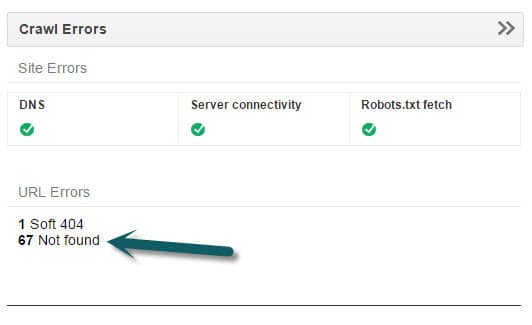
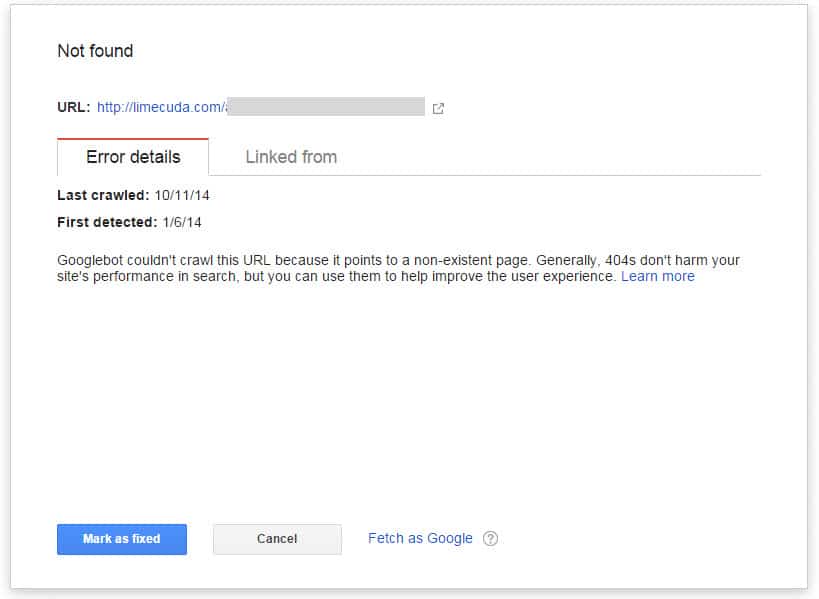
2) If you have your site verified in Google Webmaster Tools it will show you Error pages that it has found. This is a good thing to look at from time-to-time to try and keep that number near zero.

gwt
gwt-error

When you have fixed an error reported by GWT make sure to click “Mark as Fixed”.

3) Another option is to use Google Analytics. If you go to Behavior>>Site Content>>All Pages and do a search for 404 it might show you some pages people have hit that didn’t exist.

4) Not necesarily even a broken page on your site but using  brokenlinkcheck.com to scan your site may be another way to find error page and/or broken links.

5) Before ditching an old site we  create a list of all its pages. This tool, https://www.xml-sitemaps.com/ can scan your site and return a list of its pages. Use this option: “Download Sitemap in Text Format”

How to Remedy?

There are a number of methods for redirecting these but they all have in common that they need to be the 301 (Permanent) type of redirect.

1) If you use a typical Linux-type hosting running Apache you can use the .htaccess file which is found in the root of the site if you access it with sFTP.

In that file you can add lines like the below…

Redirect 301 ^/old-url/ http://limecuda.com/new-equivalent-url/

Pro Tip: To assemble all of these URLs with the “Redirect 301” you might want to use concatenation in Excel or if you use an amped up Notepad tool like Notepad++ you can do some clever tricks like the following to add “Redirect 301” in front of every line. This uses the regex caret symbol ^  which means “at the start of”.


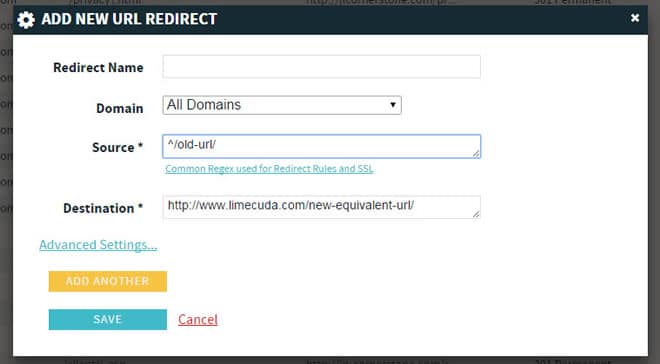
2) If you use a premium host like WPengine (runs many of our sites) then it might be running on nginx (pronounced “engine x”) in which case there might be a panel that looks like this…

redirect-nginx-404-pages


You may need some RegEx for properly redirecting some of these.


Now you know why error pages are a bad thing, how to find them, and how to fix them.

Have questions? Please ask in the comments!

How LimeCuda Uses Basecamp

We love Basecamp for Project Management. It helps us stay sane but more importantly we’re able to deliver a world-class solution to our clients in the most efficient way possible…every time, repeatedly, and consistently. Things get done quickly and correctly.

Back to where it all began, Grove City College

This past week we took a short trip to the birthplace of LimeCuda and my old stomping grounds, Grove City College.

Main reason for the visit was the former director of the Entrepreneurship department, Craig Columbus was speaking on “Living the Entrepreneurial Life”. It was a great talk and had a very genuine and frank feel. Some of the quick points from it off the top of my head:

  • Be an “abundance” thinker not a “scarcity” thinker. Don’t view profit as a pie to be divided but as a pie to be grown.
  • Conflict is inevitable you just need to learn to deal appropriately with it. Peace is not the absence of conflict but the presence of God.
  • Success is rarely a straight line. You will have many failures and that is ok.

It was an inspiring talk. Craig is a brilliant and humble entrepreneur.

Had a great time catching up with a peer I admire very much, Gray MacKenzie of Guavabox. Together we stormed one of Tim Sweet’s famous wing nights.

The next two days I spoke to a few classes:

  • Digital Marketing
  • The Entrepreneurial Mind
  • Internet Content Marketing
  • Ecommerce

I am not sure that people realize just how aggressively innovative the Entr Dept. at GCC really is. In the classes above and other they are learning how to leverage cutting-edge tech, not just things like Word and PowerPoint but WordPress, SEO, and how to write engaging content for online consumption, etc. This stuff is key, so much of modern business depends on understanding and successfully using technology.

Each time I go back I wish I could go through the program again, there are so many amazing classes. Simply amazing.

Big thank you to the Entrepreneurship Dept. for graciously hosting me again. It is always encouraging to be back and fills my tank with inspiration each time.

Here’s my son and I enjoying a Buffalo Chicken Tender Wrap in the Student Union. 

gcc-student-union


How the Mobile Web WILL Affect Your Business

There are some amazing new statistics about mobile phone usage.  With these numbers, there is no doubt that mobile must be a major aspect of small business’ web strategy and will only become more important.  In this next phase of Internet evolution, how will your business be affected?

At LimeCuda, our biggest pet peeve is seeing our clients and other small businesses getting wooed into spending lots of money in the pursuit of false hopes.  Although mobile design has a much lower risk of underhanded marketing activities than services such as SEO (we are not degrading SEO as a service, only certain SEO “experts” that do their clients more harm than good) there is still opportunity for salesmen to capitalize on the “need to get your site mobile” without putting the specific needs of your small business first.

Here are a couple of things to think about when considering the development of your approach to the mobile web.

Track YOUR Analytics!

Take a look at the statistics presented in the mobile marketing video above.  These statistics further show that mobile IS the current (and future) trend in Internet use. However, what is the trend for your website? Are your analytics showing you what you need to be focusing on a mobile site design? Or are your analytics telling you that your current web budget is better spent on SEO or Social Media strategies?  Just because there are a large number of people searching for local businesses from their phone, what good is it for your business to have a mobile website if you don’t even have a Google Place page?  Focus on your goals and utilize your budget to best reach these goals. Be tactical with your budget.

Mobile Analytics Examples from our Clients

Mobile Visitors from Jan 1st 2010 – April 30th 2012

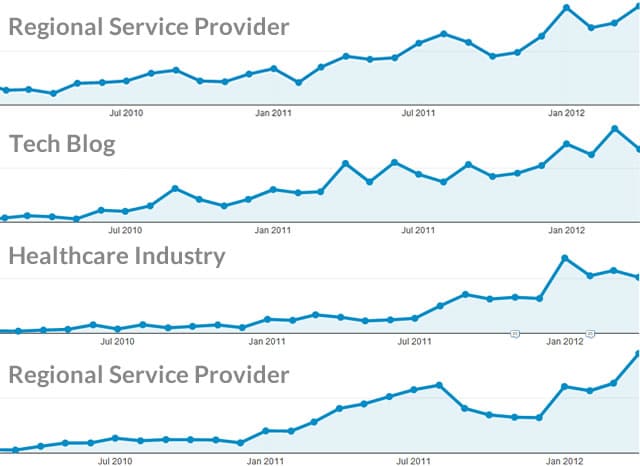
We ran some analytics reports from a few clients that have data going back to 2010. These are a good applicable sample.  Other clients’ analytics show similar trends. The below graphs show mobile visits over time. (each dot is a month)

mobile traffic analytics stats

First Four Months of the Year

(mobile as a % of total visits)

Year

Client A

Client B

Client C

20101.32%1.15%2.2%
20117.26%4.59%4%
201217.5%9.70%9.6%

You might say that 10% of your visitors isn’t massive but the trajectory is increasing. It is not a stretch to predict that by next year a solid third of your traffic might be mobile!

Have you determined your goals for being online?  
Do you know how to track and understand your analytics?  
We would love to discuss these issues with you directly!  Contact us today!

What are your customers looking for?

So you have determined that you need a mobile website now!  What next?

You need to determine what people are trying to accomplish when using your site from a mobile device.  This is definitely more difficult to determine and relies on educated guessing, however there are some great clues that can be found within the search terms and traffic flow in your analytics.

For example, imagine you run an upscale Italian restaurant in a major city (we’ll say Atlanta since that is the world outside my door right now).  A sample of your customer base might be:

  • Wealthy locals
  • Locals celebrating special events (anniversaries, engagements, etc.)
  • Tourists (everyone budgets at least one “fancy meal” for their vacations)
  • Business Travelers

Your website has an elegant design which entices the visitor with the feel and atmosphere they’ll experience when visiting your restaurant.  It showcases your world-class chef, large, elegant images of your featured dishes, and a quick way to contact or book a reservation.  What does a mobile user want to do?  Some possible intentions:

  • Get directions to your restaurant (they’re already in the car!)
  • Find your number to call
  • Book a reservation
  • Browse your menu
  • Find out if you have any specials running

While these are just educated guesses, your analytics might give you good insight into what the mobile user wants.  Why not give them this information more immediately, while still providing the same feel and atmosphere from the main site design?

Effective mobile web strategy must begin with knowing what is most helpful to the mobile browser.

Do you need a mobile web strategy?  Contact us today about developing and implementing your mobile strategy!