Why Your Website Needs to be Secured with HTTPS (in Layman’s Terms)

Don’t miss the boat getting your website secured with HTTPS! Here’s why…

Around 6 years ago very few sites were mobile-friendly. We’ve had a revolution and now every website needs to be usable and pleasant experience on mobile.

In similar fashion, we’re at a turning point for all websites being “secured” (HTTPS) using SSL Certificates.
https-secure-wordpress-website

What is SSL / HTTPS?

It is basically a protocol that means any traffic to-and-from your website is encrypted and if it is intercepted it cannot be understood.

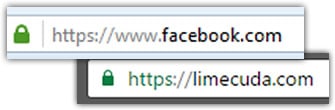
Your site either gets accessed using HTTP or HTTPS. The secure version, HTTPS will usually show a trust-gaining green lock in the browser. The “S” in HTTPS stands for “Secure” – it should all makes sense now…
ssl-wordpress-website

If you visit an unsecured website and fill out a contact form while on McDonald’s WiFi, anyone else on that network can see all your traffic and what you submitted – if the site is not HTTPS. You can see how this is a problem!

The 6 Reasons You Need to Join the SSL Pivot Point

1. Gain Better Search Rankings

In an effort to encourage best practice and protect their users,  Google sees sites being secure as a minor ranking signal. Ranking for keywords is hard, this could give you a small boost.

2. Avoid Embarrassing “Insecure Site” Warnings

The Chrome browser team recently announced that starting in January there will be insecure warnings on site login pages that aren’t SSLed. This could be a blot on your brand and isn’t a good reflection to the user. In the future it seems likely that securing an entire site will be best practice.

3. Security Contributes to Brand Trust

Having that green lock in the browser and seeing that your site is secured may help users trust you more highly if this is their first impression.

4. You Care About Your Website’s Visitors

Even if you aren’t collecting credit card details, SSNs, or private details…you want to guard your users. Sometimes little details could help a hacker build a profile on them and do something nefarious. We’ve even had clients whose customers couldn’t access an insecure site – usually for industries like military or government. If your site isn’t secure, your users’ traffic is wide open to any governments, shady monitoring outfits, and hackers.

5. Keep Your Own WordPress Admin Secure

While the WordPress Dashboard / admin area does have some security features, you are still transmitting your logins insecurely when you login and are making changes to your site.

6. Could Help Your Website Load More Quickly

I don’t need to even say why that is an awesome thing. The technologies that work with HTTPS and your browser now mean that an SSL certificate won’t slow your site down but could actually make it faster for users!


Your Next Steps to Get Secured

Migrating from HTTP to HTTPS is becoming inevitable. There is so much value in switching that it is already a no-brainer.

If your WordPress site is not secured and able to use HTTPS, reach out to us and we can create a plan to migrate. Typically the certificates cost $50-250/year. However, you can now get an SSL Certificate for free using Let’s Encrypt. We use SSL for all new WordPress hosting accounts, it is becoming a must-have feature.




Why Redirect Pages from Your Old Site?

404-not-found

Say you had a page on Blue Widgets on your old site – when you go live with a new site maybe you decided to delete that page or you changed the URL.

So what happens if someone tries to go to that page on your old site? They will hit an error page AKA 404 “Not Found” page. 

This is no bueno. In my somewhat-biased opinion whether this gets remedied or not can be a clue as to whether a developer is good or great.

So Why Redirect Defunct Pages?

If we don’t there are two primary negative effects:

1) The domain now has a bunch of 404 errors which Google keeps track of and will not see that as a good sign. Those null pages also may have had some trust/authority in Google’s eyes that get lost if they go nowhere. Even if these all just redirect to the homepage that is better than nothing.

2) Broken user pathways. So if someone had a page bookmarked or had emailed it to a friend, that link is now broken. Additionally there may be old marketing materials that link to it or other vendor / partner sites that linked to them.

404-error-page-lost-visitors

How do you know which pages are broken?

1) Do a search in Google for site:limecuda.com but replace limecuda.com with your domain name. This will show the pages Google has indexed for your domain. As a post-launch practice I will usually do that search and open up each result and create redirects for any URLs I missed that result in errors.

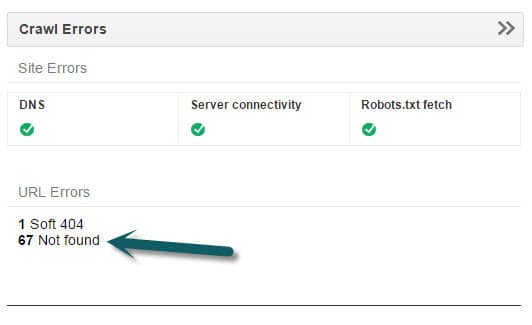
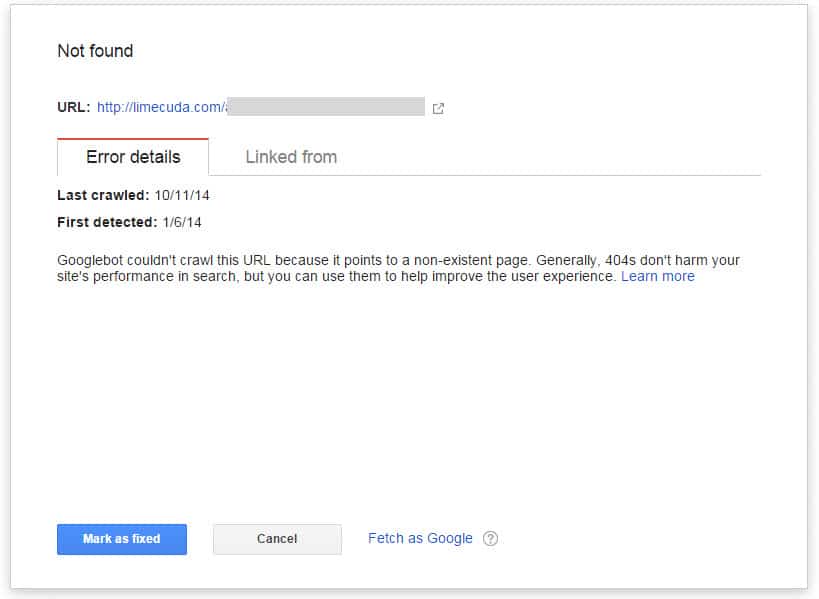
2) If you have your site verified in Google Webmaster Tools it will show you Error pages that it has found. This is a good thing to look at from time-to-time to try and keep that number near zero.

gwt
gwt-error

When you have fixed an error reported by GWT make sure to click “Mark as Fixed”.

3) Another option is to use Google Analytics. If you go to Behavior>>Site Content>>All Pages and do a search for 404 it might show you some pages people have hit that didn’t exist.

4) Not necesarily even a broken page on your site but using  brokenlinkcheck.com to scan your site may be another way to find error page and/or broken links.

5) Before ditching an old site we  create a list of all its pages. This tool, https://www.xml-sitemaps.com/ can scan your site and return a list of its pages. Use this option: “Download Sitemap in Text Format”

How to Remedy?

There are a number of methods for redirecting these but they all have in common that they need to be the 301 (Permanent) type of redirect.

1) If you use a typical Linux-type hosting running Apache you can use the .htaccess file which is found in the root of the site if you access it with sFTP.

In that file you can add lines like the below…

Redirect 301 ^/old-url/ http://limecuda.com/new-equivalent-url/

Pro Tip: To assemble all of these URLs with the “Redirect 301” you might want to use concatenation in Excel or if you use an amped up Notepad tool like Notepad++ you can do some clever tricks like the following to add “Redirect 301” in front of every line. This uses the regex caret symbol ^  which means “at the start of”.


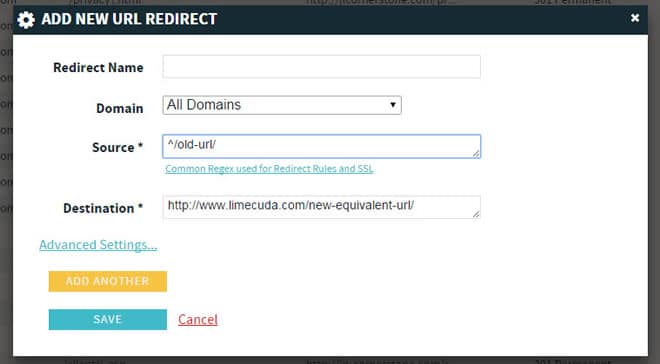
2) If you use a premium host like WPengine (runs many of our sites) then it might be running on nginx (pronounced “engine x”) in which case there might be a panel that looks like this…

redirect-nginx-404-pages


You may need some RegEx for properly redirecting some of these.


Now you know why error pages are a bad thing, how to find them, and how to fix them.

Have questions? Please ask in the comments!

New cPanel Upgrade for Hosting Accounts

Those clients that host their sites with us, your lives just got ever-so-slightly better. We recently upgraded the LimeCuda dedicated servers to the latest version of WHM/cPanel. This is the software that runs on the hosting side of things and makes it much easier to manage the technical aspects of your site.

Without dragging you through the boring details just know that this means better security, improved usability, and a beautiful new interface.

cpanel-lg

Never used cPanel? Here are some of the ways it can be used…

  • Creating webmail accounts (unless you are using Google Apps for Domains as email)
  • Create subdomains
  • Create redirects
  • Edit DNS
  • Create MySQL databases and edit them with phpMyAdmin

You can log in at yoursite.com/cpanel – so basically just add a /cpanel to the end of your domain and you should be presented with this screen:

Nota Bene: Just because you can access this, it might not be a good idea to just change things unless you know what you’re doing. When in doubt check with us and we can give you some direction. 🙂

Have a question about our WordPress hosting or using cPanel? Give us a call at 724-870-4742