Practical Starting Concerns for Web Accessibility

Practical web accessibility is a mindset. Accessibility, broadly speaking, is helping something be as usable as possible to a broad range of users – especially those with visual impairments. The following isn’t a comprehensive list of accessibility requirements for modern websites, but we do give a general mindset and high level checklist for ensuring we don’t overlook common items. This list can provide big improvements in the usability of a website for those with web accessibility concerns.

Starting Point: good content organization and proper markup

With CSS comes great responsibility. Styles can be used to completely manipulate a site’s layout and visually rearrange the site in a way that doesn’t match the actual flow of the content. For accessibility, we always strive for a logical layout for the site and the content so that if you removed all the site’s styling, you could read the site from top to bottom and it would clearly convey the intended message.

With this approach to readability, proper markup is also used to ensure content is assigned the appropriate value for its intended purpose. This includes: headings, forms, buttons, images, and links. When these elements are given the appropriate markup, it helps to define content hierarchy as well as tell screen readers more information about the content that is present.

Visual Concerns for Accessibility

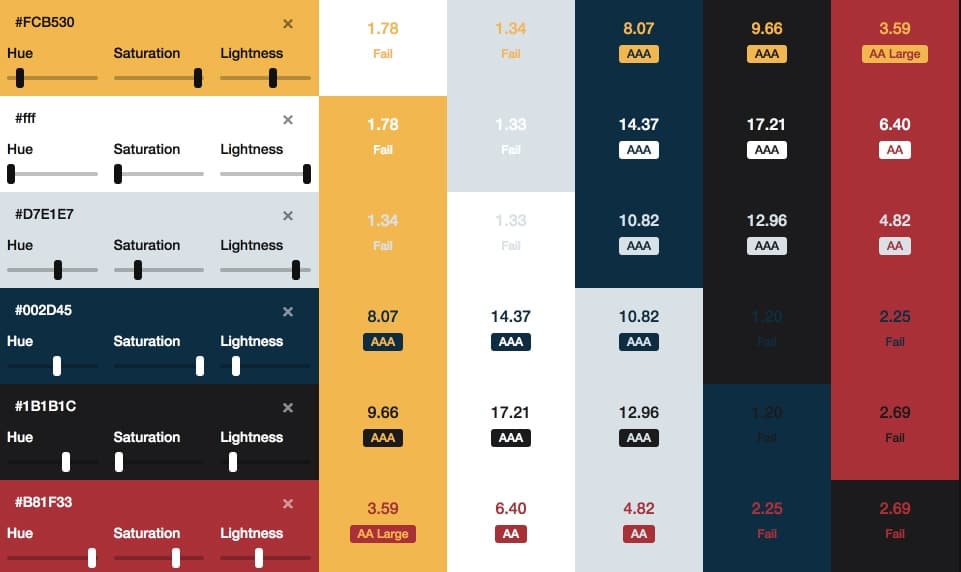
  • For any text elements, ensure that there is enough color contrast between the background and the foreground color of the text. That way, you can ensure all text is legible for those even with minor visual impairments due to disability or age.
  • Ensure all image elements have “alt” tags for those that can’t see the image to know what that image represents. If image isn’t necessary for the content, include an empty “alt” tag (alt=””)
  • Ensure all action elements (buttons, links, triggers) have proper labels and present proper context so users clearly understand what happens when interacting with that element. No need to have title tags on these links as long as the linked text is clear and defines result of action.
  • Ensure there are skip links at the top of pages so those using keyboard navigation along with a screen reader can “jump” repeated elements like the navigation and instantly hit the page content for the pages they’re visiting.

Physical Impairments

  • Ensure keyboard navigation allows users to access all action elements on the page. This includes all elements of a navigation including submenu items that aren’t initially visible on the page.
  • Ensure there is enough padding and space on clickable elements on the page. That way users with some physical impairment that are still using a mouse can easily click on their desired actions with limited opportunity to click on the wrong elements.


Have a web project we can weigh in on? Drop us a line! 

5 Solid Ways to Fine-Tune a Blog

We’ve done a lot of WordPress blog optimization work – this last year in particular. Here are 5 solid ways to fine-tune your blog.
fine-tune-a-blog


  1. Make it fast!


    Yes, users expect your blog to be fast. Faster blogs generate higher engagement, more page views, and are much better at driving that blog traffic to your primary “Calls To Action” and services.


  2. Be intentional with your blog post SEO


    Your blog is a marketing tool but how do you generate good, new traffic to your blog? This is a very weighty topic, but being intentional with your blog post SEO is key to generating more organic traffic to your blog.


  3. Interlink blog posts


    Interlinking blog posts is a great way for you to tell Google what your content is about. It helps to tell Google that this post is a valid and authoritative source of information on the “linked topic” (the text that you used as the link. Like “Interlinking blog posts” in the sentence above.)


  4. Have interesting imagery


    Let’s face it, we’re very visual creatures. Yes, the content of your blog is what’s important, however, having strong and engaging visuals helps to get people pulled in and connected with your content. Not sure where to start finding good imagery? Check out our post on how to find good blog images. (see what we did there? #2 above)


  5. Drive towards a goal.


    Why do you have a blog in the first place? For some people, the blog content engagement is the goal. To have users engage with and share the content is the primary goal of the site and layout. For example, that is the case for Rachel Shultz and her blog “On Homemaking” or Jim Cutler’s Vlog. Your site may have many secondary (but important) goals like: pageviews, ad revenue, brand exposure, building an email list, selling an eBook, etc. etc.


    For many businesses, the blog is just the starting point for the “what’s next” that they would like visitors to pursue. Not establishing and driving towards a goal is a waste of your blogging efforts. Ultimately, you want a customer, an advocate, and brand loyalty – not casual bystanders that have no push towards further engagement with you.


tune-a-post-like-a-guitar

See how easy it is to enhance your blog without adding fluff? Now that you’ve read these quick tips, take a look back over this post. Can you see how we used these exact tips to bring a little more power to this post?

Need some blog optimization done by seasoned professionals (hint hint), contact us and give us the scoop on your project. 

Documentation, Where Do I Put That?

As we’ve been looking to bring on more talented people into the mix here at LimeCuda, one area that we’re focusing on improving is documentation. At the core of creating any documentation is a need to get expertise, knowledge, and experience out of our own heads and presented in a way that is digestible by anyone coming into our business.

With this focus, we are starting by focusing on support and procedural documentation.

Support Documentation

We are cumulatively responsible for about 200 websites with a wide array of industries and purposes. Even with great variety between sites, we do find ourselves answering some of the same questions on a regular basis… Issues around domains, SSL, and general hosting are very common for us. By creating support documentation to answer these recurring questions, we no longer have to rely on bespoke responses for these issues and can provide a quicker response with reliable and tested information.

To help us in aggregating this information, we’re working to build out this documentation within the “Docs” feature in Helpscout. If you’re an existing customer, you likely received an email about how to submit a support ticket (also powered by Helpscout). By building the documentation here, we’ll have a seamless approach for quickly adding this documentation to our email responses to your requests.

Procedural Documentation

It’s difficult to have a functioning business if you don’t document the why and how general tasks are to be performed for your business. This would include general processes like our process for handling single-developer sprints, configuring DNS, or full checklists like our checklist for a WordPress SSL / HTTPS migration. This documentation is crucial for capturing experience and lessons learned from performing some of these tasks over-and-over and passing it along to new team members when they join. These ever-evolving documents help to ensure that every time we perform a task, it is the best we’ve ever done it.

We have multiple places where we capture procedural documentation. We are a business built around an Open Source ecosystem and have a strong bent towards transparency and sharing. With that ethos, our first place for capturing this documentation is on our public resource site Fewer Than Three. This documentation is fully available to anyone to use in improving their own websites and businesses.

For things that are specific to us internally at LimeCuda, we utilize the Wiki features available within Github. This way, it is easily accessible when creating new tasks for specific projects that can be assigned to anyone on our team.

Is your company actively using a documentation process to help in improving your business? We’d love to hear the tools and strategies you’re using in creating your documentation.

Let Your Blog and Comments Be Transparent!

I had a rather irritating experience trying to comment on a blog recently. A vendor/tech partner we use published a blog post with a couple interesting points. However, one of the things they were recommending in their post was something that was completely at-odds with their own technical infrastructure.

Being a kindly sort I commented on the post asking why was this one aspect mentioned as I thought it wouldn’t work on their platform. Here’s where things went south…

My comment was never published or responded to! 

Sad Blake! Even worse, they approved some other comments AND removed the part of the post I had questioned! I couldn’t believe it, this was not behavior consistent with our industry. The whole point of a blog allowing comments is the transparency and public conversation that they allow.

This experience really broke my trust in this company’s blog.

How could they have responded differently?

I understand that perhaps there was some intern or marketing person that wrote the post and really didn’t clear the content past anyone who should have caught it. Editing the post to remove incorrect information is perfectly acceptable.

There are three more reasonable routes they could have taken though…

  1. Approved my comment and then replied to it noting that they had some incorrect info and the post has been updated.
  2. If they didn’t approve my comment they could have emailed me privately and thanked me for pointing the error out.
  3. Don’t allow comments or don’t allow them on certain posts (I don’t normally advise this)

In this story we are an ideal longtime customer of theirs, to the order of tens of thousands of dollars over our account history. We have sent a many people their way and are major brand advocates. This whole story, while minor and a trivial issue really left a bad taste in my mouth.

The moral of the story is: treat your commenters and your comment section with care. If someone called you on the phone and pointed out an error on your website you wouldn’t abruptly hang up on them and then fix it! Don’t treat your commenters that way!


How We Grew in 2017

2017 was a wonderful year for LimeCuda – January 2018 was actually our 8th year anniversary!

As we’re starting to head full steam into 2018 I thought I’d (Blake) share some news and reflections. First up…

A new baby in the mix

My wife and I are thrilled to announce the birth of Micah Roger Imeson in early October. It was the “boring” delivery we were praying for and so far he has been a delightfully easy baby.

A major thanks to all the clients who very graciously allowed me to take two weeks of time mostly ignoring email and project work. There is much I love about the work we do at LimeCuda and the flexibility to attend to our families is easily our chief perk.

What would a baby announcement be without oodles of cute pictures? Here are 9 photos out of the probably 9000 we’ve taken 🙂

imeson-collage-2017


A change of scenery for the Mallards

This was also a year of big change for my (Josh writing now) family. We finally sold our home in Georgia and have embarked on a new adventure in South Carolina! We’ve landed in a 100 year old mill converted into lofts in Spartanburg, South Carolina. It’s a beautiful and creative space with an awesome community. My 5 year old loves meeting new people everyday on the elevator and talks about how he loves his new apartment better than his “boring house”. This area is a great hub being within an hour of Greenville, Asheville, and Charlotte and a great spot for launching some memorable weekend adventures.

We’ve been here only a couple of months and have met some wonderful people, great organizations to get the kids involved, as well as found a great church community we look forward to getting more invested with.

Growing our persistent team


As many of our clients may have noticed, our team has been growing a little bit in 2017 as well. This year has been hectic that we shamefully let our newest team member, Elizabeth Copeland, get settled without making a big announcement to the world here. Her official job title is “Project Manager”, a role which she has filled wonderfully, but she wears many other hats including designer, developer, and Blake & Josh wrangler. We really look forward to continuing to work with her in 2018!

Additionally, we’ve also had the pleasure of working with several new designers and developers this year to help us bring your projects to life. We can now say that our clients sites have been crafted with love in California, Georgia, Michigan, South Carolina, and Texas.

Focus for 2018

As we look forward to 2018, we’re focusing on our commitment to “doing great work for awesome people”. Our biggest assets at LimeCuda are our awesome clients and the unique relationships we have with each of them. We love working with cool people on projects and passions that we can support and stand behind. If we can add value in those scenarios, we want to find a way to make it happen!

[WEBSITE ARCHITECTURE] When and Why You Use Child Pages?

When thinking about and assembling a Sitemap, one of the key considerations is that of hierarchy – which pages should be child pages, and why?

how to best use child pages

What is a Child Page?

A child page is a page that “lives” in hierarchy underneath another page (the parent). In the example below, both “Our Team” and “Company History” are child pages of “About”.

  • Home
  • About
    • Our Team
    • Company History
  • Contact

A brief look at Sitemaps

A sitemap is a listing of public webpages or categories on your site.

When assembling a sitemap / site architecture, you want to keep it as flat as possible. Having parent/child relationships creates just that between the content on those pages – a relationship.

Once you add multiple layers, the relationship between the content becomes convoluted. This creates a hierarchy that is difficult for your users to navigate as well as increases the likelihood that pages will not be crawled and indexed by Google.

Should you find yourself in a situation with multiple levels of relationships (four or more) it may be a clear sign that you need to re-strategize the site’s architecture. Sites with thousands of pages of content present a challenge, but it is a challenge you can overcome.

Take a look at how massive sites are addressing the hurdle:

[genesis_column size=”one-half” position=”first”]

[/genesis_column]

[genesis_column size=”one-half”]

[/genesis_column]

There are capabilities within the WordPress ecosystem to automatically generate both HTML sitemaps (what we are talking about here) and XML sitemaps (which get submitted to search engines).

Strive for a logical and sensible sitemap. Keep it simple.

What is the impact of making a page a “Child”?

There are three primary effects of making a page a child.

  1. It will affect the URL of the page. This is automatic in WordPress. The URL for the above example would be .com/about/our-team This is good and sensible. If you see this URL you know what the page is likely about.
  2. It may affect where the page visually “shows up” on your site. This is mostly of concern when thinking about, say, your top navigation. Most likely, it won’t make much sense to have a child page be one of your top-level nav items.
  3. It will affect your sitemap formatting. When viewing an automatically-generated sitemap, the child page should be neatly displayed under and indented to its parent page. This formatting helps someone at-a-glance understand your site.

If you are modifying existing pages, make sure that if the URL changes, you redirect the old URL to the new URL. We have written about why you should redirect your defunct pages.

Hit us up in the comments if you have questions on how to handle child pages.

Why We Love Paying for WordPress Plugins

Everybody loves free! You get what you want and you don’t have to give up anything for it!

But is it the best “value”- even at $0.00? Is anything ever really free? Can we really get something we want without trading something for it?

love-paying-wordpress-plugins

TL;DR Why we love paying for plugins

  • You can trust they will be updated and improved over time
  • They are a safer cart to hitch your horse to for the long haul (path dependency)
  • Support exists and is usually very helpful
  • The author / company has a VERY keen interest in your success with their plugin

What about free WordPress Plugins?

Don’t get me wrong, we love free plugins too. There are free plugins that we use almost all of our WordPress projects. There are many high quality and reliable plugins built by people that we know (some we like 😉 ) and trust.

Why pay for WordPress Plugins?

However, we really love paying for premium plugins as well. But, when many in our community expect things for free, we feel the need to dig into why we love to pay for WordPress plugins.

Open Source works phenomenally, but sometimes the author / company’s interest in providing well for themselves is an even more effective and predictable incentive.

It is not from the benevolence of the butcher, the brewer, or the baker, that we expect our dinner, but from their regard to their own interest.
– Adam Smith
The Wealth Of Nations, Book IV, Chapter II

Quality of the Plugin Code

The first thing you might expect us to reference here is quality. The assumption is that if you get it for free you must be sacrificing quality.

In reality, free does not automatically translate to a lack of quality. Conversely, paid or premium items do not automatically guarantee a high level of quality.

Quality in WordPress plugins is a highly objective matter. Does the code follow security best practices? Does it do what it promises (and many times, only what it promises), and is it easy for our clients to use. (Note: here is how we feel about extending Enterprise-level WordPress with plugins)

In our space, there are many free plugins that greatly outrank the premium plugin alternatives in terms of quality.

The reasons are also tied to incentives. Companies can build extremely profitable businesses on the back of a free plugin via “Pro” add-ons, extensions, support, and connections to larger service projects. (AKA Freemium) Also, many individuals take pride in their public WordPress reputation and are incentivized to maintain quality as a matter of pride (no negative interpretation implied).

Even though they’re not being incentivized through direct plugin sales, there is still a huge pressure to maintain the quality on a free WordPress plugin.

So, quality could be a reason but why else do we really love to pay for plugins?

Long-Term Reliability

It’s reliability. If there is no path to getting paid for their work, we cannot rely on that developer to keep the plugin updated with current WordPress versions or provide support for the occasional bugs.

For us, this is the most important reason why we’re happy to pay for code used on our client sites. We’re not looking for quick solutions for these features. When we choose a plugin (or build a feature ourselves) we are committing them to a “path dependency“.  We want it to be a fantastic path.

With any plugin that we choose to integrate, we’re looking for long-term, quality, and reliable sources that will best serve our sites for as long as possible.

How about you?

Have you experienced this? Any tools or resources you excitedly pay for rather than get for free? Tell us about it in the comments!

PSA: Please Protect Your Domain Name!

Your domain name is a CRITICAL and hard-to-replace component of your web presence. Take steps to make sure you don’t lose it!

It seems like a great time for a Public Service Announcement. We’ve recently helped several clients work through some really messy situations where they almost lost their domain names. It is no fun I promise! But, it can be avoided!

If you lose control of your domain name you are at risk to lose:

  • Your current website being accessible on that domain name
  • Any rankings, SEO value, or links pointing to it
  • Any email being sent to it
  • Worst yet, someone could scoop the domain name and redirect to a different site or put up something nefarious

First, what is a domain name

Obvious right? A domain name is your address on the web, like limecuda.com or google.com

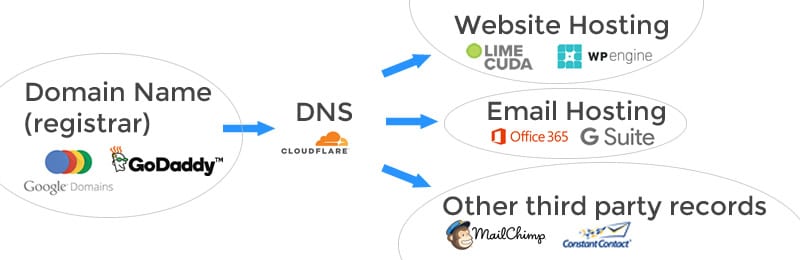
A domain is bought at what is called a “registrar” and has a yearly renewal fee. It can be confusing because the registrar may also provide website hosting, email hosting, and other services all wrapped into one. Sometimes the DNS is controlled at the registrar or at the webhost. However, they can be all separate services and look like for example…

Some common registrars are GoDaddy (we use and recommend), Google Domains, Hover, register.com, Network Solutions (avoid if possible), and NameCheap,

How to prevent losing your domain name

These are the most common issues we bump into…

  • The email address connected to the registrar account is one that isn’t often checked or is using the email of a former employee
  • The credit card has expired
  • The domain isn’t set on auto-renew
  • You didn’t realize you were paying for a domain name with that vendor (it is confusing as there is also sometimes separately: website hosting, email hosting, and DNS)
  • Have in writing what legal entity or person owns the domain name

Alternatively, we’re happy to purchase / hold domain names on your behalf. This is a courtesy service (with a minimal fee to cover our cost) and means the domain is extremely safe and secure in our account. Whatever the route you choose, please treat your domain name like your birth certificate or some other irreplaceable document.

What to do if you’ve lost your domain name?

First, depending on the registrar you were using, there may be a grace period. GoDaddy is especially generous here while Network Solutions extorts you with a massive fee. Call up your registrar immediately and see what your options are. If someone has already scooped up the expired domain you may be able to negotiate them selling it back to you. I recommend using a service to negotiate on your behalf. There are lots of scammy domain squatters out there.

You may need to look for a replacement domain. Migrating email and website hosting to it will be painful but at some point it may be your only option.

Don’t lose that domain name! Please contact us if you want to chat through your options.


RUTHLESS EFFICIENCY: The Secret Magic of Clipboard History

This begins a new series we’re doing on “Ruthless Efficiency”.
Short tips to redeem time from mundane, repeatable, inefficient tasks. The result: more joyful work, less stress, more time for creativity.

ruthless-efficiency-clipboard

To start, let’s take a look at something already built into your computer, the clipboard. Your computer’s clipboard can be so much more than copy/paste. Learn how to add hidden talent and make your computing more effective AND efficient.

The Normal Clipboard

You know the drill, it is a hidden storage place where something lives that you just copy/cut and then when you need it you “paste” it. Simple, binary, one thing in, one thing out.

Common Clipboard Keyboard Shortcuts

Cut
Windows: Control (Ctrl) + X
Mac: Command (Cmd) + X

Copy
Windows: Control (Ctrl) + C
Mac: Command (Cmd) + C

Paste
Windows: Control (Ctrl) + V
Mac: Command (Cmd) + V

The Efficiency Beast of a Clipboard

This is really one of my favorite tools I use all-day-long. It is called “clipboard history”. The concept is simple, your clipboard ends up accumulating all the stuff you copy and you can go back and re-paste stuff from days or weeks ago. I can search and recall text I copied weeks ago or thousands of copies ago.

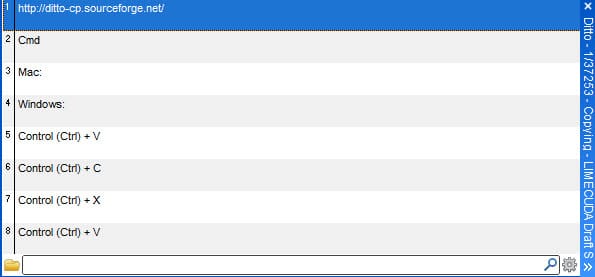
I use a Clipboard history tool for Windows called Ditto. While it is free and works great, it is not the prettiest…clipboard-history-ditto

I just hit a special key combination and it pulls up the above interface. I can just start typing part of a previous item I know I had copied. So if I had previously copied:

<p id="aesc"><a href="https://www.aesc.org/" title="AESC - The Association of Executive Search and Leadership Consultants" target="_blank"><img src="/assets/img/common/aesc.gif" alt="AESC - The Association of Executive Search and Leadership Consultants"></a></p>

I could find it by starting to type “aesc” or “href” – basically any part of the paste I remember can help me recall it to use again.

Features of Ditto

[genesis_column size=”one-half” position=”first”]

  • Easy to use interface
  • Search and paste previous copy entries
  • Keep multiple computer’s clipboards in sync
  • Data is encrypted when sent over the network

[/genesis_column]

[genesis_column size=”one-half”]

  • Accessed from tray icon or global hot key
  • Select entry by double click, enter key or drag drop
  • Paste into any window that accepts standard copy/paste entries
  • Display thumbnail of copied images in list

[/genesis_column]

Other Clipboard History Tools

The time savings and ability to quickly repeat tasks make this an essential tool for the computer power user!

Hosting and Maintenance for Enterprise WordPress Sites

We previously looked at what it means to extend WordPress via plugins and custom coding for enterprise websites. However, this is only a small part of the “battle” when it comes to working with enterprise websites.

wordpress-enterprise

The 5 Key Aspects of Enterprise WordPress Hosting & Maintenance

Enterprise websites are never “set it and forget it” properties. They need to be regularly backed up, monitored, updated, and maintained.

Use this post to do an audit and determine if your site is on stable ground.

There are many great solutions out there. We carefully tailor a hosting setup for each client that involves sometimes dozens of tools working in harmony to create an optimal hosting and maintenance setup for WordPress.

1. Hosting Security

It all begins with a properly architected server setup. This is basic – just like having deadbolts on your doors and locking your windows.

Things we look for (and provide) in our enterprise WordPress-specific hosting:

Security Practices of Major WordPress Hosts

2. Keeping WordPress Updated

The biggest security risk in WordPress is not having the codebase updated to the latest versions. This includes the WordPress core, plugins, and the theme. In recent security reports, the majority of WordPress-related hacks are due to sites using outdated versions of WordPress or outdated plugins that have had vulnerability patches publicly available for well over a year.

We use site management tools that let us update all our client sites at once and within minutes of a security patch being released.

3. Regular Site Maintenance

In this case, for “maintenance” we’re not referencing retainer-type work where active feature improvements are being made to the site. Think of maintenance as the aforementioned regular updates being performed but with a careful eye to making sure the site keeps working as it should.

Conflicts are pretty rare but in an enterprise-context, a key feature failing could mean serious lost revenue or at a minimum a black eye on the brand reputation.

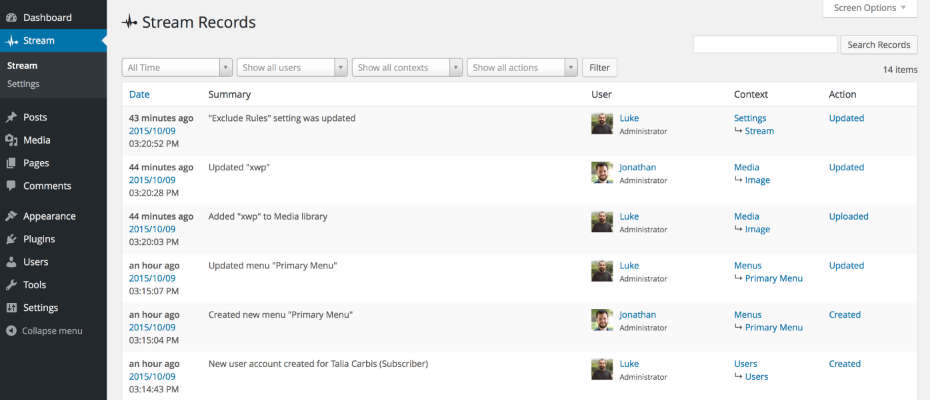
We use a brilliant plugin called Stream that is basically a black box for WordPress. It records all the stuff that happens on the backend of the site. This is really useful for tracing back what went wrong. It let’s you see who-did-what-and-when.

stream-plugin

Scheduled and Quality-Assured update intervals

A security update should usually be applied immediately. Non-critical updates and feature releases are better applied at set intervals (like once a month or every two weeks) That way these can be done on a staging site, or when the site has low traffic. Once a batch of updates is applied it is then efficient to go through an extensive QA list to ensure the sites look and functionality is still perfect.

Tip:
Do you have a staging area that you’re able to test your plugin updates to make sure everything is going well before running those updates (or migrating your staging) on live?

4. Site Backups and Restoration

Regular, full, off-site, and redundant backups need to be maintained with the ability to restore a site at any point in time.

If something ever goes wrong you need a quick way to restore! 

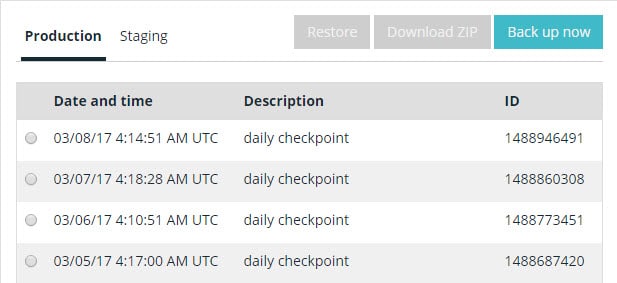
How often a site is backed up will be dependent on the type of site you’re hosting. For example, a corporate blog with daily posts would probably be adequately served by a daily backup. However, a high-volume, e-commerce site really needs a real-time backup solution to protect a complete list of customer transactions.

We use a couple backup solutions but at a minimum we utilize WPENGINE’s daily automatic backups.

wordpress-backups-wpengine

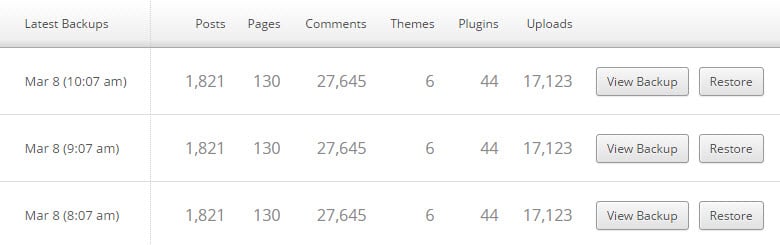
VaultPress has a great real-time backup feature for business-critical / E-Commerce sites. Additionally there is constant malware detection and this is a sweet deal.

vaultpress-ongoing-backups

5. Keeping a close eye on the website

For enterprise websites on WordPress, there are four types of monitoring:

  • Uptime monitoring
  • Security monitoring
  • SEO / Analytics
  • Performance / Speed

Uptime Monitoring

For uptime monitoring, the aim is always 100% uptime. But we live in a very complicated world with many moving parts and human error. (see recent Amazon S3 downtime due to a wrong keystroke)

Uptime Robot is a good monitoring tool that lets you send alerts to emails, texts to phones, RSS, updates in Slack, etc.

uptime-robot-dashboard

Security Monitoring

We use a combination of tools but an absolute key is to have the site being tracked in Google Search Console. This is free and it will email you if your site is ever suspected to be compromised. Google is very careful about sending search traffic to malware-infested sites. (Pro Tip: connect Google Analytics and Google Search Console).

If you are needing a one-off check to see if your site is clean, try the Sucuri SiteCheck tool.
Sucuri also has a good plugin to manage WordPress Security

SEO / Analytics

There are tons of great tools and ways to do this. (Google Analytics of course) Analytics and traffic measuring tools can also be used to alert you to all kinds of problems with your site being down or having malware.

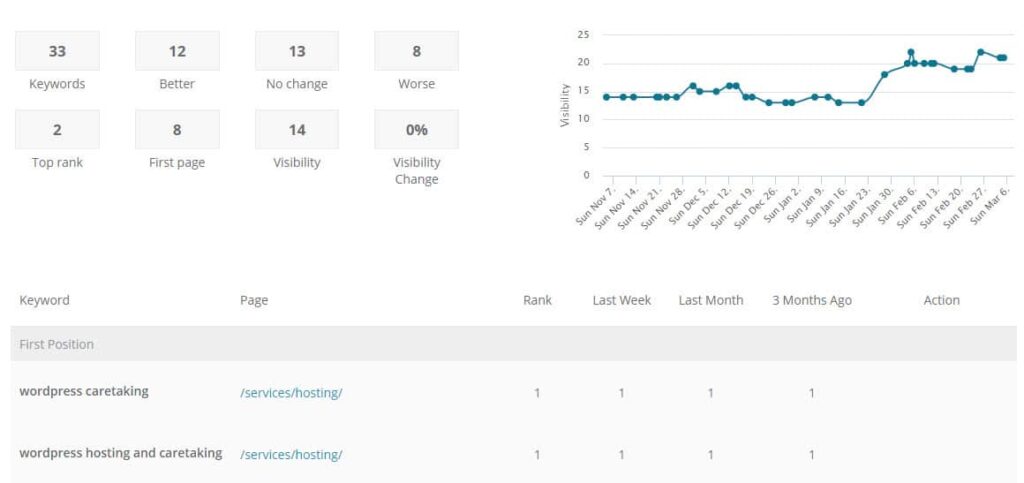
Being able to see keyword rankings can also be key to monitoring the site’s ongoing success.

seo-ranking-tracking

Performance / Speed

It isn’t enough to know that your site is up – it also needs to be loading quickly! We have alerts to head off any issues if a site starts loading sluggishly.

A good quick test for site speed is the Pingdom Website Speed test.

WordPress can be a great tool for enterprise needs but it must be hosted correctly and properly loved! Have a question or something to add? Comment below…