It might seem simple, search Google, find an image, and then use it… However, for the best results and avoiding legal trouble, there is a better way…
Why use images in blog posts?
I don’t need to work hard to sell you on this. A text-only blog post is pretty dull and uninspiring.
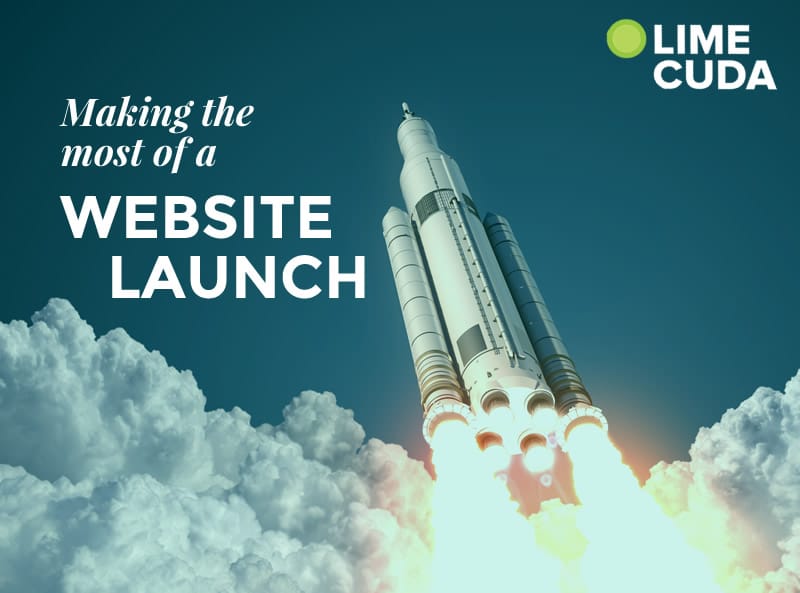
Adding an image to a post (or page) livens them up with visual interest AND it helps someone more quickly understand what your post is about. (#humblebrag we really like what the image conveys on our recent website launch ideas post)
Why you MUST be careful about where you get your images!
Intellectual Property and “creative use” is an extraordinarily complex subject and even differs across the globe. Your best bet is only use images you are permitted to use.
We’ve had several clients who accidentally used an image they didn’t have permission to use. This can result in a strongly worded letter threatening legal action. This can sometimes feel like a bit of an extortion game to try to get you to pay up. Just avoid that mess and use a little extra effort to get legitimate images.
Where is the best place to get images?
Here are four good sources for usable images….
1. (FREE) Image Search Engine
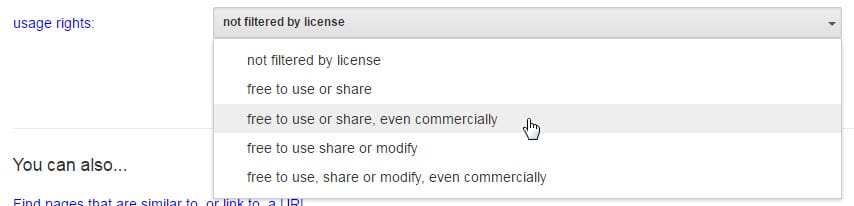
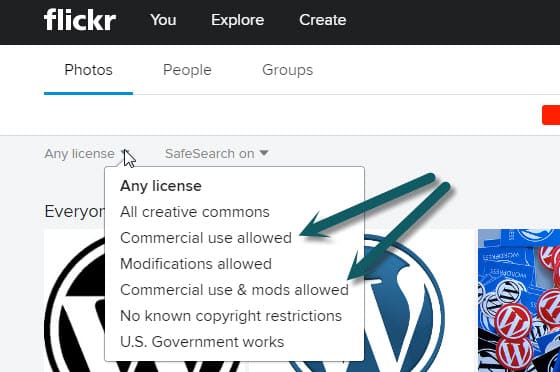
When you use Google Image Search or Flickr there are options to filter by license. Find free images already cleared to use.
Google Image Search Click the “Advanced Image Search” when searching in Google Images. Filter by the right license and then go find that image!
Flickr Like Google, Flickr has a massive collection of great images.
2. Stock photography sites
We have a monthly subscription to Big Stock Photo. There are quite a few great stock image sites. Be prepared they can easily be $10-40 per image but this is a small cost if the image is perfect.
This is our favorite option. Get a local professional photographer to take a bunch of pictures. Make a list of shots you know you need and also have shots take of anything that is unique or interesting – you never know what future photo needs may arise. Here are some ideas of what to get photographed:
Individual employee headshots
Team / group shots
Office building, signage, foyer, office space
Employees in action (within offices or doing whatever work you’re known for)
People naturally going about their day in your office environment
Unique art pieces or awards
Factory, storage areas, warehouse space, etc.
4. Ask permission to use
If there is a really great shot on someone’s website – they might be willing to let you use it. In this case, contact them and get their written permission to use it. Setting up the “ask” well can go a long way to getting clearance.
Great photos really do make-or-break a website. Take care with where you get them and choose great photos!
Rankings are the holy grail and goal of SEO. A great (overlooked) tactic is interlinking between your own content. We’ll show you a technique to make your SEO interlinking more effective.
The What and Why of Interlinking
When you link to a page, Google not only sees that as an indication of trust it gives them an idea on the subject matter of the page.
If we have a page on our site all about our “WordPress Expertise” and we intentionally linked to it with that phrase or variations of it – Google would get the idea what that page was all about! (should be noted that linking to that “wordpress expertise” page within this post is so meta and a perfect case-in-point 😉 !)
Now, getting these links from other websites is even better but you can and should be interlinking within your own site! There is a “PageRank damping factor” that won’t let you just keep escalating the power of interlinking on your own site, but you should still interlink when it makes sense and do it with SEO intentionality.
How to Make Interlinking Manageable
If interlinking isn’t easy, you won’t do it!
In WordPress adding a link to a piece of content within the same site is stunningly easy.
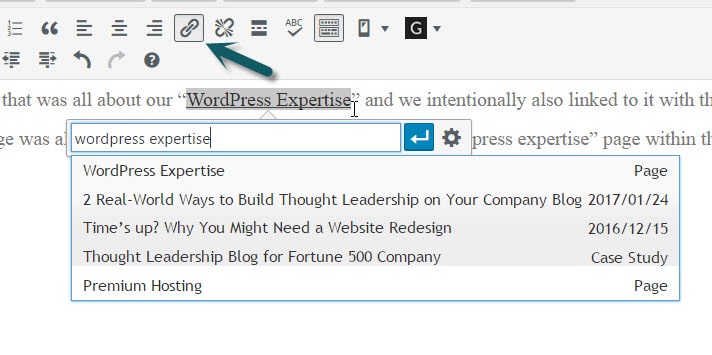
Highlight the text you want linked, type Ctrl+k (Command+k on Mac) or click the link icon. Then start typing a part of the title or URL for the content you are wanting to link.
Assign Keywords and Keep Track to Interlink Like a Pro
If you only have 5 keywords that map to 5 pages, then it may be manageable within your head. However, if you have dozens of keyphrases you are pursuing or you are working within a team of content writers then you need a better method.
Here’s the Keyword Interlinking Strategy that works for us…
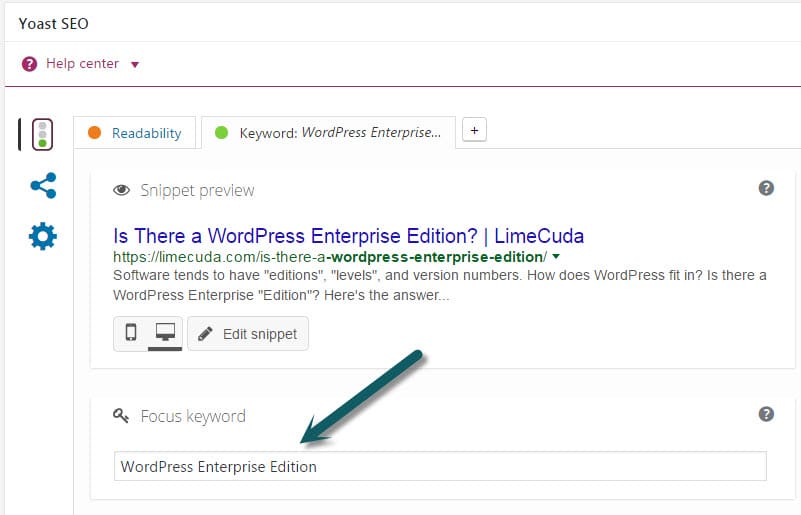
1. Assign a Focus Keyword to Each Post In the Yoast SEO tool this is easy and hopefully you’ve been doing it as you go along. If not, go back through and assign a focus keyword (think keyphrase) to each post.
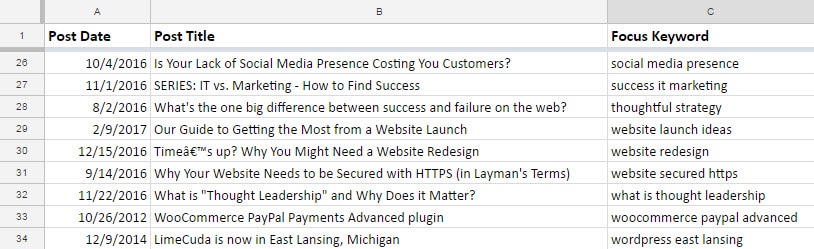
2. Export a List of Your Posts Use a tool like WP CSV to export a CSV file of all your posts. This file contains a column named “cf__yoast_wpseo_focuskw”. This “custom field” value is what contains your SEO Focus Keyword. So now you have a list of all your posts with the keyword mapped to each.
We recommend importing this CSV into a Google Sheet. Then you can easily share it with your team and keep it updated over time. If you only occasionally add posts it may be worth it to just manually add new Post Titles and Focus Keywords to your Sheet as time goes on.
3. Use the Spreadsheet when writing content When you are writing a post (before and after) reference your spreadsheet and see if there are natural (and helpful!) ways you can link to these posts – using the keywords!
Over time you can have a nice interlinked blog system that keeps users reading your content and Google understanding and ranking it!
Launching a new website can feel like earning a degree or having a baby. It is a big deal and you beam with pride and people are generally happy and encouraging.
A website launch can be a great marketing opportunity, here’s how to NOT let it go to waste. Here are our best website launch ideas gleaned from hundreds of launches,
Let People Know About Your New Look
If you have people that come to your website often, it might help to ease them into a new and unfamiliar experience. Change can be a great thing but (often) people don’t like change.
Launch Ideas to Spread the News
Make sure to build the excitement internally first! Share the new website launch company-wide first and your employees can become a “street team” for also sharing in the following action items.
Email people – this can be one-by-one to your closest clients and peers or more generally to an email list
Write a blog post announcing the site launch. You can then link to this in your email from above
Share the news on Social Media (LinkedIn, Facebook, Twitter)
Add a link in your email signature mentioning the launch
Is there local or industry PR you could reap? (think chamber of commerce, local newspapers, and industry associations)
Try a good ol’ Press Release
Don’t forget stakeholders, vendors, and collaborating companies!
It might even be good for buy-in to ask for feedback at different stages of a launch.
Having a new site is a great excuse to reconnect with customers or people you haven’t touched base with in ages. In relationship marketing, having legitimate touchpoints is so helpful. People want to know you care about them and most people are truly encouraging if things are going well for you.
Commemorate the Launch Occasion
Your new website was a big investment for your team in terms of planning, building, and launching – at all points, your team was likely very involved in the process. There is a lot of emotional investment from all the blood (hopefully not!), sweat, and tears. So make a big deal of this occasion.
We really don’t recommend breaking a bottle of champagne over a laptop…
However, it might be a great excuse to throw a company party or at least break out some cupcakes. One recent launch the company held an employee picnic complete with silly games, cupcakes, t-shirts, and company-branded sunglasses!
Don’t Be Afraid to Communicate the “Why” for Your New Website
What you do with communicating “why you rebuilt your website” will vary by industry. Our industry and personal preference tends toward the highly transparent side. For example, maybe you built your site to reach new customers or target market. Or maybe you realized your old site wasn’t doing everything it could to best serve your existing ones.
Don’t be afraid to point out the new areas that you worked hard to improve. Here are some to jumpstart your thinking….
Better mobile or tablet experience for the X% of your traffic that is using a smaller screen device.
Product lines or service offerings changed?
Easier ways to contact the right person
Added an area of documentation or FAQs?
Do you now have a blog or an email blast list?
Timeline of a Well-Executed Website Launch
Like a wedding or birthday party, what you do before and after execution is almost as important as the actual event. Here is how our agency tends to approach launches:
1. Pre-Launch Teasing It might be fun to share coming soon notes on Social Media or in email newsletters. Make this fun, use memes, clever graphics, and show some humanity gosh darnit.
2. Pre-Launch Review This is when your key team is reviewing the website and making sure the messaging is on-point, there are no glaring spelling errors or broken user paths. This is a great opportunity to get more of the company that wasn’t directly involved in the process invested in the new site and excited about the new website that is about to launch.
3. Soft Launch Your technical team (maybe us!) will actually stand up the new site. For some launches there is a period of DNS propagation that can take anywhere from 30min to 48 hours. Our preference is late evening and even Friday night soft launches if possible In the Soft Launch period you might send the link to a wider circle of employees, key partners, and your best customers.
4. Launch! This is the day you really start to make noise! Host your party, share the news, get pumped up.
5. Post Launch Make sure to quickly squash the inevitable spelling errors and bugs that crop up. Monitor the analytics. And then keep improving the site – don’t let it go stale!
Bonus: Our team works off of a massive launch checklist (we’ll share soon!) but one thing to make sure you do is to make note of the launch date so you can compare traffic, leads, etc. We usually make an annotation in the Google Analytics for the website launch.
Use your website launch to boost your company’s energy level, self-esteem, and client relationships. Have ideas to share? Please comment below.
We previously addressed the fact that there isn’t exactly a WordPress Enterprise edition. However, you will regularly see people talking about “WordPress for Enterprise”. What does this mean? How does this differ from “WordPress for bloggers”?
In this post, we’ll look at how you would approach extending WordPress for an enterprise site.
A Different Approach to How WordPress is Extended
When using WordPress to develop your website, the core software can be extended in two ways:
Via plugins
Via your active theme
This extension of capabilities is the same for both blogs and large enterprise websites. However, there is a key difference when approaching extension for enterprise websites – the intentionality of the extension.
Intentional, Custom Development
It would be a gross misuse of resources to custom-develop every feature built for an enterprise website on WordPress. However, custom development is far more common for enterprise-level websites.
For these sites, we don’t want to piece together a feature that is “kinda what you need” using a variety of different plugins. We want to build exactly what you need in the cleanest way possible. This greatly reduces the potential points of failure for the ongoing maintenance of your site and means running your site is much more enjoyable.
Custom Development Security
When doing custom development, there should always be an intentional review for security best practices. For example, when developing any sort of user interaction, a careful review of every action should consider:
Capability – Does the user have permission to perform this action?
Intentionality – Is the user intending to perform this action?
Validation / Sanitization – Am I getting the type of content that I’m expecting?
Escaping – Is the content I’m outputting safe to display?
Tip: There are some great engineering standards that I’ll commonly reference when building out features for client projects.
Careful Vetting of Plugins
There will also be free, open-sourced plugins (there are almost 50k free plugins!) as well as premium plugins used on an enterprise website. For a typical WordPress website, this can be a pretty haphazard process. Search for the feature you want and install the plugin!
But, for enterprise websites, the plugins used will be carefully vetted. Among other factors, a few key things need to be considered:
Popularity of the plugin(e.g. how many times has it been downloaded)
Reputation of the plugin (what does a Google search reveal)
Reputation of the plugin developer
Update history of the plugin(how often and when was the last update)
User review history of the plugin
Plugin support history(take a look at the support tab threads – is the developer responsive? Are there many problems?)
The goal is to have all code that extends the default WordPress functionality on your site to be secure and performant. This is a crucial foundation to have set when we start to factor in the considerations needed for hosting and maintaining WordPress for Enterprise.
Sign up for the LimeCuda Zest to learn more about…
Considerations for Hosting and Maintaining WordPress for Enterprise Websites.
In the most basic sense, someone is a thought leader because they have answers. They have experience that a specific audience is seeking to learn from.
When looking to create content for an audience, you need to first determine who your audience is and what their interests may be. Even further, if you can determine the daily, small pain points this audience experiences, you can focus your content on addressing those pain points.
It’s an easy temptation to allow your blog to become a one way form of communication. We can sometimes rest on a feeling of safety and security by imagining we’re just dumping our content into the world for our readers to just consume as-is.
However, we must give our audience an opportunity to engage.
Thought Leaders use their content as a starting point for further engagement with their audience. The ability to actually bring experience to a conversation is key to building thought leadership – not just the ability to scream facts from your own soapbox.
A couple of ways to pursue engagement with your audience:
Give visitors the opportunity to comment on your blog posts.
For me, the best part of most informational posts is an active comment section. Many times, your post alone isn’t enough to answer the questions someone may be searching for. However, if the comments are active, it is likely someone else has engaged with you to pull more valuable information out of the topic.
Ultimately, your blog posts can be considered a way to begin initiate the conversation with your audience and the comments, your greatest opportunities to let your expertise shine.
Actively engage on Social Media
Active engagement on social media gives you an outlet for your content. It allows you to build up a community in a more personal way and engage with your audience where they are.
Also, like the considerations above for the comments sections, sharing your blog posts on social media can be a great conversation starter. And conversation and engagement is the best way to build yourself as a thought leader.
We’d love to hear from you and about your journey of thought leadership. Comment below if you like or send us a message.
Software tends to have “editions”, “levels”, and version numbers. How does WordPress fit in? Is there a WordPress Enterprise “Edition”?
The most confusing part is… there are actually two types of WordPress…
1. WordPress.com / Hosted Platform
This is the flavor of WordPress you can sign up for at wordpress.com. It is a powerful, free tool you can sign up for and be off blogging within minutes. Unless you upgrade, your site domain name will end in “.wordpress.com” This type of WordPress is not ideal for business or enterprise use. There are some good upgrades available but you don’t have server access and the ability to configure function and aesthetics is relatively limited.
2. WordPress.org / Self-hosted / Software
The other type of WordPress is WordPress the software, this is found at wordpress.org. A flavor of this software actually runs the WordPress.com example above. This is the Open Source software that can be run on a server you control.
This is the software we develop on top of and what we mean when we say “WordPress”. This Content Management System (CMS) can flexibly adapt and be a great fit for enterprise needs. It can be a blogging tool, a marketing site, a member portal, a dynamic application – or any combination. It is immensely powerful and well-suited for enterprise use.
Is There a WordPress Enterprise Edition?
No, when speaking of WordPress there is only one software edition. There is a multisite variant of WordPress but it is still all part of the same WordPress. The blogger sharing stories of their travels for their family to read and the Fortune 100 website running WordPress are on essentially the same platform. Granted, there are many ways the software can be extended to make it more suitable to the specific needs of large enterprise companies.
What About WordPress Version Numbers?
Much like operating systems where you have “Windows 7” or “Mac OS X”, WordPress has version numbers and is constantly improving. For example, WordPress is currently at version “4.7.1”. WordPress iterates rapidly with about 3-4 major releases a year. These updates generally break down into…
Major Update Releases
This would be 4.7 or 4.8 – this type of update usually has great new features and advancements.
Point Releases / Bugfix / Security Releases
These would be like 4.7.1 or 4.7.2 – they usually fix little bugs or in very rare cases patch a security vulnerability.
Fun fact, each WordPress release is named in honor of a jazz musician.
WordPress is a terrific platform for enterprise use. It has the features, security, scalability, and corporate adoption to make it a terrific contender for blogs, a CMS, or even an Application Framework.
Even though there isn’t a WordPress Enterprise Edition per se, WordPress can be easily tailored to the particular needs of large enterprise companies.
Building a website in a linear way fails to meet the essential purpose of a website…
Approaching your website with technical or design aspects first is not as effective as starting with end goals and working everything towards those.
Begin with the end in mind
Write down the essential end-results the site is supposed to accomplish. These are likely similar goals to your business in general. A few examples to help jump start the process…
Gain more customers
Serve existing customers
Then move a level deeper to…
Specific Website End Goals
Communicate to a visitor the pain your company solves or the need it fills
Get people to sign up for your email list
Download a whitepaper
Contact you (form, email, phone)
Submit a support request
Once you have identified the things you want to happen, the rest falls into place. It is only at this point that you can properly fill in all the other site requirements to make sure these items are met. Aspects like…
Make sure the site loads quickly
Have content that drives traffic to get people viewing
Intentional layouts that make sure the important goals are met
We love helping companies come up with an end-to-end strategy for a website rebuild. Send us a message and we’d be happy to chat about your situation.
Wow! 2016 flew by! It was an awesome year for LimeCuda. We are grateful for so many wonderful clients and fun projects – we’re truly blessed. Like many businesses, the early months of summer were uncommonly tough sales-wise. And we’re fighting hefty health insurance hikes. But overall, 2016 has been our best year in terms of finding better tools, processes, and taking care of business.
Let’s take a trip back over 2016 and see what happened…
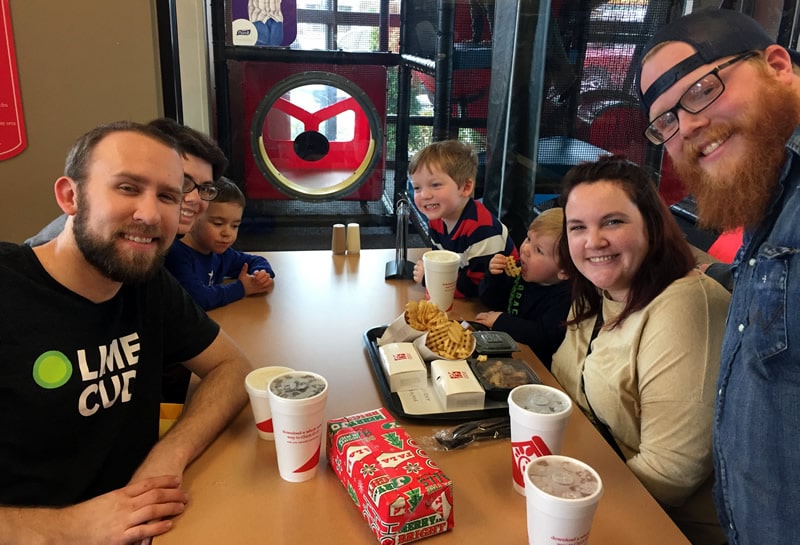
The Imeson and Mallard families meeting up for some chicken at a Chick-fil-a in Atlanta
Blake Imeson’s 2016 Story
Our family is now quite settled in Williamston, Michigan and mostly through with remodeling our house. We’re all deeply in love with the seasons of Michigan. Winter can be a bit long and gray but there are ways to break it up. We took two large family road trips to the South and back.
Our son is now 3 years old and is a hoot. He can name every two dimensional shape for you from a quatrefoil to a decagon… I somehow got my wife hooked on one of my great loves: buffalo hot sauce. I’ve been expanding my taste palette with sour beers and barleywines – Michigan is tops in the US for craft beer.
I finally gave my personal blog a fresh coat of paint and started publishing some posts. One of my new hobbies is fiddling with “Smart Home” technology – because who doesn’t want to get a text every time their fridge opens 😉
Josh Mallard’s 2016 Story
I almost died… I spent a few years with the most unhealthy of life and work habits that took a toll on my body. One day, late in March this year, it all caught up with me. You can read more about that story here.
Since then, I’ve learned how to maintain a more healthy lifestyle and am learning how to establish a manageable work/life balance. I’ve been rejuvenated like I haven’t been in a while and even had the energy to nag Blake into submission on the vision for a new brand for LimeCuda this year (see below) :).
Professionally, I’ve spent the remainder of the year building my technical skills through online courses, regular “playing around” with new technologies and ideas, and pushing forward on a few of the many plugin ideas that we’ve been toying with internally.
Personally, I’ve spent the year watching my boys grow up way too fast! It is sad to see them growing up so quickly but also exciting to experience these new phases of life.
I’ve also gained a new appreciation for yard work. Our yard was disturbingly overgrown when I first bought our house. I did a little work over the years but really only focused on having a few usable areas. Now, the process of clearing the brush and cutting down dead trees is actually one of the most relaxing parts of my week! There is something extremely satisfying about reclaiming our yard and envisioning all the new ways our boys can enjoy it once it’s all cleared.
LimeCuda
We got to know some truly wonderful people and are happy to also call them new clients…
Josh created a plugin for Gravity Forms that lets you add a download gate to get a whitepaper or other resource. This means that a visitor to your site will be required to complete a form of your choosing before being able to access your downloadable resources.
TECHNOLOGY
Secure All the Things!
2016 is the turning point year for websites being secured HTTPS (SSL / TLS). We’re now solidly in the era when all sites should be encrypting their traffic. The new free option of “Let’s Encrypt” makes SSL more readily available. If you haven’t moved to HTTPS yet, let’s talk!
WordPress Growing and REST API
WordPress now has a REST API. With this addition, we enter a new era of flexibility for the platform.
WordPress is being run on over 27% of the entire web and more than 60 percent of the top 100 sites on Inc.
Accelerated Mobile Project / Facebook Instant
These super-fast ways to load sites on mobile have hit maturity. Still really only applicable to content publishers but it has begun to shake up search results and impact user expectations.
On to 2017…
We have some exciting plans for 2017 (seriously!) and better serving you, our clients.
One of the greatest rewards for our efforts is seeing them actually help you run your businesses better, gain new customers, and help the web parts of your businesses turn from drudgery to fun!
So cheers to 2017! We’re hoping, planning, and praying it is going to be awesome!
A website redesign can be just the fresh start to reinvigorate your organization’s web efforts. We’re serious and this isn’t about building our business. Here’s why…
1. Web technology and design change quickly
Let’s look at just a few recent big shifts (dates are debatable and just for a rough idea)…
2008 Social Media becomes mainstream with Facebook and Twitter gaining widespread adoption. The stereotypical characteristics of Web 2.0 are starting to die out!
2010 Mobile revolution kicks into high gear. Your site had better look good on mobile / tablet.
2012 Broadband becomes ubiquitous through much of the industrialized world. Fast speeds mean sites can be more content rich with videos and big imagery
2015 A renewed focus on Site Speed as mobile use is accounting for a massive portion of traffic.
2016 Google AMP and Facebook Instant debut trying to help content publishers provide super-fast loading on mobile Securely encrypting your traffic (HTTPS) is suddenly best practice.
There are usually a few big impact changes within 2-3 years. These shifts I mention don’t even begin to talk about the massive changes in aesthetics and design!
Minimalism, Skeuomorphism, flat design, material design, waterfall layouts – design philosophy advances and improves all the time. A fun exercise is to use the Wayback Machine and see what your company site or your favorite sites looked like years ago.
A general rule of thumb is you likely need a new site or at least an evolved site every 3-5 years.
2. You likely know more about how your website is getting used
Hopefully you’ve been tracking how people use your site and know which pages they visit, how engaged they are with each, and the typical flows from one page to the next. Doing a redesign / rebuild forces you to confront this and ask honest questions about what should get cut out.
3. It shows your company is alive and thriving
A new site sends strong messages to your customers. It indicates to them that your business is doing well. It might help them feel the love with a site that better serves them. A new site is also a great time to drum up some PR and get some brand exposure.
What does a new redesign / rebuild entail?
A new redesign doesn’t have to be a complete upheaval or a total rebuild from the ground up. For many reasons a ground-zero rebuild may rock the boat SEO-wise. If you are already on a Content Management System you love (yay WordPress) you can likely just re-skin and modify layouts. This type of more superficial rebuild likely won’t result in you deleting pages or changing URLs which is some of the aspects that can give your SEO a shakeup.
Maybe “Evolutionary Redesign” is a better approach for you?
This may seem opposite from everything we’ve been saying up to this point but in many cases Evolutionary Redesign can be a better approach than an entirely new website.
Consider a more mild evolutionary (as opposed to revolutionary) approach only if most of these are true:
Your CMS is working well for you
The site has increasing and trackable success
The design is working and could be great with minor tweaks (e.g. fonts, padding)
The site works well on mobile / tablet
The site loads quickly
Your users give you positive feedback
If the above don’t hold true, it might be a sign that you need to pursue a more aggressive redesign / rebuild.
The aspects you may want to address in a redesign:
Aesthetics – does the site look dated? Does it still feel like the online representation of your offline brand?
Site navigation – which menu items are being visited and helpful. Might be time to clean up and re-order.
Are there elements that you should get rid of? Ads, banners, useless widgets, distracting sliders, neverending text? Approach the redesign with thoughtful strategy.
Are there elements like Social Media sharing, email signups, comments, etc. that were added one-by-one over time. Perhaps these can all be re-worked to be intentional harmonious parts of the design.
Take a look at your competitors. Are they doing new things that might be really smart to borrow some inspiration from?
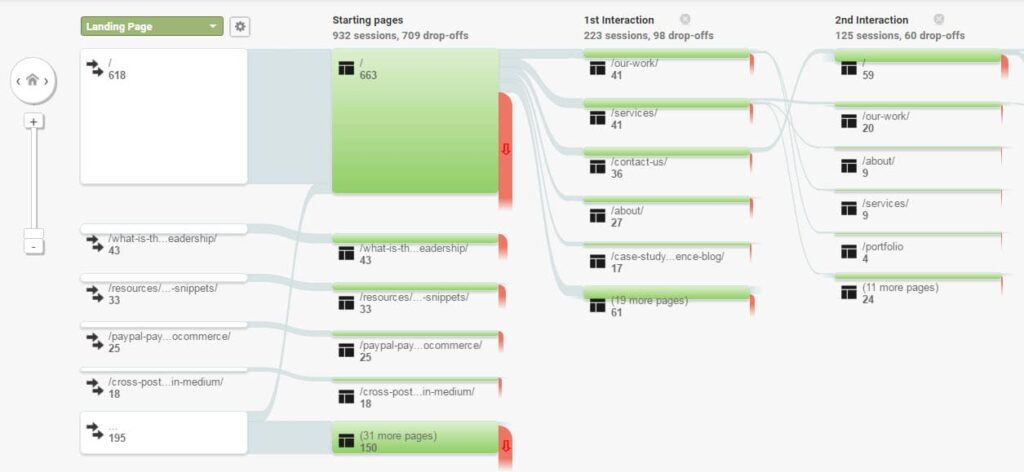
Dig deep into your analytics to see how people use your site. Google Analytics has some great behavior flow reports
Blogging can be a fantastic business tool. Getting rankings in Google feels like winning a major award. But it isn’t guaranteed…
The difficulty is – not every post is a winner. Sometimes you write something you think is great and it just flops. No rankings, no sharing, no comments. It’s painful.
But when you do hit the right nerve and the post is skyrocketing with traffic, top rankings, active sharing, everyone is commenting – it is a glorious feeling.
The Key is Persistence
You’ve got to keep writing knowing that sometimes it will be like a tree falling in the forest that no one hears. Many times you won’t be expecting a post to go anywhere and it blows you away. In a way, blogging is like rolling dice, occasionally you hit the jackpot. So keep rolling!
I thought it would be fun to share a few very unexpected “jackpots” we’ve hit.
Korean Ramen Noodles
On my personal blog I wrote a blog post sharing delicious Korean Ramen Noodles that I’m crazy about. Some Korean friends in college got me hooked on this spicy ramen. I wrote about it and how you can buy it on Amazon. Before I knew it I was getting traffic for all kinds of Korean Ramen related searches!
Takeaway: Share your passions and loves.
Accidentally Changed WordPress Site Address
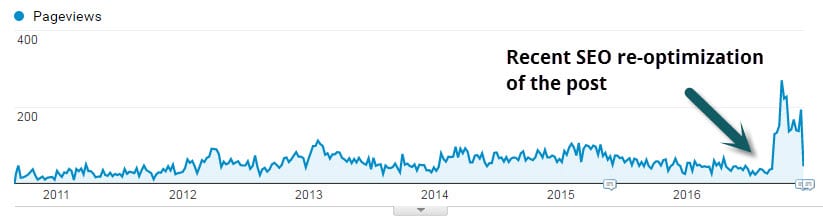
This is my most commented post ever. Published over 6 years it has gained over 150 (grateful) comments and over 18k pageviews! It was born out of a very scary incident when I accidently took down my employer’s popular blog. In my post I shared the solution for if you’ve “accidently changed your WordPress site address“. Turns out people are still making this mistake haha.
Takeaway: Share problems you’ve faced and solutions you’ve found.
WordPress Hosting and Maintenance
This is a recent one and frankly unplanned. We provide WordPress Hosting & Maintenance as a key ancillary service. This is a very competitive space and we’re playing with some very large companies. That aside, with a bit of work our hosting page is actually ranking on page 1 for “WordPress Hosting & Maintenance“!
Takeaway: Even if you are a small player you can rank for longtail keywords.
One of the most fun parts of our efforts with clients is helping them gain rankings that affect business! Keep blogging!