4 Quick Tips for Getting into That Elusive Blogging Groove

We’ve been blogging on LimeCuda’s blog every Tuesday for almost 3 months now. Add in our personal blogs, Social Media, and our new favorite child, Fewer Than Three – and that’s a lot of posts! (30+ by my count).

In the spirit of “here’s what’s working for us” I’m sharing 4 tips for getting in that elusive blogging groove.

getting-in-blogging-groove

1. Make it a regularly scheduled “habit”

We’ve committed to publishing a new post on LimeCuda EVERY Tuesday. We share the load yes, but sometimes we’re fighting over who gets to publish as much as we’re fighting over who has to fulfill this duty. Knowing this is a non-negotiable for us has helped us “own it”.

For you this might mean daily (aka Chris Lema Beast Mode), weekly, monthly, or 4 times a year.

Make it a regularly scheduled non-negotiable! 

2. Always be capturing ideas for new blog posts

Get  in the frame of mind where you are constantly looking for new stuff your audience might benefit from. I find myself scribbling post titles on a piece of note paper during client calls. We have at least a dozen partial drafts sitting in our WordPress dashboard right now.

Or, if you want to go even further… when inspiration strikes, take a few minutes and just jam out a post while it is fresh in your head!

3. Not every blog post needs to be long or earth shattering

Don’t avoid blogging because you don’t think you can write “enough”.

A powerful thought shared succinctly is better than that same thought spread over 20 rambling paragraphs. 

Don’t avoid blogging because you’re worried about not contributing an “original thought”. First, those are as rare as unicorns – Second, it might be new information for your audience! Just the practice of forcing yourself to share will mean you better grasp a subject.

For instance…

I took time over the weekend and wrote an absolutely enthralling post on the nuances of migrating a WordPress site to HTTPS. Granted, what is enthralling to some is mind numbing to others…that aside, while forming a teaching tutorial on something I’ve done dozens of times it helped me better understand the process and my own skill was bolstered.

4. Obsess over the analytics

I take this to an unhealthy level but there isn’t an addiction support group yet…

But seriously, reward yourself by watching your traffic grow. Make it a guilty habit to monitor your Google Analytics. This is the long game, don’t be upset if it takes 3 months to see results. Rarely does any worthwhile success happen overnight!

Please share your big and little tips in the comments.

Why Your Website Needs to be Secured with HTTPS (in Layman’s Terms)

Don’t miss the boat getting your website secured with HTTPS! Here’s why…

Around 6 years ago very few sites were mobile-friendly. We’ve had a revolution and now every website needs to be usable and pleasant experience on mobile.

In similar fashion, we’re at a turning point for all websites being “secured” (HTTPS) using SSL Certificates.

https-secure-wordpress-website

What is SSL / HTTPS?

It is basically a protocol that means any traffic to-and-from your website is encrypted and if it is intercepted it cannot be understood.

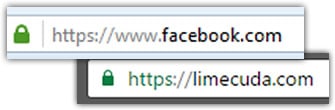
Your site either gets accessed using HTTP or HTTPS. The secure version, HTTPS will usually show a trust-gaining green lock in the browser. The “S” in HTTPS stands for “Secure” – it should all makes sense now…

ssl-wordpress-website

If you visit an unsecured website and fill out a contact form while on McDonald’s WiFi, anyone else on that network can see all your traffic and what you submitted – if the site is not HTTPS. You can see how this is a problem!

The 6 Reasons You Need to Join the SSL Pivot Point

1. Gain Better Search Rankings

In an effort to encourage best practice and protect their users,  Google sees sites being secure as a minor ranking signal. Ranking for keywords is hard, this could give you a small boost.

2. Avoid Embarrassing “Insecure Site” Warnings

The Chrome browser team recently announced that starting in January there will be insecure warnings on site login pages that aren’t SSLed. This could be a blot on your brand and isn’t a good reflection to the user. In the future it seems likely that securing an entire site will be best practice.

3. Security Contributes to Brand Trust

Having that green lock in the browser and seeing that your site is secured may help users trust you more highly if this is their first impression.

4. You Care About Your Website’s Visitors

Even if you aren’t collecting credit card details, SSNs, or private details…you want to guard your users. Sometimes little details could help a hacker build a profile on them and do something nefarious. We’ve even had clients whose customers couldn’t access an insecure site – usually for industries like military or government. If your site isn’t secure, your users’ traffic is wide open to any governments, shady monitoring outfits, and hackers.

5. Keep Your Own WordPress Admin Secure

While the WordPress Dashboard / admin area does have some security features, you are still transmitting your logins insecurely when you login and are making changes to your site.

6. Could Help Your Website Load More Quickly

I don’t need to even say why that is an awesome thing. The technologies that work with HTTPS and your browser now mean that an SSL certificate won’t slow your site down but could actually make it faster for users!


Your Next Steps to Get Secured

Migrating from HTTP to HTTPS is becoming inevitable. There is so much value in switching that it is already a no-brainer.

If your WordPress site is not secured and able to use HTTPS, reach out to us and we can create a plan to migrate. Typically the certificates cost $50-250/year. However, you can now get an SSL Certificate for free using Let’s Encrypt. We use SSL for all new WordPress hosting accounts, it is becoming a must-have feature.


Use Your Website to Boost Employee Engagement and Performance

Have you considered how your public website could be used to boost your employee engagement and performance?

At LimeCuda, we’re proponents of the idea your website can be more than just a marketing tool for your business. Used strategically, your web presence can be a tool to help promote health in all areas of your business.

Applauding Employees Boosts Performance

The Data on Employee Engagement and Performance

According to Bob Nelson, one of the top drivers for employee performance is “I have been recognized recently for what I do.”

Consider this statement from the American Psychological Association Center for Organizational Excellence:

Employee recognition efforts reward employees both individually and collectively for their contributions to the organization … By acknowledging employee efforts and making them feel valued and appreciated, organizations can increase employee satisfaction, morale, and self-esteem. Additionally, the organization itself may benefit from greater employee engagement and productivity, lower turnover and the ability to attract and retain top quality employees.


Recognizing employees and the work they’re doing can be one of the greatest ways to boost their engagement and overall performance

How can your website improve employee engagement and performance?

Celebrating successes

Your website will primarily be geared toward engaging with your potential customers. This is why you’ll have Social Media accounts, blogs, downloadable resources, as well as other avenues for engagement.

This doesn’t mean your website can’t be used to celebrate your business and the successes driven by your team.

By publicly celebrating these successes and directly attributing them to your team, employees feel that their work is making a difference and the company genuinely appreciates their efforts. This is a huge driver for loyalty and performance. Positive reinforcement experienced through recognition gets multiplied exponentially. Not only are your employees recognized by their managers, they’re now recognized by their family and community.

Imagine the feeling of knowing your spouse, your family, and your community are proud of your work? Imagine the feeling of opening Facebook to see a notification from your spouse sharing a doting message along with an article written about you by your company?

Celebrating individuals and humanity

In addition to celebrating your team and their successes, your website can be a great place to celebrate individuals and the fun idiosyncrasies of our humanity.

Your employees are part of what make your culture unique. Share a glimpse and let your clients and vendors know there are real people working there with personality and humanity.

You’re so much more than a bunch of email addresses or phone extensions.

Ideas to jumpstart your engine

  • Andrew just gained a new hard-to-acquire credential
  • Peter spoke at a local conference
  • Amanda was honored for years of volunteer work
  • Tim worked nights and weekends for a month so a local business could open on time
  • Susan and Fred just welcomed their second child into the world

Would this work for your business?

There are a lot of ways you could pursue recognizing your employees through your website. If you’re interested, we’d be happy to chat about the opportunities here for your website.

7 Helpful (but Obscure) WordPress Tricks

Did you know these 7 obscure super-secret WordPress tricks? For a while only Chuck Norris knew these!

Screen Options

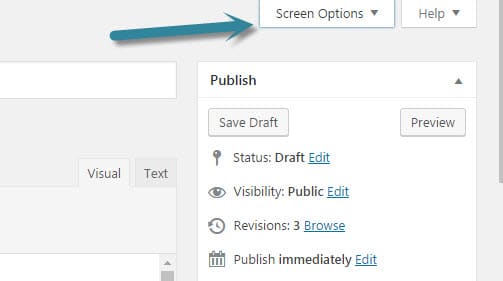
On most views within the WordPress backend there is a very subtle hidden menu named “Screen Options.” This will let you change what shows on the view and sometimes even the number of items.

  • Want to see more pages at once? When viewing all pages change it from 20 to something like 50.
  • Don’t really need to see the Custom Field, Author, or Excerpt meta boxes when editing a post? Hide them.

wordpress-screen-options

Soft Return

If you hit “enter while holding shift” it will let you go down to the next line without adding a bunch of extra space.

Resize and edit images in editor

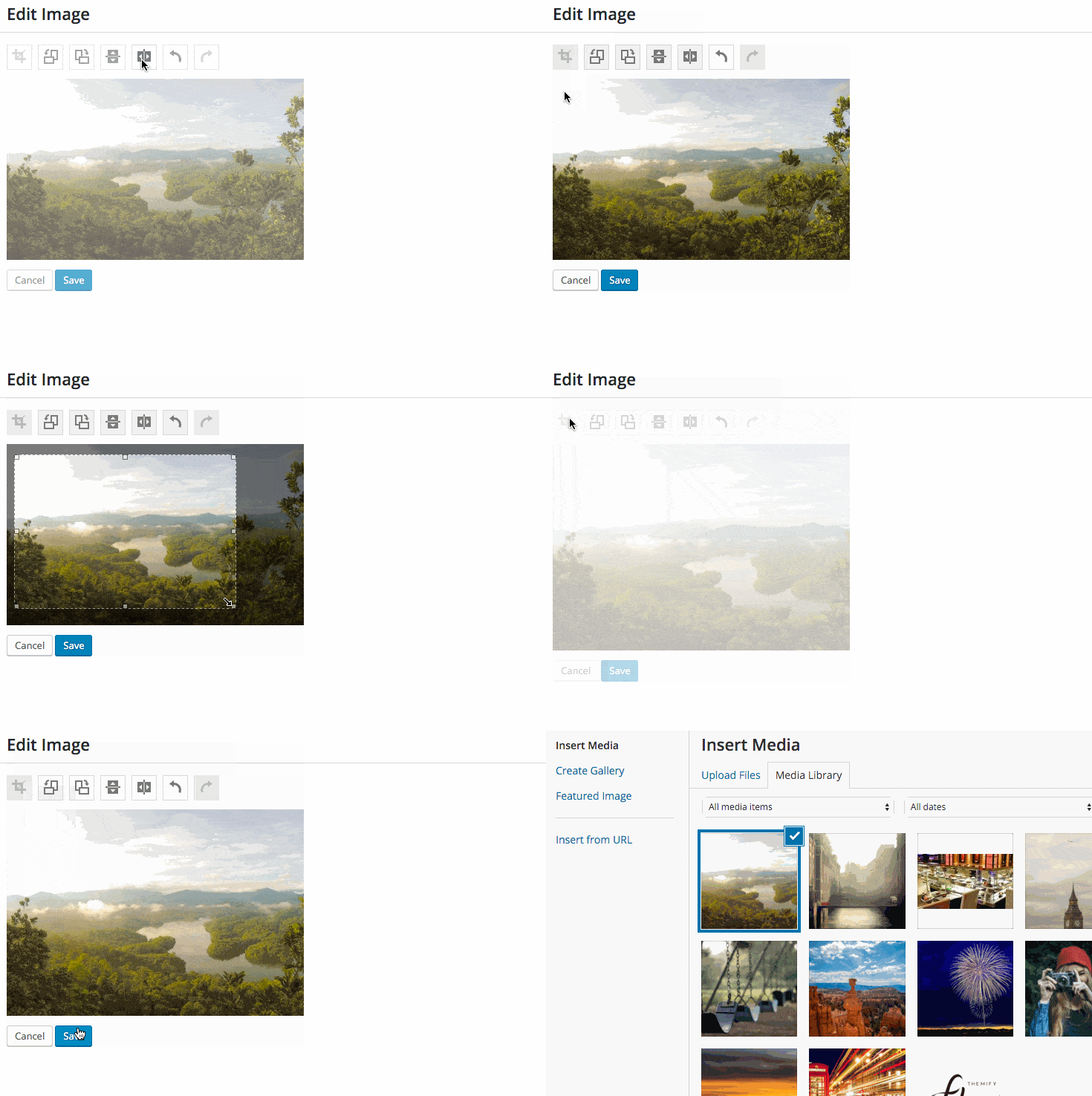
You can drag the corners of an image in the WordPress Editor to resize the image. Use carefully as the image can be distorted and pixelated if you resize it too much past its normal size. I recommending only resizing it smaller too.  If an image doesn’t look quite right after you upload it, there are simple tools for cropping and rotating.

Easily embed YouTube (and more)

WordPress has this nifty tech called oEmbed. It lets you just paste a link (e.g. to a YouTube video of goats yelling like humans)

Full list of embeddable items.

Paste a URL over Text

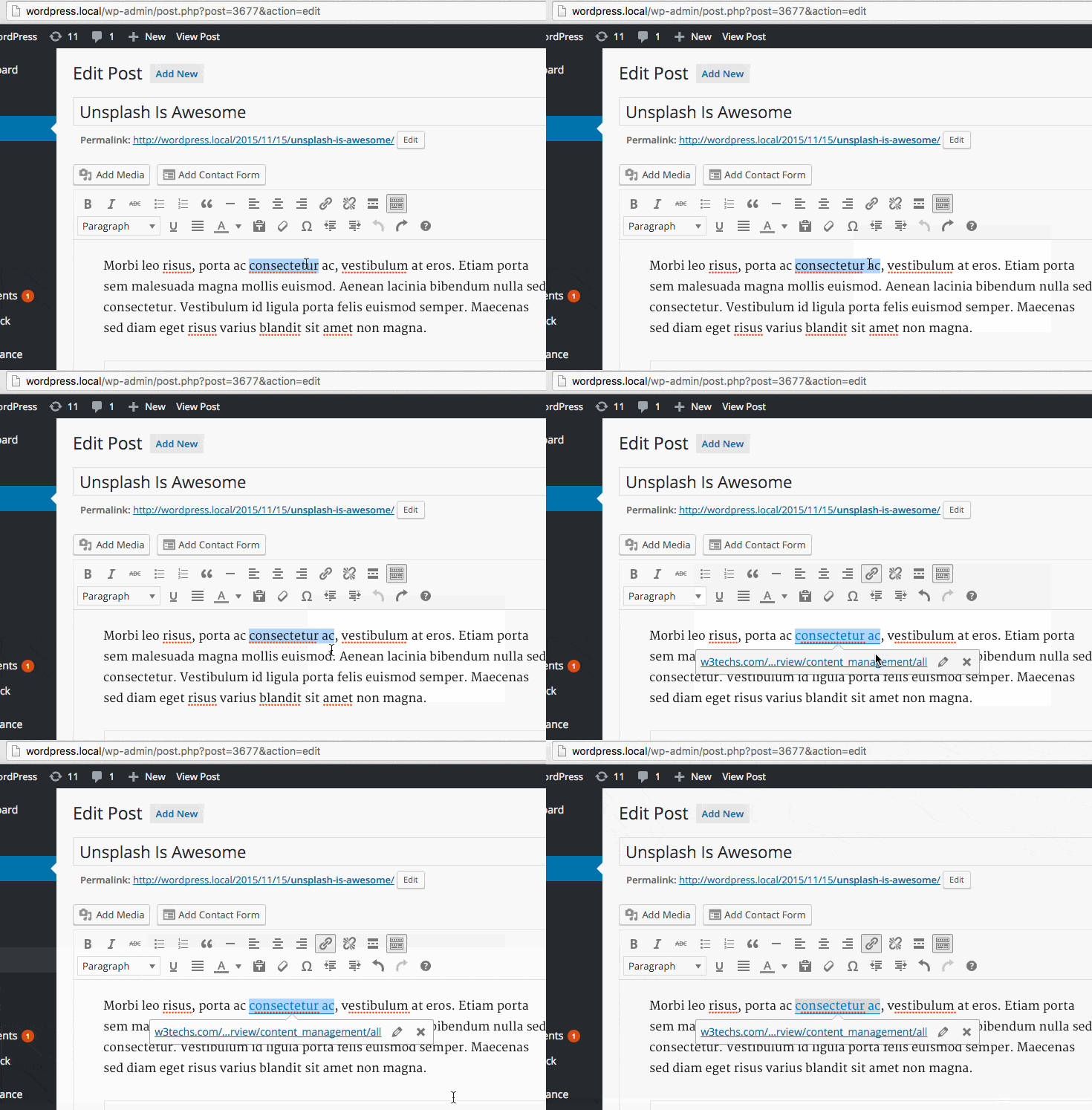
This one feels like magic – you just highlight some text and then paste over it if you have a link you’ve already copied. WordPress will automatically make that text a link!


Text Styling Shortcuts

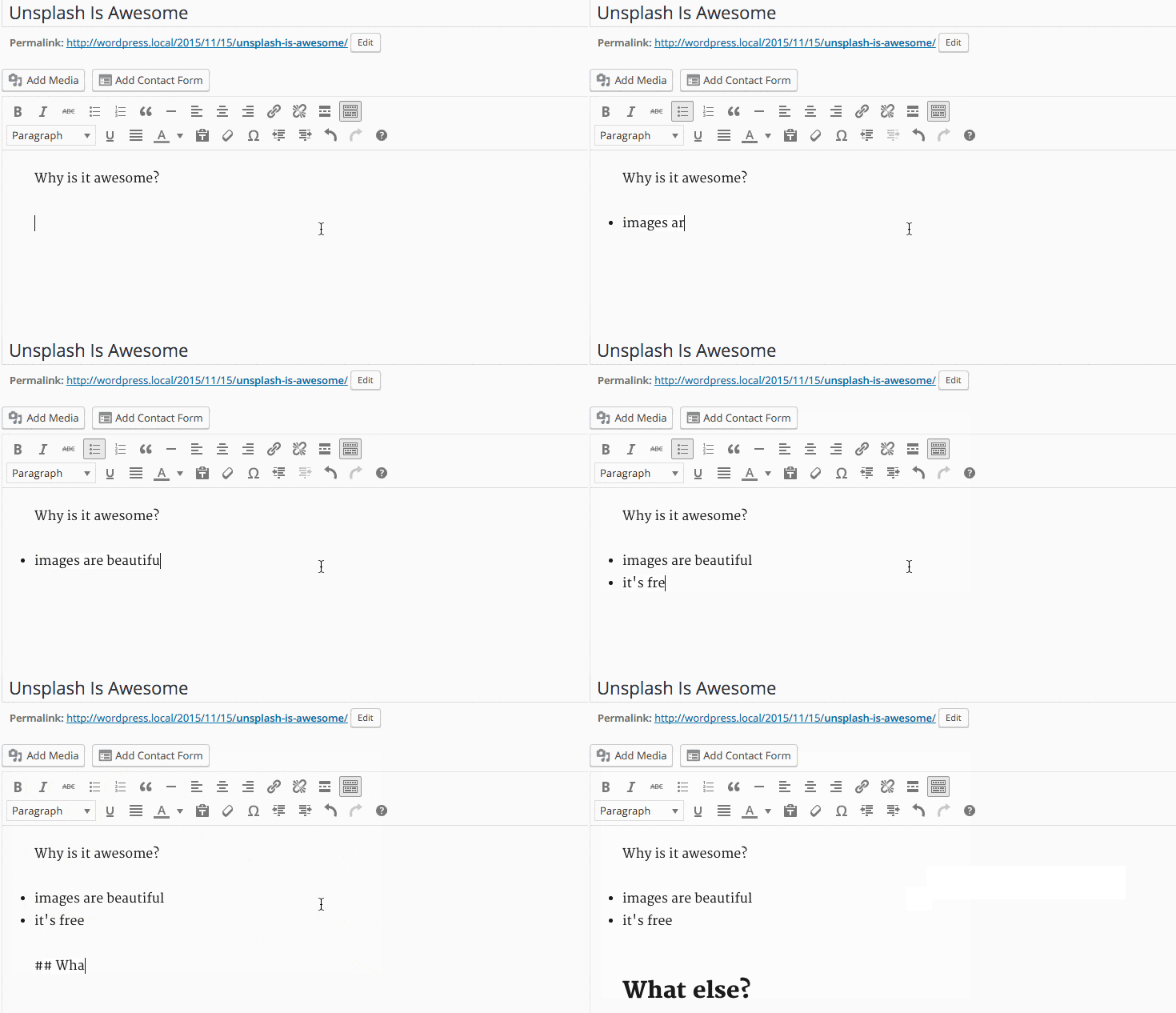
This is similar to Markdown and gives you a quick method for writing your content while adding formatting. Try typing a * and then hitting the spacebar. Magic!

Typing * or – will automatically give you a proper HTML list right away. Same for 1. or 1) Pressing backspace will undo this change. You can also use the undo button, ctrl/cmd+z or esc.

Starting your paragraph with two to six number signs # will convert that paragraph to a heading. Similarly the greater-than symbol > will convert the paragraph to a blockquote.


Bulk Post / Page Editing

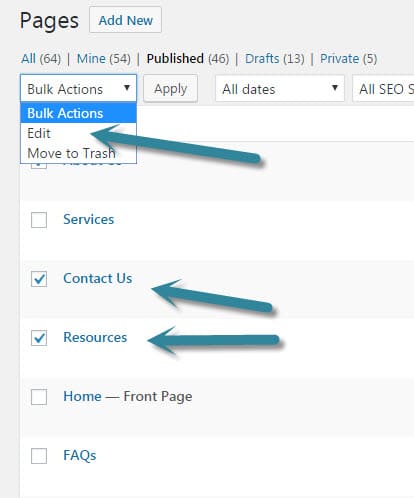
When editing posts or pages you can bulk select and edit a bunch at once. For instance, you could change the author on a bunch of posts at one time.

bulk-edit-wordpress-posts bulk-edit-wordpress-posts-make-changes


In the course of writing this post I found several posts that had the same idea. If you’ve enjoyed this one take a look at these ones for some other tips.


Made with <3 by LimeCuda

It started as a joke. Looking at the footer of a site, I thought it would be funny to reach out to Blake on chat, “Why do so many sites feel the need to tell you that they were made by fewer than three people in a certain city?” What I thought was a funny joke fell on confused ears.

GOOGLE ANALYTICS: How (and Why) to Set Up On-site Search Tracking in WordPress

Tracking on-site search is really easy with Google Analytics and WordPress. See what terms people are searching when using your WordPress site search box.

tracking-on-site-search-google-analytics

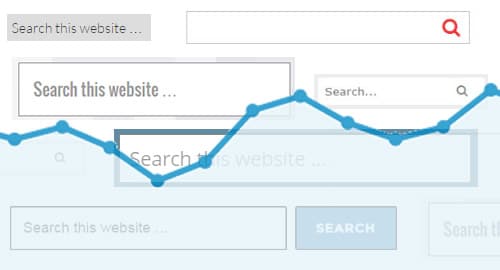
What is On-Site Search?

By this we mean when someone is actually browsing your site and uses your site’s search bar to search within your website.

search-bar-in-sidebar         search-bar

Setting up Google Analytics to track Search

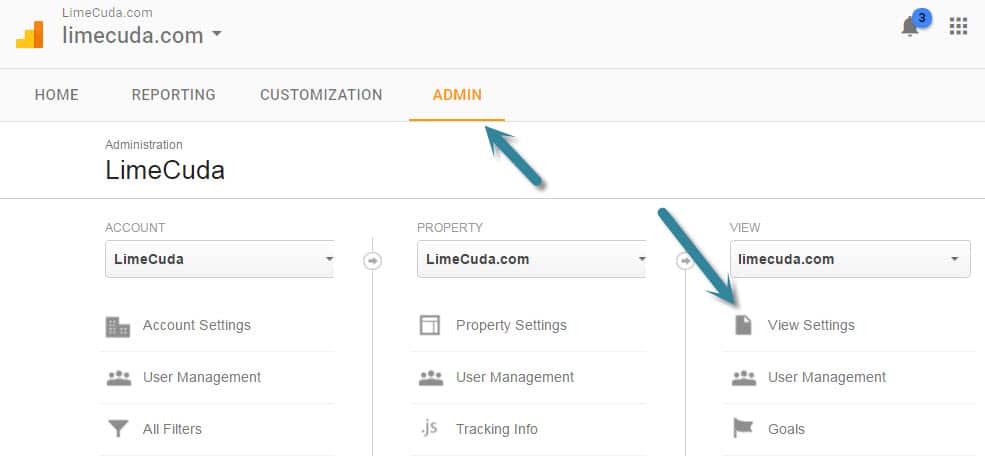
First navigate to the Admin area of your Google Analytics account. Then click the View Settings item underneath VIEW.

google-analytics-admin-search-setting

You’ll see a section towards the bottom like so. Turn Site search Tracking to “ON”. Then make sure there is a Query parameter set of just “s”. This part hooks the WordPress search bar system in to be trackable by Google Analytics.

google-analytics-on-site-search-settings

Where to See the New On-Site Search Data

It may be a couple days before you start to see the data trickling in. Do a couple test searches from other computers to give you some dummy data.

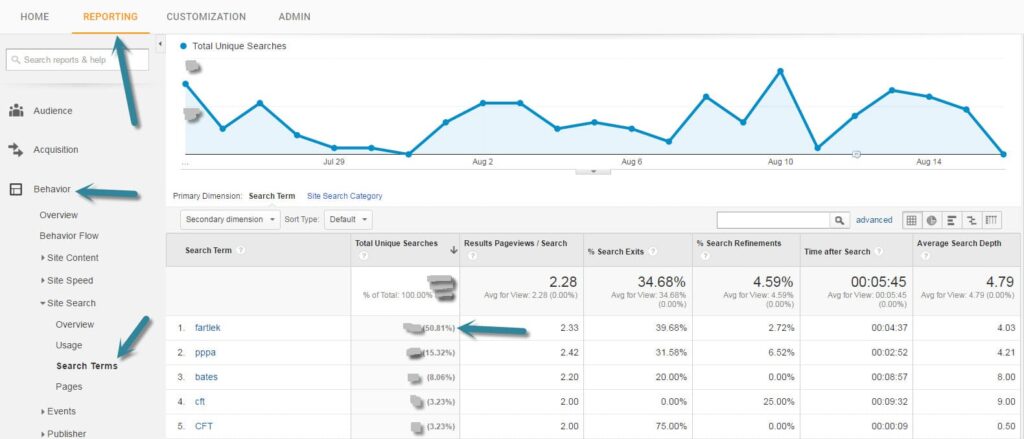
In the Reporting side of Google Analytics look under the Behavior menu item at Site Search >> Search Terms. You’ll see a list of the terms that users searched along with really great data about those visits.

Search Terms from Google Analytics tracking the On-Site Search

What is fascinating about the above report is that for this client they discovered that about half of their search terms were for one specific term (an awkward term but it is a Swedish Running Method)

Let the Search Terms Guide You

For the above project we realized a huge quantity of their users were looking for content that wasn’t easily found on the site. This realization turned into action and we added several menu items to take people directly to the content, as well as creating an entire new specialized website.

Put a reminder on your calendar and keep an eye on what people are searching for when on your site. It could…

  • Give you ideas for new content or posts to write
  • Let you know that you have a navigational issue
  • Aren’t really giving your visitors what they are looking for
Need help setting up WordPress and Google Analytics? Drop us a line and let’s see if we can help you get on the path to better insights about your users.

Video on WordPress – Using YouTube Video Embeds

Thinking of uploading videos directly to WordPress rather than an embed like YouTube? Here’s why that isn’t a good idea.

There are many options available to us when using videos on WordPress. We’ll be looking at the options available over a few blog posts here, however we wanted to kick off with the most accessible option and our most preferred method – embedding YouTube videos.

Pros of Using YouTube Videos on WordPress

YouTube
Firstly, it is free. Self-hosting video or using a premium tool can quickly become an expensive and complicated endeavor. If video isn’t your primary gig, then using a tool like YouTube is probably wise.

Video Loading / Speed

  • Leverage their massive architecture so videos always load quickly
  • Embed codes are intelligent and will load different quality streams based on the viewer’s connection
  • Embed codes play well across most devices – including mobile and tablet

Video SEO and Marketing

  • Your videos can be displayed publicly within YouTube search, this could be just another avenue for someone to find you
  • You can enable monetization and get some share of the ad revenue from your video. This is likely not advantageous if you are hosting marketing or about-type videos.
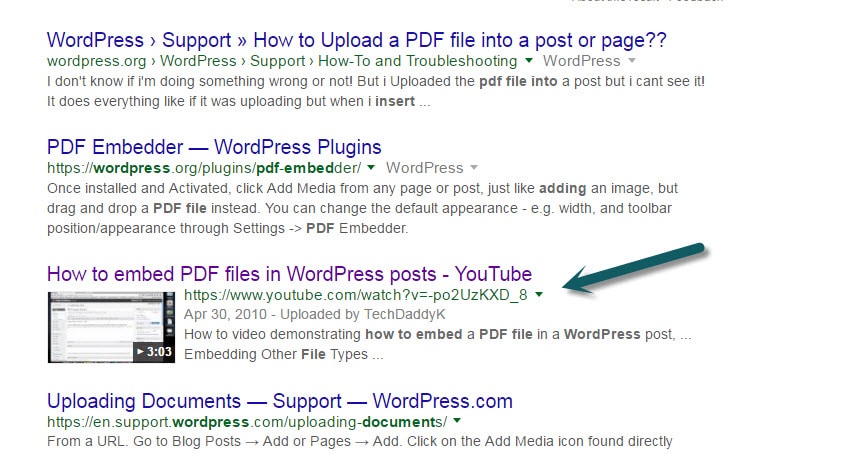
  • Videos may be called out in Google Search as videos. Could help you rank for terms with video. Check out the Yoast Video SEO plugin too.

youtube-wordpress-embed-results-google-search

How a Video can look within Google Search

Video Aesthetics

  • Append tags to a YouTube URL to get special features. Add additional tags using an “&”
    Example: https://www.youtube.com/watch?v=7aP4Fi9bC_U?rel=0&modestbranding=1&autoplay=1

    • Stop unwanted related videos from showing up by adding: rel=0
    • Get a nice subtly branded look by adding: modestbranding=1
    • Have video autoplay (use carefully!): autoplay=1
    • See the full list of YouTube URL parameters available including looping and setting a custom start time
  • Just paste a YouTube URL right into the editor and WordPress will auto-embed the video

Cons of Using YouTube for Videos on WordPress

  • Your video is out of your control and ads will be shown on or near it within YouTube
  • You may not like the related videos that show up when viewing on YouTube
  • It isn’t as classy or enterprise a feel as using something like Vzaar or even perhaps Vimeo

There is so much more you can do with YouTube… embedding playlists or galleries, embedding a live stream, having videos load in lightboxes, etc.

We’re pretty big fans of the combo of YouTube and WordPress. Curious about how the other video services stand up in comparison? Subscribe to our monthly insider email and you’ll get those next blog posts as well as a bunch of other cool content once a month.

Working on a site which needs to leverage video? Please reach out and we’d be happy to chat through the options available.


What’s the one big difference between success and failure on the web?

If I were a game show host at this point I would have you go register your guesses. Some of you are thinking… persuasive content, SEO, having an amazing product, flashy graphics, a big spinning logo…

I contend web success is far more straightforward.

The distilled concept would be “thoughtful strategy”

Let’s unpack that basic and obvious set of words with two stories of this done poorly and two stories of thoughtful strategy done right.

thoughtful-strategy-he-chose-poorly

[Done Poorly] Antonio’s Pizzeria – Where’s the Phone #?

Antonio has a pizza shop and his homepage is filled with beautiful pictures of his delicious deep dish pizza. However, the reason people come to his site 75% of the time is to literally just get his phone number to call and order. The phone number is buried at the bottom of the site in small text and isn’t clickable on a phone. Major strategic fail.

[Done Poorly] Consulting Firm – No Evidence of Credibility

Bruce runs a small boutique consulting firm that specializes in B2B. He has a lot of fluff on his site that describes what he does but nothing that shows the real world impact he’s had. No testimonials from his happy clients. No Case Studies. He is part of 4 professional organizations but neglected to list any of their logos. Big missed opportunity.

[Done Right] Talent Agency – Getting Email Signups

Imagine a talent management agency for actors. This one has a weekly tips email they send out which is filled with tricks to land the next big gig. Knowing that this is a natural and non-threatening Call-To-Action they made this button one of the most obvious items on the page. Once they had an actor’s email they could continue to be in front of them even after they left the site. Big strategic win.

[Done Right] Media Outlet – More Pageviews

Patrick runs a blog that depends on ad revenue from people reading his team’s content. He set out with the goal to increase pageviews and approached it from all sides. He figured out how to make the site load more quickly. He added a related article feature at the bottom of the posts to give someone another article they may want to read. He cut away a bunch of useless distracting page elements to let the more important elements shine. The ad revenue goes way up.

Be Thoughtfully Strategic

Set out the end goals, assemble a thoughtful strategy to accomplish them. Don’t be distracted by shiny objects. Do cut away what isn’t helping you achieve your goals. And make thoughtful strategy sit at the core of your efforts on the web.

[INTERVIEW] Blake chats with ManageWP about LimeCuda’s beginnings

Blake_interview

I really like the idea that you offer to train people in WordPress, I am a fan of the “teach a man to fish” philosophy. How does this work at LimeCuda, is it online tutorials?

Glad you caught that, it is actually a super core part of our philosophy. Part of why we got into WordPress specifically is that it is a perfect rebellion against being beholden to some cranky code monkey if you wanted to make changes to your site. WordPress totally changed what marketers were able to do on the web.

Read the full interview

Embracing Progress Through Small Steps and Iteration

Progress! A single word which embodies both the impressive growth experienced by entire nations over centuries as well as the hope we have for ourselves and tomorrow.

When it comes to our businesses, we are gluttons for progress. We love it in large doses. The more we can have, the better. On the other side of the coin, we seem to despise it in small doses. If we’re not overwhelmed by it, we become frustrated that it isn’t enough.

progress-through-small-steps

But, as we’ve learned from those with more experience, big progress and successes are rarely driven by single events or opportunities. They are the accumulation of the small steps and iterations that have been taken over a long period of time.

In thinking about this for myself, I can pinpoint two main hindrances that prevent me from embracing small steps and iterations:

  1. Risk & uncertainty of the investment
  2. My own impatience and the desire for instant gratification

1. Risk of the investment

Taking the small steps on their own isn’t much of an investment. However, it is “the accumulation of small steps… over a long period of time” that can become a huge investment of my time. While working to help build a small business, time is the most valuable resource I have.

But, I should never let this be a hindrance. Yes, time is a valuable resource. But, if I’m not fully investing my time, I’m squandering that precious resource.

My biggest fear here is the possibility that I’ll be investing my time in the wrong steps and pushing in the wrong directions.

I can usually overcome this particular fear by remembering two things:

  • The persistent taunting of missed opportunities
    Seeing the successes of others as well as my own, what if I had only started blogging on a regular basis a year ago? Imagine where I would be today? Imagine where the business would be? Reflecting on those types of things with regret can be very healthy. In those times, if there isn’t a “well I was working on…” which filled that time, the regret serves to remind me that I do need to be investing that time.
  • What if I start heading in the wrong direction?
    As a developer, this can be an extremely common concern. There are so many different languages, approaches, environments that I could pursue. I can’t tell you how many things I’ve learned that I’ll most likely never use in a real application. Like Thomas Edison finding the perfect filament for the light bulb, I’ve at least been able to mark something off the list as a solution for future projects. Even the small steps taken in the wrong direction can teach us lessons which make the terrain a little easier to traverse when we do find ourselves on the right path.

2. I want everything now!

We’ve all heard the accusations that we live in an era being ruined by instant gratification. We have instant access to almost anything we could want. Just thought of a movie you haven’t seen in a few years? No problem! You can stream or download it from a dozen different sources at your fingertips.

In the same vein, this generation is the last one that will ever experience the real pain of having “oooh! who was that actor from that movie” linger on the tip of their tongue for hours #FirstWorldProblem. That pain can be instantly resolved with a Google search on our phones that returns the information in under a second.

When it comes to business, sometimes I know the steps I need to take. I have a clear vision and know how to accomplish that vision. What I don’t have is the time to execute on the vision. The frustration then grows that I want the product of my vision RIGHT NOW!

It’s almost impossible to get things done to perfection the very first time. We have to embrace an iterative process. So, even though I may not be able to implement exactly what I would like right now, is there anything that I can accomplish that will help get me closer to that goal?

As a comparison, imagine that the problem is to get from point “A” to point “Z”. The vision you have is to build a car because it is the best tool to for the job.

However, if you only have enough time and resources to build a bike, why not build the bike?

It isn’t the perfect tool but when compared to having to walk the distance, it is a mighty fine solution.

So, what is holding you back from taking those small steps for yourself and your business?