5 Reasons to Consider Social Media (Even if You’re Boring / B2B)

Many B2B companies don’t get into Social Media.
But is that prudent? Spoiler… I think they should reconsider.

Why they fear the water…

  • Cost – worried it will be a financial drain with little ROI
  • Time – “ain’t nobody got time for that!”
  • Nothing of value to contribute
  • Don’t know how to get in
  • Don’t think anyone cares – perhaps due to a boring product or industry
  • They’re B2B and consider Social Media to be a solidly B2C realm

All of those are valid points, to some extent. Social Media can be a tornado of a time waste…

social-media-tornado

But wait! Here are some things you should consider before ditching on Social Media.

1. Claim Your Brand

Even if you don’t plan on utilizing that Twitter account, it may be prudent to snatch the name up so someone else can’t. Down-the-road you don’t want to be rocking a regrettably-long and awkward handle. @acme_co_123 really isn’t that pretty.  With this point I am thinking primarily of Twitter but considering you can get Vanity URLs on LinkedIn and Facebook this can apply more broadly.

Another key consideration, Social Media pages tend to rank really well for brand names. So if the first page of search results for your company name is not ideal, filling that space with some harmless and controlled Social Media pages could be a great strategy.

2. Can Actually be Low Effort

By hooking up your blog to auto-publish to Social Media, you can actually have a zero-effort Social Media presence.

Sure, the auto-generated tweets and Facebook shares won’t be as on-point as if you handcrafted each one but better to have shared some than not shared at all, right?

Your community of clients may get notice of your new content via LinkedIn or Facebook when they would otherwise have missed out.

We like the Publicize component of the Jetpack WordPress plugin.

3. Help Your Brand Look Relevant

Ok, this one is a bit pathetic but it could help your brand seem more current and “with it” if you have a Social Media presence. Would you think less of a company if they didn’t have an email address? Of course you would! This isn’t that severe, but sometimes I judge a company harshly if they don’t have key Social Media pages.

4. You Could Be Wrong

Who knows, maybe your customers would actually care what you have to say about your seemingly boring product / service. If you don’t test the water, then you can’t know for sure.

Further Reading: The Ultimate Guide to Epic Content for Boring Industries

5. Could Help Your SEO

There are many ways this could help your SEO…

  1. Social shares and likes are seen as “social signals” and could help your posts achieve better trust in Google’s eyes. Especially if your stuff gets shared by other non-company accounts.
  2. Some Social Media entities (e.g. Facebook or Google+) actually have a Local SEO component and could help your company be more findable locally!

Further reading: 5 Things You Need to Know About Social Media & SEO

We always love to hear stories of unusual and unexpected Social Media success. Please share!

Want to talk about your Social Media? Contact us

How “Rubber Duckying” Can Help Your Business

You’re deep in thought struggling with an unsolvable problem. You sigh and turn from your glowing monitor to a rubber ducky sitting next to it.

It sits there patiently and listens as you spell out the problem. Your friend the duck just politely stares back, uninterupting, and lets you lay out the entire situation. Mr. Rubber Duck has a knowing wisdom as he lets you just unload on him.

Suddenly, without him saying a word, you have a solution! “Thanks man,” you say and give him a ducky high five. Victorious once again, you turn back to your screen.

rubber ducky

Wait, what?!?! Have the LIMECUDA guys lost it?

Meet “Rubber Duckying”, a very real concept from the world of software development. It is really just the exercise of having to explain a problem to someone as if they know nothing about it.

It really can help breakthrough on tough problems. Give it a try next time you’ve hit a wall. Just talk to Mr. Rubber Duck.

“Marinating in the Problem Space”

I was recently listening to the Office Hours podcast with Carrie Dils and guest Chris Lema. There was something Chris said that really resonated with me. When listening to your customer’s narrative and the problems they’re facing, we really need to take time to “marinate in the problem space.”

For this graphic, you can imagine me as this lovely cut of beef. The butcher block will be the “problem space”

For me, this means I need to break the habit of brainstorming possible solutions immediately after hearing the initial problem.

I thought I was supposed to be brainstorming solutions?

I’ve personally found this to be a very difficult habit to break. A big part of my job is knowing what options are currently available for particular problems. Also, one of the biggest appeals for many of our new clients is that we have previously developed solutions for other clients to address very similar problems to the ones they’re facing.

So, when joining initial client calls, I always thought part of my role was to be brainstorming ideas as I was hearing the problems. However, if I’m thinking about potential solutions am I completely hearing and understanding the problem?

A very wise counselor once shared that when he is counseling someone on a tough life issue and gets to the point where he thinks he totally understand what he needs to address, he takes five more minutes and asks five more questions. He said he is always shocked how often that extra “marinating” turns up something that was much deeper than he was going to address.

It costs us more in the long run

No matter what, we’re committed to doing everything possible to deliver an end product that our clients are excited about.

Even though we may save a lot of time at the onset of a project jumping straight into “solution mode”, it will inevitably mean there will be changes or missed features that will need to be addressed further down the line. And addressing these things further down the line will always take longer to implement than if we had accounted for them from the start.

So what does it really mean?

“Marinating in the problem space” means we take the time to fully hear and understand the problems being described. It means we take time to narrate the full story surrounding the problem and how other parts of the business can impact (or be impacted by) these particular problems.

This gives us the ability to ask better and smarter questions. It means we can ensure from the start we’re proposing better and fuller solutions for our clients.

Rubber meeting the road

The benefits of this approach became very evident to us on a recent proposal. The problems being described were straightforward, very similar to the majority of problems described by our web development clients.

However, there were a couple of phrases we kept hearing which we knew needed to be taken into account when providing a proposal (our solution).

  • “Spread thin”
  • “We’re all wearing too many hats”

We needed to marinate on those statements and really consider the implications for the business on a day-to-day basis. Our typical proposal, while being a solution for their stated problems, would have exacerbated those feelings of being overwhelmed with their current responsibilities.

The big takeaway… spend plenty of time feeling the pain of the problem. Marinate in that space. This takes self control and diligence but it is so worth it in the end! Think of the wisest people you know, they typically ask many questions and really seek first to understand before they offer counsel.


LIMECUDA version 3. no wait, 4.0?

I’m honestly struggling to contain the excitement I have for the new LimeCuda!

So I won’t…

giphy

You may be thinking this is just a new logo or a fancy new website. Those are definitely included but for us, this is so much more.

Let me explain…

Updating the brand

Even though 6 years feels long in our industry we’re still a young company learning where we fit in and can add the most value. We have been evolving and pivoting over the last few years. We try new things, learn from our mistakes, then push forward.

A consequence of this was that our existing website and brand no longer truly represented who we had become as a company.

When LimeCuda was born, the tagline was “Refreshingly Aggressive Web”. This made sense particularly for that time because there was a lot of opportunities on the web for helping small businesses. LimeCuda recognized that many small businesses weren’t capitalizing on this potential. So, the position was to get aggressive on behalf of our clients in taking full advantage of those opportunities.

We still think this underlying idea is great. However, when reflecting upon our most successful projects over the years, the common underlying element has always been the relationships that we’ve been able to cultivate with our clients.

In this context, the term “Aggressive” doesn’t convey a proper or positive personality trait for building great relationships. “Refreshing” does though :). So, we decided to fully embrace the “Refreshing” portion of the existing brand.

We are dropping the “Aggressive” terminology from most of our public assets. Pivoting the focus away from the barracuda portion of the LimeCuda name and toward the refreshing nature of the lime. This is now reflected in the updated logo and color palette.

LimeCuda-Logo

LimeCuda 2016 Color Palette

Crafting a new website

When designing the new website, our goals were pretty straightforward. We wanted to showcase our latest work with deeper substance as well as convey the value we place on great relationships with our clients.

So, we decided to start creating case studies for certain projects while also designing a way to sprinkle testimonials throughout the whole site. We added this into an updated design that matched the new brand and let simplicity really be our guide.

[limecuda_mockup desktop_image=”3968″ mobile_image=”3966″]

Practicing what we preach

One of the key things that we also wanted to approach with this “re-launch” was to be very intentional and regular with our blog postings and Social Media engagement. We’ve been preaching these things to our clients for years and have seen first-hand the amazing impact little steps in this area can have for a business over time.

We’re establishing strategies for engaging consistently but still adding value and not just noise. This should be fairly straightforward for us since we’re adamant about maintaining our own personality and letting that shine (with Blake being a good filter for the occasional edges in my own personality 🙂 ).

We’ll also be experimenting with a posting calendar to help us stay on top of regular postings and optimize how-and-when we’re posting for the greatest impact.

Excuse to play around

Now for the fun stuff (or nerdy stuff if you will). This was my favorite portion of this entire process.

Working on a personal website gives us a chance to play around with a lot of new things. Here’s just a quick breakdown of things that we’ve played around with or implemented in this site build that we’ll be rolling out for new client sites:

  • Created a project starter repository 
    In the past we had a starter theme and a core functionality plugin that we used when creating new client sites. We wanted to update this process. We created a starter git repository which includes our updated starter theme and core plugins in a single repository. We structured this to allow us to take advantage of WPEngine git set up for deployments.
  • Switched to Gulp for task running
    Like most people, my first interaction with a Javascript task runner was with using Grunt. I still like Grunt, however there were certain benefits to using Gulp that forced me to give it a try on a recent project. I liked it so we decided to switch for all our future projects. We’ve now got it integrated nicely with our starter repository.
  • Mobile first
    This theme was a new and deeper dive into building a website with a mobile first design approach. Is it perfect? Nope! But it was definitely helpful in allowing us to not only see the benefits of this approach when it comes to resource management, but also the benefits associated with having cleaner and more efficient styling process for mobile views.
  • Exploring new ways for managing dynamic content
    One of the things we’re very passionate about is empowering our clients when it comes to managing their own sites. This is the main appeal of using a software such as WordPress. This passion drives us to explore usable and more intuitive ways for clients to manage more complex content elements on their site. Check out the blog post I wrote about how we’re managing this in our own Case Studies here.

You can check out previous site versions in this post.

We have much still to do, but as we tell clients, it is better to launch a new design if it is a big improvement than to spend years trying to perfect it before re-launching.

Launch and iterate! 

We’d love to hear what you think, drop us a comment.


DIY Website Builders – Friend or Foe?

diy-website-builder

There has been a lot of chatter in our industry over the last couple of years due to the growth in popularity and usability of DIY Website Builders.

What is a DIY Website Builder? These are websites where you can go and build your own website for free or very inexpensively without any coding. You know, I’m sure you’ve seen the commercials for Squarespace, GoDaddy Website Builder, ShopifyVirb, Jimdo, Weebly, and even WIX flooding your television. As you can guess, some people within our industry have seen this a threat to their livelihoods and have been trashing these services endlessly since they began to grow. Not us…

We like the growth of DIY Website Builders

We think of these things differently. We’re small business owners and we care about small businesses. We started out building websites primarily for small business a few years back because there really wasn’t a quality alternative.

However, that is changing. Are these DIY website builders for every small business owner? Absolutely not. Could they be a huge money saver for others? Absolutely. And we love any tool that helps a small business owner manage key areas of their business in better, easier, and affordable ways.

website-builders

Which is the right approach for me?

If you’re just needing a great looking site to promote your local business in an online brochure fashion, you’re probably the perfect candidate for one of these DIY website building sites. Even if you’re not in the mood to do it yourself, there are plenty of designers out there with the necessary skills to bring the site together for you to look great at a very reduced rate from a custom website.

If you’re someone that actually needs your website to DO SOMETHING, a DIY website builder is probably not your best option. Sure these tools are becoming much more powerful, however that growth is mainly towards how you build the site. This means you can have a lot of flexibility when designing but not when it comes to how you manage your site or how users will use the site. DIY builders can be great when they have the ability to do what you want but if they don’t then you are completely out of luck. So make sure Squarespace, etc. do all that you will need it to do in the foreseeable future so you don’t find yourself having to migrate your site not long after building it.

If you need complex forms, access control, customer/client management activities, custom functionality and third-party API integrations – these solutions are definitely not for you at this time and will probably never be a viable solution for your business. If this is something you’re looking for, these are right in our wheelhouse and we’d love to talk to you.

Things to look out for…

As a bit of a footnote to this article we did want to do a bit of warning about some of these systems.

1. Can you make it look how you want?

2. Will it have all the features you really need?

3. Advertisements

With some of them being “Free”, there is a bit of a conflict of interest that arises when it comes to the purpose of your website.

The website for your small business should be designed to advertise and promote your small business (novel idea right?). Be sure to watch out when building your DIY website that the company isn’t using valuable space on the site to promote their service (the free website builder that you’re using). I’ve seen a few sites with fixed content at the top and bottom of websites promoting the DIY website service that completely distracted from the main content of the site. It does not leave a great first impression about the strength of your business if there are ads all over it.

No matter how much money you save, you’ll never be properly served by a website that promotes someone else’s business over your own.

4. SEO

These have made huge progress in the last 3 years but still if ranking and proper SEO is a big component of your online success, the control you have with WordPress still has the upper hand.

Things to look out for:

  • Ability to have SEO-friendly URLs and to modify them. So you can end up with something like https://limecuda.wpenginepowered.com/diy-website-builders
  • Automatic XML sitemap. This is the sitemap you submit to Google Search Console. Ideally the sitemap automatically adds any new posts or pages as you create them. Then the pages have the best chance of quickly being added to Google’s index.
  • Mobile-friendly. This is now a ranking factor – your site should be
  • Quick loading. Your site won’t have good success with rankings if it loads slowly, besides it ends up being a terrible experience for the user – and you don’t want that!

5. Can you export the content or move easily in the future?


Got any questions about DIY Website Builders? Leave us a comment or send us a line. We’d be happy to chat. 

LimeCuda’s 5 Year Anniversary

Wow. 5 years! It’s flown by and been a blast. Seems like a great time to reminisce and take a tour of where we’ve come from and where we are at now. – Blake

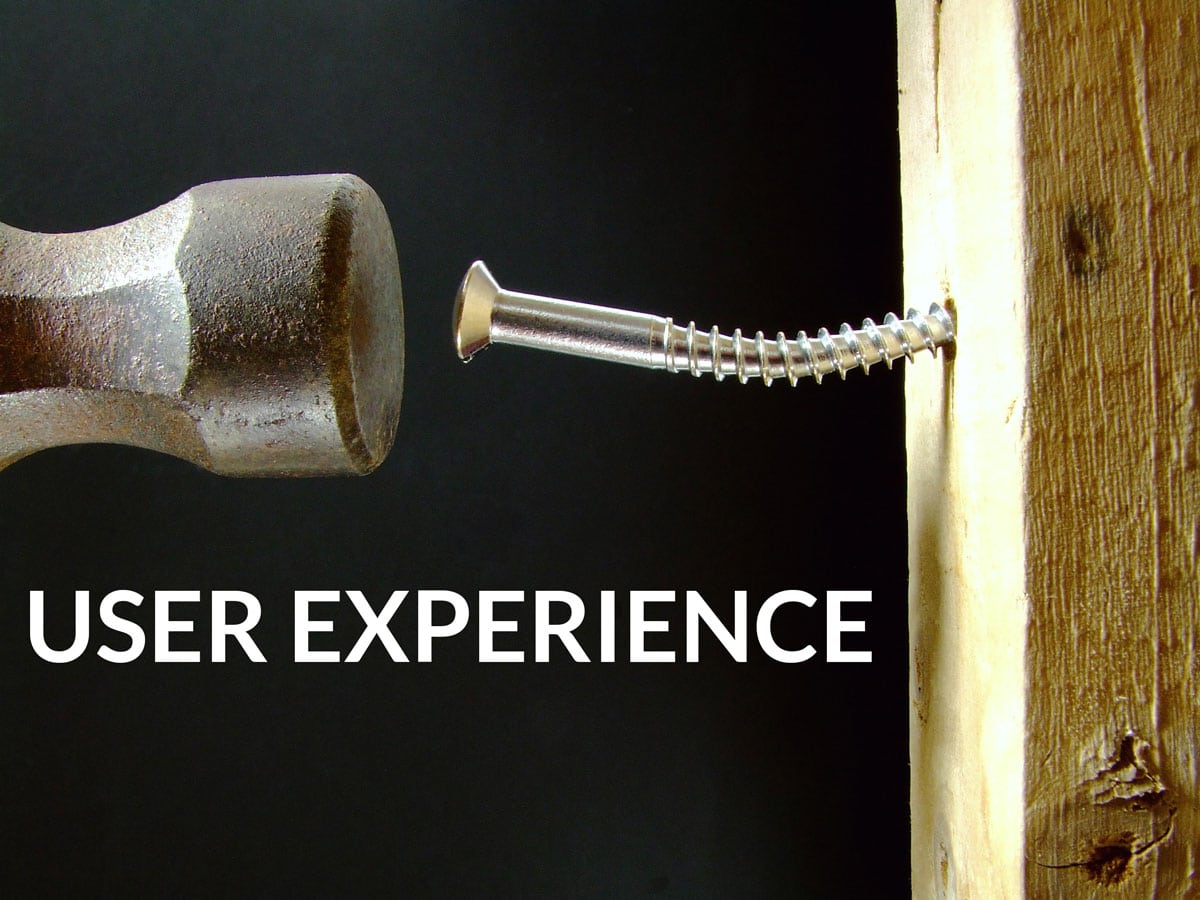
User Experience! Why Everyone Hates Your Website

At its most basic, User Experience (UX) design is exactly what it sounds like. You’re designing and working towards users having the best possible experience using your website or application.

This means they can quickly determine what your website is about, finding the information they’re looking for is a breeze, and accomplishing necessary tasks takes very little mental exertion. At the end of the process, the best UX allows for users to accomplish the primary purpose of your website with as little mental exertion as possible.

This is why one of the greatest books on the topic is called “Don’t Make Me Think“, users don’t want to have to think about what they’re doing. They just want to do it!

Where to start when thinking about UX?

UX design is a great field with many different techniques that can be employed to help in understanding how well users are able to interact with your website or application.

But, as a starting point for most people, the simplest step is to get out of your own head and think about your users – your potential clients.

Particularly if it is your own business, you’ve probably had your mind wrapped up in a lot of things that most clients don’t care about.

For example, you may take great pride in the interesting story behind the founding of your business. However, potential clients looking for your core service may find your story to be a hindrance if it gets in the way of them completing their main objective.

Align your objectives

If you’ve ever had a conversation with us you know we’re big on having a clear, and usually solitary, intention for your website. What do you want to accomplish? What is your objective?

So, when building a website you should have a clear objective. Your site is subsequently designed to meet and promote this clear objective.

So, at its core, I believe a great UX can only exist when the objective you set for your website is aligned to the objective a potential client has when visiting your website.

For a successful website, the two objectives must match.

This can only happen when you first take a step back and think about your user and not your business.

What are your potential customers looking for when they land on your website? Do they find it?

LimeCuda is now in East Lansing, Michigan

WordPress design East Lansing

Big news for LimeCuda and myself (Blake): We’ve relocated to East Lansing, Michigan! We’re looking forward to using our WordPress expertise to help businesses in the East Lansing / Mid Michigan area.
Most of you are probably already aware of this as technically we moved a few months ago. But consider this the official announcement post.

This really won’t affect most of our customers or the way we serve you, except our mailing address has changed to:

[wpseo_address show_phone=”false” show_state=”1″ show_country=”1″ show_email=”0″]

LimeCuda will be turning 5 years old this coming January. We’ve seen a lot of change in ourselves, in the industry, and how we create web-solutions. We’re as excited as ever about helping organizations better harness the power of the web and we still truly love what we do.

WordPress All Over the World

wordpress

We began in Pennsylvania, moved to Florida, then Georgia, and now to Michigan. We have clients in 16 US states and 11 countries. The magic of the Internet age is we’re able to provide WordPress-centric solutions to clients all around the world – but if you are in our new neighborhood of East Lansing, Michigan we’d love to meet you!


The Mallard Family is Growing!

A couple of weeks ago, my wife and I welcomed our second son into the world, Hudson Forrester Mallard. We’re excited about the growing family and our 2 year old is happy to have “BABY!” around. He’s already started talking to him and reading him books 🙂

Hudson Forrester Mallard

Brothers

Family

Not Annotating in Google Analytics? You’re Missing Out

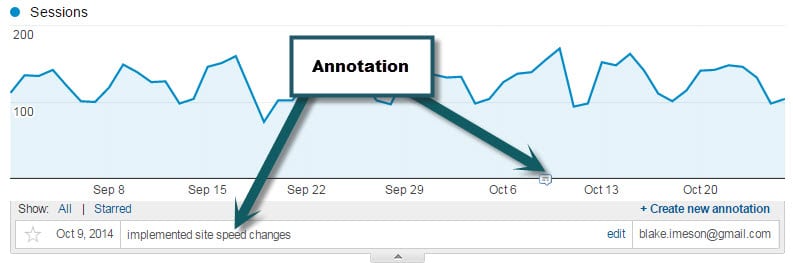
Have you ever made a change to your website hoping it will increase your traffic or specific conversions? How do you track the effectiveness of this change? One simple way to track your efforts is to take advantage of annotations within your Google Analytics account.

What are Annotations in Google Analytics?

google-annotation

Annotating in Google Analytics is simply recording a note that will always be visible. Simple but powerful. Take a look for yourself in the following screenshot.

What would be worth annotating?

  • Site re-launch
  • Major content changes
  • Email campaigns
  • Adding a new plugin

Basically, anything that could  in a meaningful way positively or negatively affect the traffic is worth adding. That way if you are going through your analytics history you might be able to trace back upswings or downswings to things that were done.

How do you annotate?

Super easy, just select the date range in Google Analytics that will encompass the date you want to annotate on and then click the “+ Create new Annotation” button.If you choose the option “shared” then your note will be visible to other users on the Analytics account which can be helpful for the team and for those that may follow after you.