Why Redirect Pages from Your Old Site?


404-not-found

Say you had a page on Blue Widgets on your old site – when you go live with a new site maybe you decided to delete that page or you changed the URL.

So what happens if someone tries to go to that page on your old site? They will hit an error page AKA 404 “Not Found” page. 

This is no bueno. In my somewhat-biased opinion whether this gets remedied or not can be a clue as to whether a developer is good or great.

So Why Redirect Defunct Pages?

If we don’t there are two primary negative effects:

1) The domain now has a bunch of 404 errors which Google keeps track of and will not see that as a good sign. Those null pages also may have had some trust/authority in Google’s eyes that get lost if they go nowhere. Even if these all just redirect to the homepage that is better than nothing.

2) Broken user pathways. So if someone had a page bookmarked or had emailed it to a friend, that link is now broken. Additionally there may be old marketing materials that link to it or other vendor / partner sites that linked to them.

404-error-page-lost-visitors

How do you know which pages are broken?

1) Do a search in Google for site:limecuda.com but replace limecuda.com with your domain name. This will show the pages Google has indexed for your domain. As a post-launch practice I will usually do that search and open up each result and create redirects for any URLs I missed that result in errors.

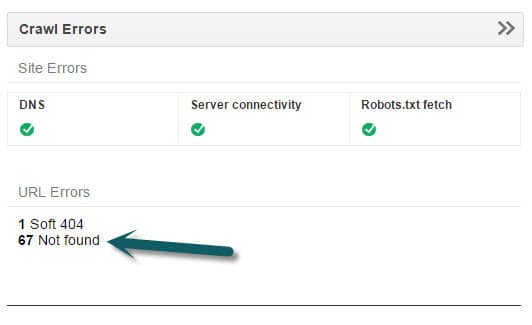
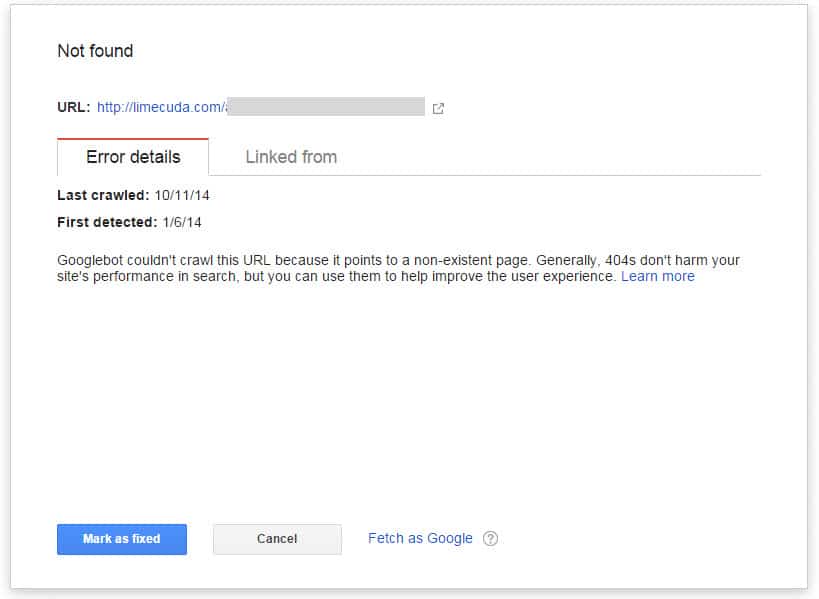
2) If you have your site verified in Google Webmaster Tools it will show you Error pages that it has found. This is a good thing to look at from time-to-time to try and keep that number near zero.
gwt
gwt-error

When you have fixed an error reported by GWT make sure to click “Mark as Fixed”.

3) Another option is to use Google Analytics. If you go to Behavior>>Site Content>>All Pages and do a search for 404 it might show you some pages people have hit that didn’t exist.

4) Not necesarily even a broken page on your site but using  brokenlinkcheck.com to scan your site may be another way to find error page and/or broken links.

5) Before ditching an old site we  create a list of all its pages. This tool, https://www.xml-sitemaps.com/ can scan your site and return a list of its pages. Use this option: “Download Sitemap in Text Format”

How to Remedy?

There are a number of methods for redirecting these but they all have in common that they need to be the 301 (Permanent) type of redirect.

1) If you use a typical Linux-type hosting running Apache you can use the .htaccess file which is found in the root of the site if you access it with sFTP.

In that file you can add lines like the below…

Redirect 301 ^/old-url/ http://limecuda.com/new-equivalent-url/

Pro Tip: To assemble all of these URLs with the “Redirect 301” you might want to use concatenation in Excel or if you use an amped up Notepad tool like Notepad++ you can do some clever tricks like the following to add “Redirect 301” in front of every line. This uses the regex caret symbol ^  which means “at the start of”.


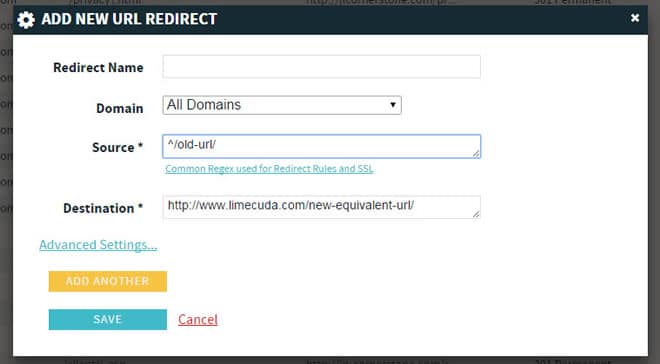
2) If you use a premium host like WPengine (runs many of our sites) then it might be running on nginx (pronounced “engine x”) in which case there might be a panel that looks like this…
redirect-nginx-404-pages


You may need some RegEx for properly redirecting some of these.


Now you know why error pages are a bad thing, how to find them, and how to fix them.

Have questions? Please ask in the comments!

How LimeCuda Uses Basecamp

We love Basecamp for Project Management. It helps us stay sane but more importantly we’re able to deliver a world-class solution to our clients in the most efficient way possible…every time, repeatedly, and consistently. Things get done quickly and correctly.

Back to where it all began, Grove City College

This past week we took a short trip to the birthplace of LimeCuda and my old stomping grounds, Grove City College.

Main reason for the visit was the former director of the Entrepreneurship department, Craig Columbus was speaking on “Living the Entrepreneurial Life”. It was a great talk and had a very genuine and frank feel. Some of the quick points from it off the top of my head:

  • Be an “abundance” thinker not a “scarcity” thinker. Don’t view profit as a pie to be divided but as a pie to be grown.
  • Conflict is inevitable you just need to learn to deal appropriately with it. Peace is not the absence of conflict but the presence of God.
  • Success is rarely a straight line. You will have many failures and that is ok.

It was an inspiring talk. Craig is a brilliant and humble entrepreneur.

Had a great time catching up with a peer I admire very much, Gray MacKenzie of Guavabox. Together we stormed one of Tim Sweet’s famous wing nights.

The next two days I spoke to a few classes:

  • Digital Marketing
  • The Entrepreneurial Mind
  • Internet Content Marketing
  • Ecommerce

I am not sure that people realize just how aggressively innovative the Entr Dept. at GCC really is. In the classes above and other they are learning how to leverage cutting-edge tech, not just things like Word and PowerPoint but WordPress, SEO, and how to write engaging content for online consumption, etc. This stuff is key, so much of modern business depends on understanding and successfully using technology.

Each time I go back I wish I could go through the program again, there are so many amazing classes. Simply amazing.

Big thank you to the Entrepreneurship Dept. for graciously hosting me again. It is always encouraging to be back and fills my tank with inspiration each time.

Here’s my son and I enjoying a Buffalo Chicken Tender Wrap in the Student Union. 

gcc-student-union


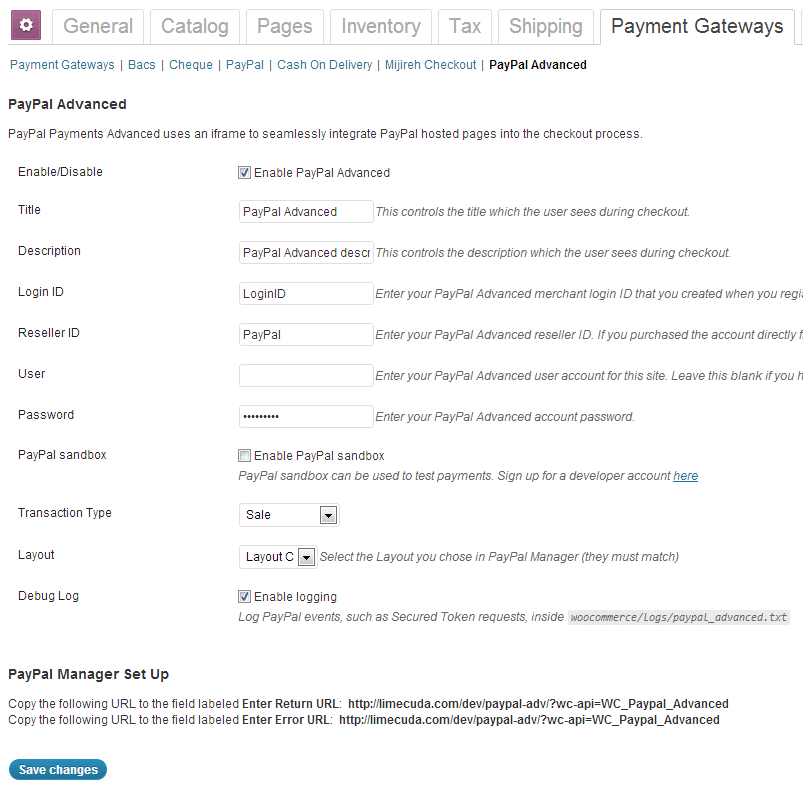
WooCommerce PayPal Payments Advanced plugin

PayPal Advanced

Introducing the PayPal Payments Advanced plugin for WooCommerce.

This is LimeCuda’s first major foray into the Premium WordPress plugin/extension market. We’re very excited!

So what does this do?

WooCommerce PayPal Advanced

This plugin combines two essential elements of an eCommerce cart checkout:

  1. a merchant account
  2. a payment gateway

It does all of this while keeping customers on your site for the entire checkout experience.  This means the user has a unified, branded experience throughout the entire purchasing process.

Key Features:

  • Unlike most on-site, seamless gateways this is only $5/month. Most cost at least $30/month whether you sell anything or not. (The cost can be this low cause PayPal has put their BillMeLater and PayPal Express checkout options along with it)
  • Simpler PCI compliance. Doesn’t require an SSL certificate (although it is recommended for higher user trust)
  • Works by using an iFrame to contain a checkout page hosted by PayPal
PayPal Advanced WooCommerce settings

Links

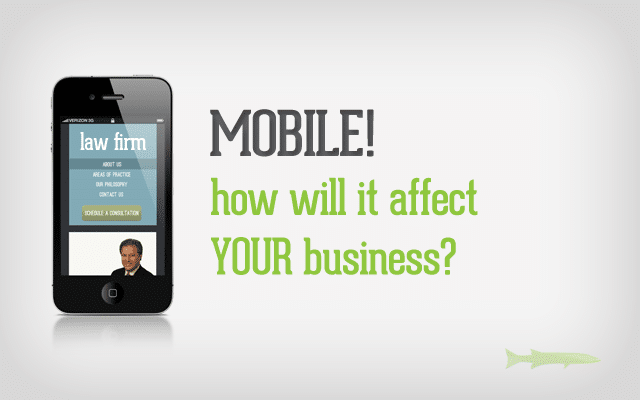
How the Mobile Web WILL Affect Your Business

There are some amazing new statistics about mobile phone usage.  With these numbers, there is no doubt that mobile must be a major aspect of small business’ web strategy and will only become more important.  In this next phase of Internet evolution, how will your business be affected?

At LimeCuda, our biggest pet peeve is seeing our clients and other small businesses getting wooed into spending lots of money in the pursuit of false hopes.  Although mobile design has a much lower risk of underhanded marketing activities than services such as SEO (we are not degrading SEO as a service, only certain SEO “experts” that do their clients more harm than good) there is still opportunity for salesmen to capitalize on the “need to get your site mobile” without putting the specific needs of your small business first.

Here are a couple of things to think about when considering the development of your approach to the mobile web.

Track YOUR Analytics!

Take a look at the statistics presented in the mobile marketing video above.  These statistics further show that mobile IS the current (and future) trend in Internet use. However, what is the trend for your website? Are your analytics showing you what you need to be focusing on a mobile site design? Or are your analytics telling you that your current web budget is better spent on SEO or Social Media strategies?  Just because there are a large number of people searching for local businesses from their phone, what good is it for your business to have a mobile website if you don’t even have a Google Place page?  Focus on your goals and utilize your budget to best reach these goals. Be tactical with your budget.

Mobile Analytics Examples from our Clients

Mobile Visitors from Jan 1st 2010 – April 30th 2012

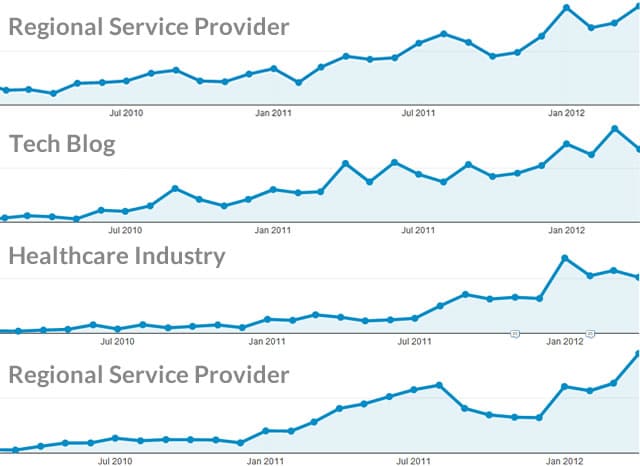
We ran some analytics reports from a few clients that have data going back to 2010. These are a good applicable sample.  Other clients’ analytics show similar trends. The below graphs show mobile visits over time. (each dot is a month)

mobile traffic analytics stats

First Four Months of the Year

(mobile as a % of total visits)

Year

Client A

Client B

Client C

20101.32%1.15%2.2%
20117.26%4.59%4%
201217.5%9.70%9.6%

You might say that 10% of your visitors isn’t massive but the trajectory is increasing. It is not a stretch to predict that by next year a solid third of your traffic might be mobile!

Have you determined your goals for being online?  
Do you know how to track and understand your analytics?  
We would love to discuss these issues with you directly!  Contact us today!

What are your customers looking for?

So you have determined that you need a mobile website now!  What next?

You need to determine what people are trying to accomplish when using your site from a mobile device.  This is definitely more difficult to determine and relies on educated guessing, however there are some great clues that can be found within the search terms and traffic flow in your analytics.

For example, imagine you run an upscale Italian restaurant in a major city (we’ll say Atlanta since that is the world outside my door right now).  A sample of your customer base might be:

  • Wealthy locals
  • Locals celebrating special events (anniversaries, engagements, etc.)
  • Tourists (everyone budgets at least one “fancy meal” for their vacations)
  • Business Travelers

Your website has an elegant design which entices the visitor with the feel and atmosphere they’ll experience when visiting your restaurant.  It showcases your world-class chef, large, elegant images of your featured dishes, and a quick way to contact or book a reservation.  What does a mobile user want to do?  Some possible intentions:

  • Get directions to your restaurant (they’re already in the car!)
  • Find your number to call
  • Book a reservation
  • Browse your menu
  • Find out if you have any specials running

While these are just educated guesses, your analytics might give you good insight into what the mobile user wants.  Why not give them this information more immediately, while still providing the same feel and atmosphere from the main site design?

Effective mobile web strategy must begin with knowing what is most helpful to the mobile browser.

Do you need a mobile web strategy?  Contact us today about developing and implementing your mobile strategy!

SEO Over-Optimization?

Keeping you in the loop on some interesting SEO changes from Google; we’ve got your back Jack.

Google search/spam guru, Matt Cutts, recently threw the SEO world into an upheaval when he said…

So all those people who have sort have been doing, for lack of a better word, “over optimization,” or overly doing their SEO, compared to the people who are just making great content and trying to make a fantastic site, we want to sort of make that playing field a little more level.

This is related to the so-called Penguin update to Google’s search algorithm that happened on April 24, 2012.

Should you be concerned?

If we have been guiding your SEO, you will be just fine. Here’s why… 

  • We have always emphasized user-centric SEO – if your content looks spammy, you are doing it wrong
  • One of the main purposes of our SEO is to accurately convey to machines and users what your content/site are all about
  • We never engage in shady or low-quality link-building tactics and those are part of what is getting hit hardest

This update may actually help many of you as it will level the playing field some.

Further Reading:

(are you a fan of us on Facebook? Like our page to keep up-to-date on new changes in the Web industry)

New cPanel Upgrade for Hosting Accounts

Those clients that host their sites with us, your lives just got ever-so-slightly better. We recently upgraded the LimeCuda dedicated servers to the latest version of WHM/cPanel. This is the software that runs on the hosting side of things and makes it much easier to manage the technical aspects of your site.

Without dragging you through the boring details just know that this means better security, improved usability, and a beautiful new interface.

cpanel-lg

Never used cPanel? Here are some of the ways it can be used…

  • Creating webmail accounts (unless you are using Google Apps for Domains as email)
  • Create subdomains
  • Create redirects
  • Edit DNS
  • Create MySQL databases and edit them with phpMyAdmin

You can log in at yoursite.com/cpanel – so basically just add a /cpanel to the end of your domain and you should be presented with this screen:

Nota Bene: Just because you can access this, it might not be a good idea to just change things unless you know what you’re doing. When in doubt check with us and we can give you some direction. 🙂

Have a question about our WordPress hosting or using cPanel? Give us a call at 724-870-4742


Looking for a web developer?

Working email support for a popular WordPress theme developer, I’ve come across a lot of inexperienced design firms that promote themselves as “experts”.  With advances in technology, the entry into the web development industry has never been easier.  A reality that has created many opportunists trying to make a quick buck.  Although it is easier to become a “web developer”, it is now much harder to be a good web developer.

This being the case, not all young web developers are bad.  There are a lot of quality web developers that can provide you a great service at a great price.  Naturally, everyone must start somewhere and we can’t condemn all newcomers as scam artists.  But, how do you determine whether someone is a quality developer or an opportunist looking for a quick buck?

A Couple Things to Keep in Mind

A single person can NOT be an “expert” at everything needed for your web strategy. 

If you are reviewing a freelancer that claims to be an “expert” at web development, web design, branding, social media, inbound marketing, and analytics… RUN AWAY!  It is a full-time job just staying up to date on one of these topics, this means that anyone claiming to be an expert at them all is most likely a hack at them all.

But this is where the trade off of cost and reward come into play.  To truly have experts in all of these areas manage your web strategy you will be spending a minimum of $20,000.  So, knowing that you only have a $2,000 – $5,000 budget for your web presence, you must determine what will get you the most bang for your buck.  Just keep in mind, people that promise everything will most likely leave you with nothing.

Note: LimeCuda has a team of experts, each well-qualified in their particular niche. Each person also understands the big picture and how the different niches must work together.

Why not get some referrals?

No matter how new someone is to the industry, if they are charging you, they should have some referrals.  It is a common thing for people to request referrals from someone providing them with a service.  This is a big step for your business, don’t hesitate to find out about the experience others have had with a certain developer.

Review their portfolio

Take a look at the websites in their portfolio and keep a couple of things in mind:

  1. What kind of businesses do they serve?
  2. Imagine yourself as that business’s customer, is the site simple and intuitive? Does it draw you in and make you want to do business with them?

If the answer to these questions is no, you might want to look at other developers.

Are you currently looking for a web developer?

If you are currently looking for someone to handle your web project, we happily invite you to take a look at:

  1. Meet our team
  2. What our clients have to say about us
  3. See some samples of our work

We would love to hear from you!


New Facebook Timeline, What You Should Know

The new Facebook Timeline layout is launching for fan pages! Are you ready?

We’ve been busy helping clients move to the new design. If you want to have a go yourself, check out the below links. Here is a particularly helpful one that has the dimensions for the new images. We switched the LimeCuda fan page over last week. Do you have a favorite example of a new page?

timeline

The following collection of links is brought to you courtesy of the social media savants at Marketing Savant

Blog Posts & Articles

E-Books, PDFs, Downloads [PDF or registration links below]

Templates & Guidelines

Bonus

  • Here’s a quick Facebook Timeline Pinterest Board that Marketing Savant put together on their Pinterest page that links to some of the better infographics, guides and resources that they’ve found for Timeline.

Philosophy of Communication, A Look Inside the LimeCuda Culture

Aj the dog, driving on his way to workThe culture a company forms for itself has massive impact on the work produced.


Stealing this unashamedly from my dad… we try very hard to be “fun, friendly, and helpful.”   This manifests itself in: the calls we have with clients,  our state-of-mind while at our desks, and how we communicate in email.

Life is hard enough, so we always try to keep a positive and upbeat attitude. You wouldn’t think, so but creating or transforming a company’s web presence can be stressful and high pressure. People entrust their businesses to us all the time; being alert and thorough is key. However, in order to not let this responsibility turn us into uptight, stressed-out, robots, we mix a healthy dose of fun, humor, and joy into our work.

Don’t be mistaken, this surface casualness is how we keep our work full of joy, meaning, and we don’t end up in padded rooms scribbling “Die Internet Explorer, Die!” We are still professionals underneath the jeans and un-tucked dress shirts.

Yada yada yada, so what do we mean?

Phone Calls

If we chat on the phone, we try to be direct and not waste your time, while being fun and interesting people. I do far too much rubbing in the face of my northern clients, the warm weather and sun that I suffer through. (sorry!)

Posts / Content

When we interact in the online world with Social Media, mailing lists, website content, and blog posts, we may be more casual and entertaining than you are used to. And that is exactly why… we would put you to sleep at your keyboard if everything from LimeCuda was “what you are used to”.  Have you ever seen the face of someone who fell asleep on their keyboard? It ain’t pretty.Guy falling asleep on keybord

Emailslimecuda-email-icon

We all get faaaaaar too many of them. We feel your pain. In our correspondence we try to be to-the-point and not waste your valuable time. You also might get some humor. We’re also certainly no strangers to the emoticons like: 🙂 or 😉 and if you are a cheekish client maybe even a 😛  (don’t be alarmed if you see an lol, only 30% of the time are we laughing at you)

Why do we engage in such frivolities? Experience. There is a very real danger when communicating with someone online as you immediately lose the  90% of communication that is non-verbal. By adding a smiley face we are trying to bring back some of the meaning and intent that is lost in written communication. This isn’t us being goofy, this is us trying to make sure you know that we aren’t mad or frustrated.

Note: in case you weren’t aware, ALL CAPS is the online equivalent of screaming, so unless you are very mad or very excited about something, don’t use it. Don’t leave us guessing what you meant when you said “THE FONT IS WAY TOO SMALL” 🙂

Now it’s your turn… Any tips you want to share for communicating online? Have a different style philosophy? Please share in the comments!