[SEO STRATEGY] Interlinking Your WordPress Content and Gaining Rankings

Rankings are the holy grail and goal of SEO. A great (overlooked) tactic is interlinking between your own content. We’ll show you a technique to make your SEO interlinking more effective.

The What and Why of Interlinking

When you link to a page, Google not only sees that as an indication of trust it gives them an idea on the subject matter of the page.

If we have a page on our site all about our “WordPress Expertise” and we intentionally linked to it with that phrase or variations of it – Google would get the idea what that page was all about! (should be noted that linking to that “wordpress expertise” page within this post is so meta and a perfect case-in-point 😉 !)

Now, getting these links from other websites is even better but you can and should be interlinking within your own site! There is a “PageRank damping factor” that won’t let you just keep escalating the power of interlinking on your own site, but you should still interlink when it makes sense and do it with SEO intentionality.

How to Make Interlinking Manageable

If interlinking isn’t easy, you won’t do it!

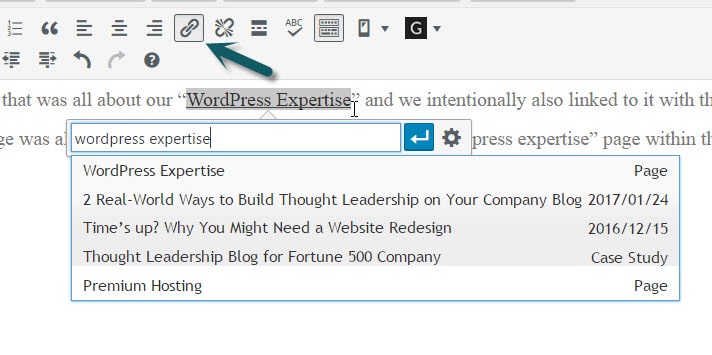
In WordPress adding a link to a piece of content within the same site is stunningly easy.

Highlight the text you want linked, type Ctrl+k (Command+k on Mac) or click the link icon. Then start typing a part of the title or URL for the content you are wanting to link.
interlinking-easy-in-wordpress

Assign Keywords and Keep Track to Interlink Like a Pro

If you only have 5 keywords that map to 5 pages, then it may be manageable within your head. However, if you have dozens of keyphrases you are pursuing or you are working within a team of content writers then you need a better method.

Here’s the Keyword Interlinking Strategy that works for us…

1. Assign a Focus Keyword to Each Post
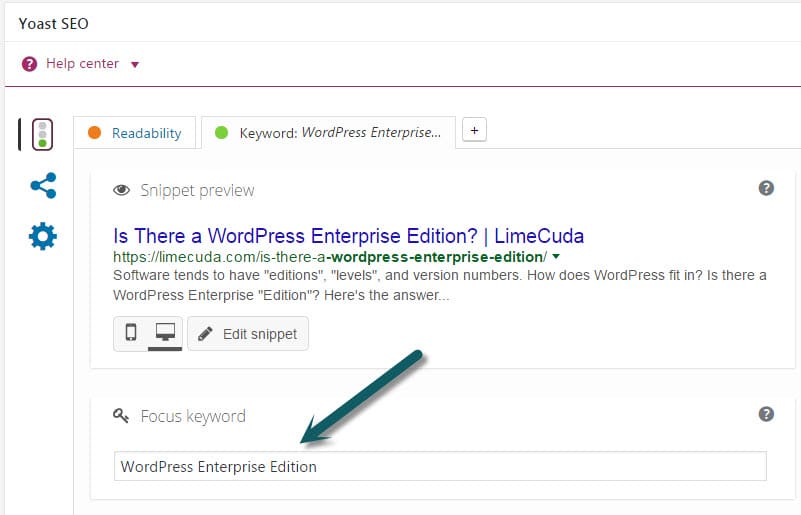
In the Yoast SEO tool this is easy and hopefully you’ve been doing it as you go along. If not, go back through and assign a focus keyword (think keyphrase) to each post.
wordpress-focus-keyword-yoast

2. Export a List of Your Posts
Use a tool like WP CSV to export a CSV file of all your posts. This file contains a column named “cf__yoast_wpseo_focuskw”. This “custom field” value is what contains your SEO Focus Keyword. So now you have a list of all your posts with the keyword mapped to each.

We recommend importing this CSV into a Google Sheet. Then you can easily share it with your team and keep it updated over time. If you only occasionally add posts it may be worth it to just manually add new Post Titles and Focus Keywords to your Sheet as time goes on.
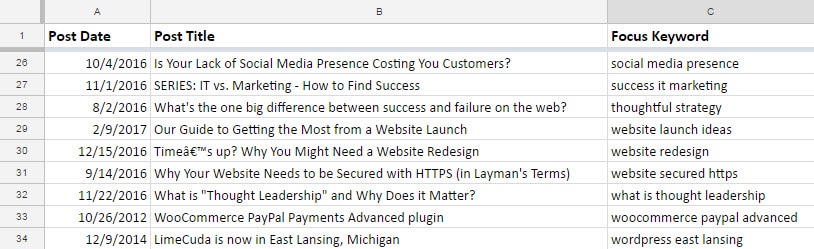
seo-focus-keyword-tracking-for-posts

3. Use the Spreadsheet when writing content
When you are writing a post (before and after) reference your spreadsheet and see if there are natural (and helpful!) ways you can link to these posts – using the keywords!

Over time you can have a nice interlinked blog system that keeps users reading your content and Google understanding and ranking it!

Not Annotating in Google Analytics? You’re Missing Out

Have you ever made a change to your website hoping it will increase your traffic or specific conversions? How do you track the effectiveness of this change? One simple way to track your efforts is to take advantage of annotations within your Google Analytics account.

What are Annotations in Google Analytics?

google-annotation

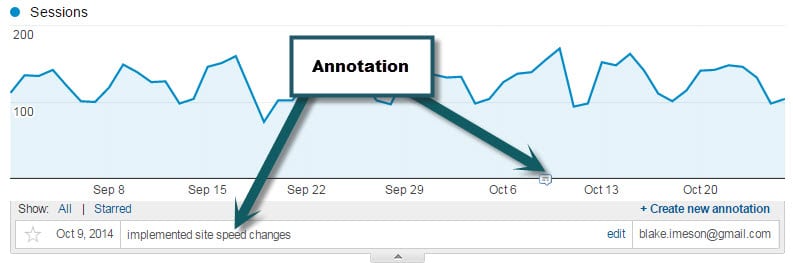
Annotating in Google Analytics is simply recording a note that will always be visible. Simple but powerful. Take a look for yourself in the following screenshot.

What would be worth annotating?

  • Site re-launch
  • Major content changes
  • Email campaigns
  • Adding a new plugin

Basically, anything that could  in a meaningful way positively or negatively affect the traffic is worth adding. That way if you are going through your analytics history you might be able to trace back upswings or downswings to things that were done.

How do you annotate?

Super easy, just select the date range in Google Analytics that will encompass the date you want to annotate on and then click the “+ Create new Annotation” button.If you choose the option “shared” then your note will be visible to other users on the Analytics account which can be helpful for the team and for those that may follow after you.


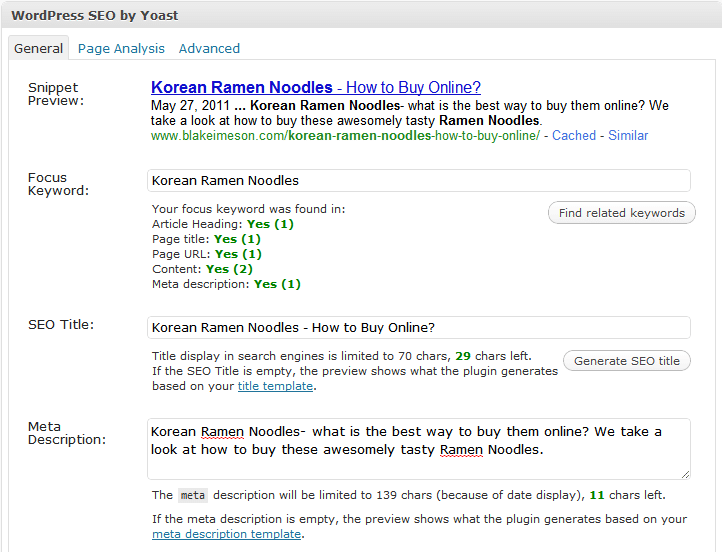
SEO Over-Optimization?

Keeping you in the loop on some interesting SEO changes from Google; we’ve got your back Jack.

Google search/spam guru, Matt Cutts, recently threw the SEO world into an upheaval when he said…

So all those people who have sort have been doing, for lack of a better word, “over optimization,” or overly doing their SEO, compared to the people who are just making great content and trying to make a fantastic site, we want to sort of make that playing field a little more level.

This is related to the so-called Penguin update to Google’s search algorithm that happened on April 24, 2012.

Should you be concerned?

If we have been guiding your SEO, you will be just fine. Here’s why… 

  • We have always emphasized user-centric SEO – if your content looks spammy, you are doing it wrong
  • One of the main purposes of our SEO is to accurately convey to machines and users what your content/site are all about
  • We never engage in shady or low-quality link-building tactics and those are part of what is getting hit hardest

This update may actually help many of you as it will level the playing field some.

Further Reading:

(are you a fan of us on Facebook? Like our page to keep up-to-date on new changes in the Web industry)

Configuring WordPress SEO Plugin on Posts + Pages

Watch as I quickly go over how to use the powerful WordPress SEO plugin by Yoast on my posts and pages.

We’ve tried many SEO plugins but none are as robust or perfect as this one by Yoast.

Learn how to use it when editing your WordPress Posts + Pages:

I’ll leave you with a couple thoughts (some were in the video)

SEO Title

[arrowlist]

  • Highest value keywords should be towards front of tag
  • Having a longer title with many keywords dilutes the strength of each keyword
  • Use separators like: | – > <
  • The default auto-generation on global settings page. I use %%title%% or %%title%% | %%sitename%%

[/arrowlist]

SEO Description

[arrowlist]

  • Has little SEO value but terms the user searches get bolded
  • Needs to entice the searcher to click thru

[/arrowlist]

Focus Keyword

[arrowlist]

  • Only for your own internal use
  • Only put one keyword/phrase
  • Use this to remind you of where you can naturally use your keyword

[/arrowlist]

Other

[arrowlist]

  • Use /%postname%/ for your permalinks (Settings>>Permalinks) or if concerned about speed and having many posts: /%post_id%/%postname%/
  • This plugin also generates XML sitemaps that you can submit to Google Webmaster Tools
  • Download plugin

[/arrowlist]

Have questions? Send us a message or comment below!

Is Buying Links an Effective SEO Strategy?

Our clients often pass us emails from people offering to sell them links. But is link buying an effective and ethical SEO strategy?

Yes and No.

Links drive the web. Google will grant your site trust/authority based on not only the quantity of links pointing to you, but also on the quality. (See PageRank)

Quality of a link to your website depends not only on what links are pointing to the site that is linking to you but also on the relevancy of that site to yours.

If I run a blog on cooking techniques, one link from Martha Stewart is worth several thousand times more than if I have 300 links from sites in some irrelevant industry like classic muscle cars. Unless I am trying to rank for keywords in the muscle car industry but if I am trying to rank for terms in the cooking niche then links from sites already within that niche have far greater power.

pagerank linking

So the bought links may help if they are in the right niches but keep in mind that Google has stated publicly that they do not approve of this practice.

There was recently a very high-profile case of JCPenny getting penalized by Google (also Overstock.com and Forbes) for buying links featured in the NYT.

There are not many effective and safe shortcuts in SEO, while a link vendor may have 1000s of websites that could link to you, they are most likely not high-quality and are also most likely in irrelevant industries. If your site suddenly has several hundred links pointing to them from off-topic sites, then that looks very suspicious to Google. Their algorithm is way too smart to game in a safe way. At best this is gray-hat SEO but I would argue it is black-hat. LimeCuda keeps squeaky clean and white-hat 🙂 If you are looking for the sneaky, under-handed, shortcut SEO then I have a few dozen emails I get daily from those companies I can send you.

Here is what it all boils down to…

Best and safest way to rank well: get people to link to you naturally because you have an awesome product/service or helpful content that gives value.

Questions You Need to Ask Your Web Designer / Developer!

Christina, an awesome SEO from the fantastic internet marketing firm, LunaMetrics, just wrote a really fun and poignant post on questions to ask a web designer.

Sign #1 That Your Web Designer Knows Bubkus About SEO:

During the web designers sales pitch, you say “I’m concerned about the Search Engines’ ability to access and properly index my site. Consequently, I’d like to know what kind of code you’ll be using to render the major design elements of my site.” and they answer:
a. Flash
b. Javascript
c. It doesn’t matter
d. I am be coding very well, it’s ok.

Read the rest…

5 Signs Your Web Designer Knows Nothing About SEO

Search Engine Optimization for Beginners – Learn SEO

As a small business owner you often will want to learn things in order to give your business the best chance to succeed. SEO is one of those things that can with some effort you can understand and grow your traffic.

If you read only one thing about SEO, read this guide from SEOmoz. They are the most highly respected SEO firm and educator. If you want more, read this 3 part series from Hongkiat.

[arrowlist]

[/arrowlist]

Remember that SEO alone won’t make you succeed. What SEO gives is traffic. That traffic must be the right kind of traffic and you must be able to convert that traffic.