LIMECUDA version 3. no wait, 4.0?

I’m honestly struggling to contain the excitement I have for the new LimeCuda!

So I won’t…

giphy

You may be thinking this is just a new logo or a fancy new website. Those are definitely included but for us, this is so much more.

Let me explain…

Updating the brand

Even though 6 years feels long in our industry we’re still a young company learning where we fit in and can add the most value. We have been evolving and pivoting over the last few years. We try new things, learn from our mistakes, then push forward.

A consequence of this was that our existing website and brand no longer truly represented who we had become as a company.

When LimeCuda was born, the tagline was “Refreshingly Aggressive Web”. This made sense particularly for that time because there was a lot of opportunities on the web for helping small businesses. LimeCuda recognized that many small businesses weren’t capitalizing on this potential. So, the position was to get aggressive on behalf of our clients in taking full advantage of those opportunities.

We still think this underlying idea is great. However, when reflecting upon our most successful projects over the years, the common underlying element has always been the relationships that we’ve been able to cultivate with our clients.

In this context, the term “Aggressive” doesn’t convey a proper or positive personality trait for building great relationships. “Refreshing” does though :). So, we decided to fully embrace the “Refreshing” portion of the existing brand.

We are dropping the “Aggressive” terminology from most of our public assets. Pivoting the focus away from the barracuda portion of the LimeCuda name and toward the refreshing nature of the lime. This is now reflected in the updated logo and color palette.

LimeCuda-Logo

LimeCuda 2016 Color Palette

Crafting a new website

When designing the new website, our goals were pretty straightforward. We wanted to showcase our latest work with deeper substance as well as convey the value we place on great relationships with our clients.

So, we decided to start creating case studies for certain projects while also designing a way to sprinkle testimonials throughout the whole site. We added this into an updated design that matched the new brand and let simplicity really be our guide.

[limecuda_mockup desktop_image=”3968″ mobile_image=”3966″]

Practicing what we preach

One of the key things that we also wanted to approach with this “re-launch” was to be very intentional and regular with our blog postings and Social Media engagement. We’ve been preaching these things to our clients for years and have seen first-hand the amazing impact little steps in this area can have for a business over time.

We’re establishing strategies for engaging consistently but still adding value and not just noise. This should be fairly straightforward for us since we’re adamant about maintaining our own personality and letting that shine (with Blake being a good filter for the occasional edges in my own personality 🙂 ).

We’ll also be experimenting with a posting calendar to help us stay on top of regular postings and optimize how-and-when we’re posting for the greatest impact.

Excuse to play around

Now for the fun stuff (or nerdy stuff if you will). This was my favorite portion of this entire process.

Working on a personal website gives us a chance to play around with a lot of new things. Here’s just a quick breakdown of things that we’ve played around with or implemented in this site build that we’ll be rolling out for new client sites:

  • Created a project starter repository 
    In the past we had a starter theme and a core functionality plugin that we used when creating new client sites. We wanted to update this process. We created a starter git repository which includes our updated starter theme and core plugins in a single repository. We structured this to allow us to take advantage of WPEngine git set up for deployments.
  • Switched to Gulp for task running
    Like most people, my first interaction with a Javascript task runner was with using Grunt. I still like Grunt, however there were certain benefits to using Gulp that forced me to give it a try on a recent project. I liked it so we decided to switch for all our future projects. We’ve now got it integrated nicely with our starter repository.
  • Mobile first
    This theme was a new and deeper dive into building a website with a mobile first design approach. Is it perfect? Nope! But it was definitely helpful in allowing us to not only see the benefits of this approach when it comes to resource management, but also the benefits associated with having cleaner and more efficient styling process for mobile views.
  • Exploring new ways for managing dynamic content
    One of the things we’re very passionate about is empowering our clients when it comes to managing their own sites. This is the main appeal of using a software such as WordPress. This passion drives us to explore usable and more intuitive ways for clients to manage more complex content elements on their site. Check out the blog post I wrote about how we’re managing this in our own Case Studies here.

You can check out previous site versions in this post.

We have much still to do, but as we tell clients, it is better to launch a new design if it is a big improvement than to spend years trying to perfect it before re-launching.

Launch and iterate! 

We’d love to hear what you think, drop us a comment.

 

Why Redirect Pages from Your Old Site?

404-not-found

Say you had a page on Blue Widgets on your old site – when you go live with a new site maybe you decided to delete that page or you changed the URL.

So what happens if someone tries to go to that page on your old site? They will hit an error page AKA 404 “Not Found” page. 

This is no bueno. In my somewhat-biased opinion whether this gets remedied or not can be a clue as to whether a developer is good or great.

So Why Redirect Defunct Pages?

If we don’t there are two primary negative effects:

1) The domain now has a bunch of 404 errors which Google keeps track of and will not see that as a good sign. Those null pages also may have had some trust/authority in Google’s eyes that get lost if they go nowhere. Even if these all just redirect to the homepage that is better than nothing.

2) Broken user pathways. So if someone had a page bookmarked or had emailed it to a friend, that link is now broken. Additionally there may be old marketing materials that link to it or other vendor / partner sites that linked to them.

404-error-page-lost-visitors

How do you know which pages are broken?

1) Do a search in Google for site:limecuda.com but replace limecuda.com with your domain name. This will show the pages Google has indexed for your domain. As a post-launch practice I will usually do that search and open up each result and create redirects for any URLs I missed that result in errors.

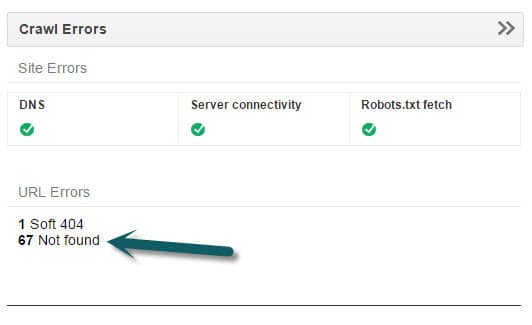
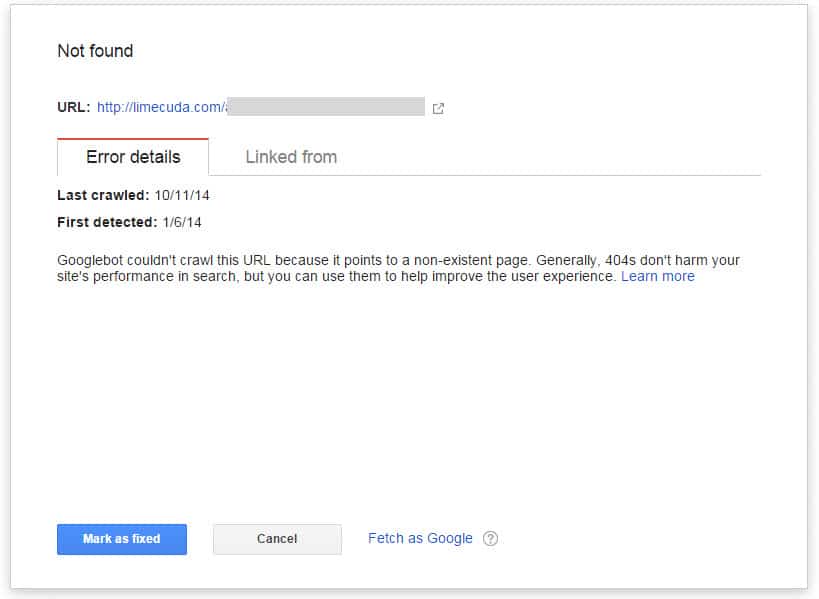
2) If you have your site verified in Google Webmaster Tools it will show you Error pages that it has found. This is a good thing to look at from time-to-time to try and keep that number near zero.

gwt
gwt-error

When you have fixed an error reported by GWT make sure to click “Mark as Fixed”.

3) Another option is to use Google Analytics. If you go to Behavior>>Site Content>>All Pages and do a search for 404 it might show you some pages people have hit that didn’t exist.

4) Not necesarily even a broken page on your site but using  brokenlinkcheck.com to scan your site may be another way to find error page and/or broken links.

5) Before ditching an old site we  create a list of all its pages. This tool, https://www.xml-sitemaps.com/ can scan your site and return a list of its pages. Use this option: “Download Sitemap in Text Format”

How to Remedy?

There are a number of methods for redirecting these but they all have in common that they need to be the 301 (Permanent) type of redirect.

1) If you use a typical Linux-type hosting running Apache you can use the .htaccess file which is found in the root of the site if you access it with sFTP.

In that file you can add lines like the below…

Redirect 301 ^/old-url/ http://limecuda.com/new-equivalent-url/

Pro Tip: To assemble all of these URLs with the “Redirect 301” you might want to use concatenation in Excel or if you use an amped up Notepad tool like Notepad++ you can do some clever tricks like the following to add “Redirect 301” in front of every line. This uses the regex caret symbol ^  which means “at the start of”.


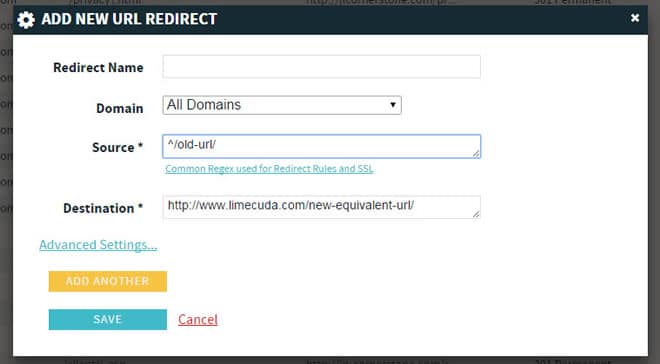
2) If you use a premium host like WPengine (runs many of our sites) then it might be running on nginx (pronounced “engine x”) in which case there might be a panel that looks like this…

redirect-nginx-404-pages


You may need some RegEx for properly redirecting some of these.


Now you know why error pages are a bad thing, how to find them, and how to fix them.

Have questions? Please ask in the comments!

How the Mobile Web WILL Affect Your Business

There are some amazing new statistics about mobile phone usage.  With these numbers, there is no doubt that mobile must be a major aspect of small business’ web strategy and will only become more important.  In this next phase of Internet evolution, how will your business be affected?

At LimeCuda, our biggest pet peeve is seeing our clients and other small businesses getting wooed into spending lots of money in the pursuit of false hopes.  Although mobile design has a much lower risk of underhanded marketing activities than services such as SEO (we are not degrading SEO as a service, only certain SEO “experts” that do their clients more harm than good) there is still opportunity for salesmen to capitalize on the “need to get your site mobile” without putting the specific needs of your small business first.

Here are a couple of things to think about when considering the development of your approach to the mobile web.

Track YOUR Analytics!

Take a look at the statistics presented in the mobile marketing video above.  These statistics further show that mobile IS the current (and future) trend in Internet use. However, what is the trend for your website? Are your analytics showing you what you need to be focusing on a mobile site design? Or are your analytics telling you that your current web budget is better spent on SEO or Social Media strategies?  Just because there are a large number of people searching for local businesses from their phone, what good is it for your business to have a mobile website if you don’t even have a Google Place page?  Focus on your goals and utilize your budget to best reach these goals. Be tactical with your budget.

Mobile Analytics Examples from our Clients

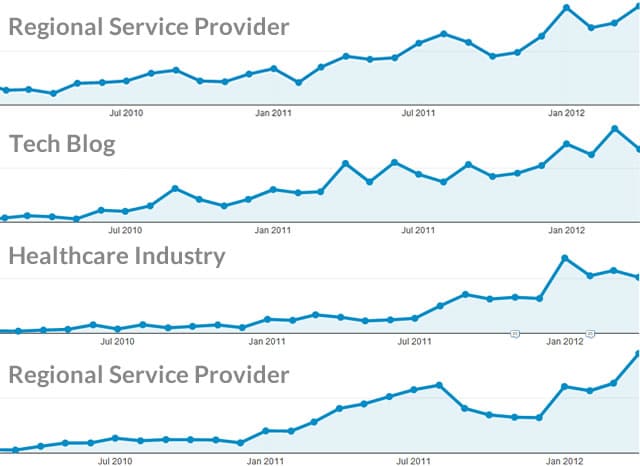
Mobile Visitors from Jan 1st 2010 – April 30th 2012

We ran some analytics reports from a few clients that have data going back to 2010. These are a good applicable sample.  Other clients’ analytics show similar trends. The below graphs show mobile visits over time. (each dot is a month)

mobile traffic analytics stats

First Four Months of the Year

(mobile as a % of total visits)

Year

Client A

Client B

Client C

20101.32%1.15%2.2%
20117.26%4.59%4%
201217.5%9.70%9.6%

You might say that 10% of your visitors isn’t massive but the trajectory is increasing. It is not a stretch to predict that by next year a solid third of your traffic might be mobile!

Have you determined your goals for being online?  
Do you know how to track and understand your analytics?  
We would love to discuss these issues with you directly!  Contact us today!

What are your customers looking for?

So you have determined that you need a mobile website now!  What next?

You need to determine what people are trying to accomplish when using your site from a mobile device.  This is definitely more difficult to determine and relies on educated guessing, however there are some great clues that can be found within the search terms and traffic flow in your analytics.

For example, imagine you run an upscale Italian restaurant in a major city (we’ll say Atlanta since that is the world outside my door right now).  A sample of your customer base might be:

  • Wealthy locals
  • Locals celebrating special events (anniversaries, engagements, etc.)
  • Tourists (everyone budgets at least one “fancy meal” for their vacations)
  • Business Travelers

Your website has an elegant design which entices the visitor with the feel and atmosphere they’ll experience when visiting your restaurant.  It showcases your world-class chef, large, elegant images of your featured dishes, and a quick way to contact or book a reservation.  What does a mobile user want to do?  Some possible intentions:

  • Get directions to your restaurant (they’re already in the car!)
  • Find your number to call
  • Book a reservation
  • Browse your menu
  • Find out if you have any specials running

While these are just educated guesses, your analytics might give you good insight into what the mobile user wants.  Why not give them this information more immediately, while still providing the same feel and atmosphere from the main site design?

Effective mobile web strategy must begin with knowing what is most helpful to the mobile browser.

Do you need a mobile web strategy?  Contact us today about developing and implementing your mobile strategy!

Georgia E-Commerce Taxes by County (Zip Code Breakdown)

This post deals specifically with e-commerce tax issues in the state of Georgia

Although web sales are generally thought to be non-taxable, if your client has a physical location they will have to pay sales tax for all of their in-state sales.  Not only are there state taxes to process, there are additional county-based local taxes which have to be accounted for in your e-commerce solution.  I know this sounds like a huge pain, and it somewhat is, but it is a necessary thing to consider in order to ensure that your client does not receive any unnecessary headaches while running their new e-commerce website.

There is however a kink to this process when considering online sales.  Local taxes are county based.  When was the last time you saw a “County” line on a checkout form? Since it is rather unconventional to include a “County” line on your checkout forms, these rates are typically calculated based on the zip codes provided when customers are purchasing items.

SPOILER ALERT!  The remainder of this article deals specifically with Sales Tax issues for the state of Georgia

Georgia Tax Rates for Online Sales

In reviewing this situation for a current project we are working on for a company based in Georgia, we decided to add a 7% tax for all items purchased from within the state of Georgia (4% state tax + 3% Local Tax).  Since there are only 9 counties with a lower local tax rate, we then determined (conservatively) the zip codes for all the counties that had a lower Local Tax rate (2% rather than the traditional 3%).  We then created a negative tax rate criteria for all orders from these zip codes, so when someone made a purchase from a zip code that fell within the lower rate it would reduce the tax amount by 1% (2% in the case of Whitfield County since they only have a 1% local tax bringing the total tax rate to 5%).  We’ve provided a breakdown below of all the Counties and associated zip codes with the lower rates.

Counties & Associated Zip Codes with 2% Tax Rate

Bibb County

  • 31201
  • 31204
  • 31206
  • 31216

Burke County

  • 30456
  • 30830

Cherokee County

  • 30114
  • 30115
  • 30183
  • 30188
  • 30189

Cobb County

  • 30008
  • 30060
  • 30062
  • 30064
  • 30066
  • 30067
  • 30068
  • 30069
  • 30080
  • 30082
  • 30106
  • 30126
  • 30144
  • 30152

Fayette County

  • 30214
  • 30215
  • 30269
  • 30290

Glynn County

  • 31520
  • 31522
  • 31523
  • 31525
  • 31527

Greene County

  • 30642
  • 30678

Gwinnett County

  • 30017
  • 30024
  • 30044
  • 30045
  • 30047
  • 30071
  • 30092
  • 30093
  • 30096

Counties and Associated Zip Codes with 1% Tax Rate

Whitfield County

  • 30710
  • 30720
  • 30721
  • 30740


We hope this helps you and maybe saves you a little time!  If you happen to be looking into an e-commerce solution for your own company, we would love to talk with you!  Contact us and we’ll be in touch with you shortly.


How to Set the Nameservers in GoDaddy

Nameservers are like signs that point the way from your domain to your hosting. I’ve done a quick screencast showing you how to change nameservers in GoDaddy.

LimeCuda uses these nameservers:
NS1.LIMECUDA.COM
NS2.LIMECUDA.COM

WordPress 3.0 released. Upgrades on the way.

Quick note that the latest version of WordPress has been released.

For our clients who are running WordPress look to be upgraded in the next week or two.

We have been running the 3.0 alpha, beta, and release candidates on the LimeCuda site for a few months now and haven’t had any real issues and love the new features.

Only minor compatibility issue so far is with the Page Management Dropdown plugin not working but that is minor and just a minor backend tweak we like to use.