SERIES: IT vs. Marketing – Why the Friction?


it-vs-marketing

A 4-part series investigating the difficulties between IT and Marketing

If you’ve been in the corporate world, you know that IT (Information Technology) and Marketing often don’t get along or at least seem to be talking past each other. Why is that?

We’ve been building websites for 7 years and have seen both the good and the bad of this classic clash. There have been really ugly situations as well as wonderful partnerships. We’re sharing our observations to get to the core of the issue.

Looking at the State of IT and Marketing

We know we’re speaking in broad generalities here, a healthy IT or Marketing group may be a very different mix.

[genesis_column size=”one-half” position=”first”]

Incentives of IT

IT usually has these aspects at their forefront:

  • Stability: preventing fires, heavy problem solving
  • Maintaining status quo
  • Managing risk / fear of the unknown
  • System integrity, Security, Scalability
  • Obsession with doing things correctly
  • Slow and steady / long term outlook

All of these things are threatened by change – more on that in a minute.

[/genesis_column]

[genesis_column size=”one-half”]

Incentives of Marketing

Marketing usually has these aspects at their forefront:

  • Improving metrics: traffic, leads, sales
  • Experimenting with new methods
  • A “get it done” attitude that dislikes trivialities and minute details
  • Embracing the unknown
  • Fast, iterative with possibly a more near-term outlook

These things lead to an approach that only improves with constant change.

[/genesis_column]

[gb_clear]

Both Sectors are Morphing

IT has gotten more complicated in some ways. They navigate the use of third party tools, Managed Services, or building resources in-house. More is expected of them, security is hard, and they handle a broad array of interrelated pieces of technology.

In the last two decades, Marketers also have seen increased pressure to acquire fairly technical skills in addition to the creative skill set that has always been expected of them. The spend on marketing software and SaaS solutions has increased dramatically.

Cost Center or Profit Center?

IT is usually considered a “cost center” within a company, even though its functions can be integral to the business running at optimal efficiency. This means that IT sometimes has to fight aggressively for budget and can be understaffed.

Marketing is usually considered a “profit center”. Its actions can more easily be traced and tied directly to new business. This means budget can be more easily rationalized. If you can determine a real positive ROI then it is a no-brainer to spend that money!

What do they each DO?

Before I get tarred and feathered, let me say that these are caricatures of each. What IT does and what Marketing does vary a ton between companies.

[genesis_column size=”one-half” position=”first”]

IT is tasked with aspects like:

  • Computer setup and maintenance
  • Office network and WiFi
  • Phone systems
  • Corporate software and Intranets
  • The Website

[/genesis_column]

[genesis_column size=”one-half”]

Marketing is tasked with aspects like:

  • Customer acquisition
  • Promotional materials / Ad campaigns
  • Branding and design
  • Tradeshows and conferences
  • The Website

[/genesis_column]

Notice the common bullet point? This is where the friction can really heat up…
The Website!

New Technology Stirs the Pot

The introduction of new technology (especially website-related) can threaten the fiefdom, control, and budget of IT. This can explain (not excuse) why new technology endeavors are met with suspicion or outright hostility.

One of IT’s greatest fears is Marketing “going rogue”. Non-technical people may break a system and IT is expected to step in and fix. Sometimes access is jealously guarded. Once given, it is hard to take back…

Marketing is increasing technologically-based. This means they are often the ones pushing for new endeavors.

Conversely (and ironically), sometimes IT introduces new technology and Marketing is leery and fights adoption.

IT vs. Marketing Series

Part 1: Why the Friction?
Part 2: The Website Battleground
Part 3: How to Find Success
Part 4: How to Communicate [COMING SOON]

Cross-Posting Your Blog Content on LinkedIn or Medium

LinkedIn and Medium can be great audience-reaching platforms… but you may already be publishing great content on your own website. Should you Cross-Post the same piece on both?

cross-posting

Any Linkedin member can self-publish a piece of content that gets exposure in LinkedIn’s system. Same goes for Medium; people love it for its easy-to-use interface and platform exposure.

What is Cross-Posting?

Cross-Posting is simply taking a piece of content and publishing it on two separate sites or platforms. Could be a great way to get your wise words in front of a bigger audience.

Keep in Mind with Platform Posting…

Will it Rank? (Search Engine Optimization)

If you are going to cross-post you may want to think about the potential for ranking in Google. Decide if ranking is key and if it is then how you approach posting needs to be strategic.

There is no Google penalty for duplicate content. However, certainly the piece Google views as a copy or less authoritative will have a harder time ranking. Definitionally, both posts are competing against each other as well.  Ironically (and irritatingly), when researching for this post I stumbled on an article posted on several different platforms.

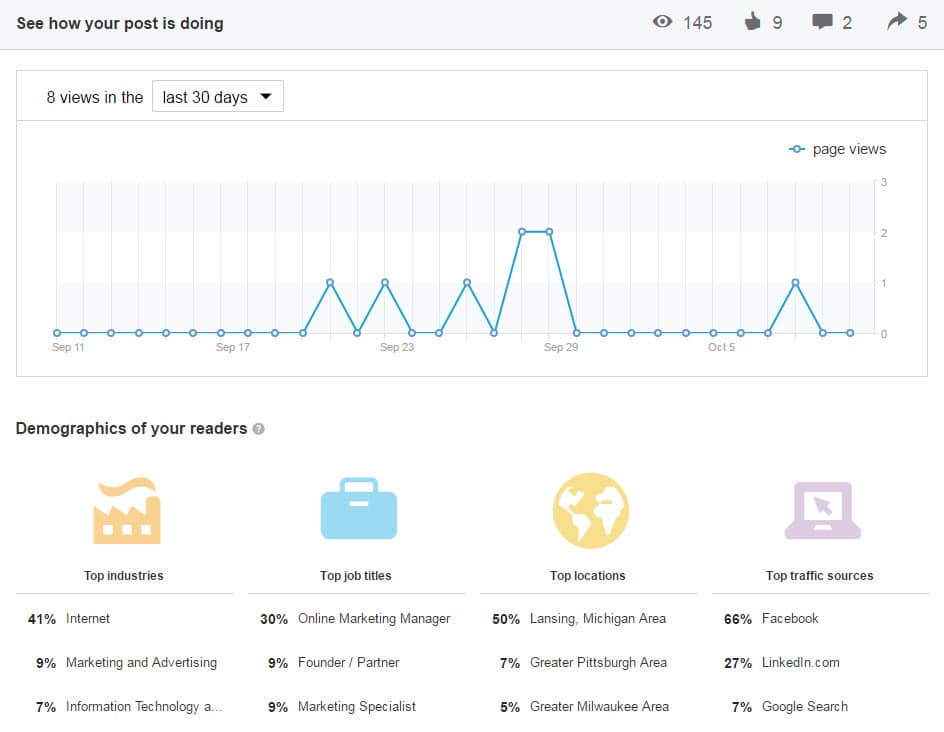
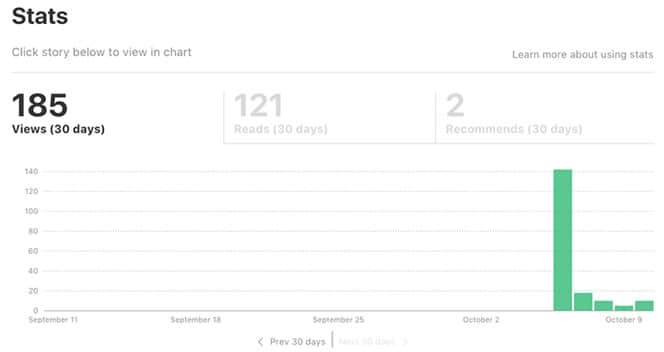
Analytics and Tracking are Minimal

When you post on LinkedIn or Medium you get precious little in terms of analytics.

linkedin-analytics-blog-posting
medium-cross-posting-analytics

May Limit Strategic Site Goals

If a reader is on LinkedIn or Medium, they aren’t on your site! Your ability to keep them navigating around and digging deeper is limited to the content within the post. The navigation, related articles, distracting ads… they’re all the platform’s, not your site. You’ll also need to decide which post you share and promote on other Social Media like: Twitter, Google+, and Facebook.

Your Network Has Power

If you have hundred of followers on Linkedin or Medium then it is likely the content will get some love. If you have a minimal network you could just be shouting into the abyss. If the piece is well-written and considered worthy it could even get promoted to LinkedIn Pulse or Medium’s Editors’ Picks.

5 Tactics to Cross-Post Correctly

1. Time-delay the Second Posting

Delay the second posting. Perhaps by a week or two. This will give Google a bit of time to find and assess the first post and clearly understand that it came first in time.

2. Link to the Other Post

Towards the beginning or the end have a line that says something like “This post originally appeared on…”.

I like to use italics and have some keywords linked. e.g

This article Your Obligation to People Visiting Your Web “House” was originally posted on LinkedIn.

3. Rewrite and Reuse

If you take the post and rewrite it sufficiently it may be seen by Google as unique content. You could perhaps tailor each post to the audience and platform.

It’s a great idea to rewrite the title and the content to target a slightly different keyphrase.

4. Give an Excerpt

You may want to use the secondary posting as a teaser to drive traffic to the first. You could put half of the article on LinkedIn for instance and give a link at the end to keep reading on your website. Give away enough good thoughts to keep them interested and coming to your site.

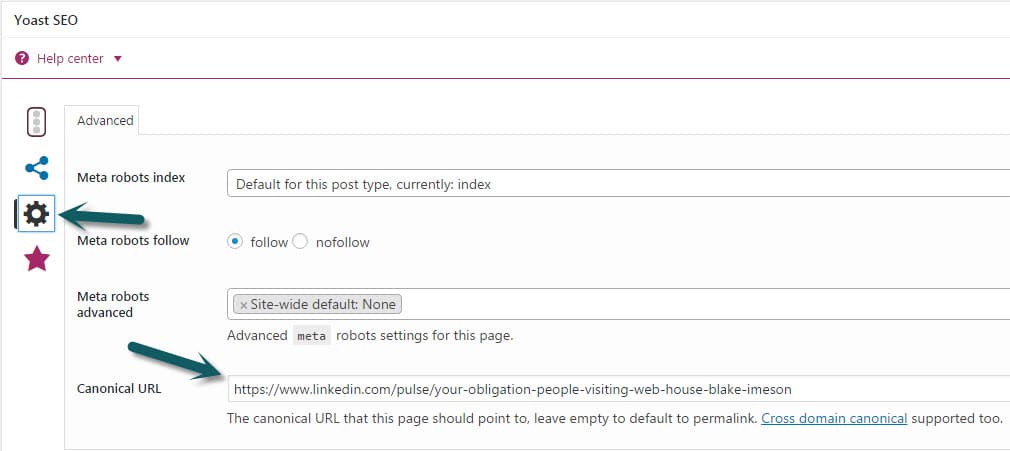
5. Use Your Blog’s Canonical Tag

If you’ve decided to let the LinkedIn post be the Search Engine golden boy then set the canonical tag for your own site’s post to be the LinkedIn post’s URL

linkedin-canonical-seo-tag

My Recommendation for Cross-Posting…

Cross-Post in moderation. Some pieces will work really well on a secondary platform and some will not. For LinkedIn it seems to me business-related pieces of a more philosophical or anecdotal nature do really well.

If ranking is important, my preference would be first publishing to your own website and then waiting to publish on the platform with a link to the original post.

Is Your Lack of Social Media Presence Costing You Customers?

Whether you like it or not, your Social Media web presence is a core part of your business. It is one of the most publicly visible components of your business that many current and potential customers will encounter. It is often even their first impression!

This is the case even if you aren’t active online. A company in our industry recently faced serious speculation whether they were a “going concern” due to their lack of Social Media and blog engagement.

As a company, you could be completely healthy and providing amazing service to your existing customers. However, if you aren’t engaged within the avenues first encountered by your potential customers, you could appear to be an unhealthy or dying company.

Have existing Social Media profiles?

Do you have existing Social Media profiles? If so, ENGAGE!

Potential customers will see these profiles. Don’t be afraid of potential negative reviews here, all reviews can and should be treated as valuable feedback. It can seem bad for these negative reviews to be plastered on such a public avenue, however you do have complete control in how you respond. Our counsel would be to allow negative reviews (within reason) and respond to them positively while maintaining the high ground.

According to the article “Handling Haters: How To Respond To Negative Online Reviews“:

Most customers won’t write you off based on one negative comment. Many, however, will gain respect for your business if you respond to the comment in a pleasant and helpful way.

Don’t allow the potential for negative reviews to prevent you from engaging on Social Media. See it as a bigger opportunity to make your company more appealing to the potential customers that have stumbled onto your profiles.

Don’t have existing Social Media profiles?

Think you can bypass some of this by just hiding away and avoiding Social Media completely? Nope! Facebook and others have made sure that’s not an option for you.

Hiding behind computer like hiding from social media

How’s that? They’re called unmanaged profiles. Users can “check-in” to your business and if there isn’t an existing profile, Facebook will create one for your business. Google Local and LinkedIn have similar tactics.

Take control of these pages and ensure your business is properly represented. If you blog you can even hook your posts to automatically be shared on Social Media.

What story is your web presence telling potential customers?

Take a second and put yourself in the shoes of a potential customer… Google your business.

What comes up? Are there customer reviews you’ve never seen before? Are there angry customers that you could’ve easily appeased but have now been left to linger and paint a negative picture of your business for the world to see? Can you respond in a frank and upbeat manner?

As always if you disagree or have a great anecdote related to using Social Media we’d love to hear! Comment below or drop us a line.

Find and Follow Your Industry’s Heroes

Looking to the leader(s) of your pack can be a great way to stay on the cutting edge and maintain ambition.

My challenge to you:
Find 3-5 leaders in your industry and follow what they have to say

follow-your-heroes

1. What is Your Industry?

This is the smallest sensible niche that you can identify. If you sell health insurance to senior citizens in southeast Maryland then find the thought leaders in your space or be that thought leader. Follow people in the outer rings too. In this example a general insurance thought leader may be helpful.

Our industry is WordPress but really more specifically WordPress Agencies. So we listen to people like Chris Lema, Carrie Dils, Curtis McHale and agencies like: Modern Tribe and Crowd Favorite. Think of the people and businesses you look up to in your niche. People who are your peers or who you wish were your peers.

2. Following them means…

Finding them online. They should have an online presence. Maybe a blog, Social Media, email list, podcast, etc.

Then just listen and reflect on what they are saying.

Don’t blindly follow but don’t arrogantly dismiss. You’re looking for wisdom not marching orders. 

3. Keep Growing and Become a Hero

Not saying you should seek fame but there is something to be said for striving to be a person or company that others look up to.

Strive for excellence and be a hero to others. Remember heroism involves great sacrifice and risk!

Does your web presence effectively build an audience and let you be a hero? Reach out to us if you’d like help in putting together the right tools for building your online reach


4 Quick Tips for Getting into That Elusive Blogging Groove

We’ve been blogging on LimeCuda’s blog every Tuesday for almost 3 months now. Add in our personal blogs, Social Media, and our new favorite child, Fewer Than Three – and that’s a lot of posts! (30+ by my count).

In the spirit of “here’s what’s working for us” I’m sharing 4 tips for getting in that elusive blogging groove.

getting-in-blogging-groove

1. Make it a regularly scheduled “habit”

We’ve committed to publishing a new post on LimeCuda EVERY Tuesday. We share the load yes, but sometimes we’re fighting over who gets to publish as much as we’re fighting over who has to fulfill this duty. Knowing this is a non-negotiable for us has helped us “own it”.

For you this might mean daily (aka Chris Lema Beast Mode), weekly, monthly, or 4 times a year.

Make it a regularly scheduled non-negotiable! 

2. Always be capturing ideas for new blog posts

Get  in the frame of mind where you are constantly looking for new stuff your audience might benefit from. I find myself scribbling post titles on a piece of note paper during client calls. We have at least a dozen partial drafts sitting in our WordPress dashboard right now.

Or, if you want to go even further… when inspiration strikes, take a few minutes and just jam out a post while it is fresh in your head!

3. Not every blog post needs to be long or earth shattering

Don’t avoid blogging because you don’t think you can write “enough”.

A powerful thought shared succinctly is better than that same thought spread over 20 rambling paragraphs. 

Don’t avoid blogging because you’re worried about not contributing an “original thought”. First, those are as rare as unicorns – Second, it might be new information for your audience! Just the practice of forcing yourself to share will mean you better grasp a subject.

For instance…

I took time over the weekend and wrote an absolutely enthralling post on the nuances of migrating a WordPress site to HTTPS. Granted, what is enthralling to some is mind numbing to others…that aside, while forming a teaching tutorial on something I’ve done dozens of times it helped me better understand the process and my own skill was bolstered.

4. Obsess over the analytics

I take this to an unhealthy level but there isn’t an addiction support group yet…

But seriously, reward yourself by watching your traffic grow. Make it a guilty habit to monitor your Google Analytics. This is the long game, don’t be upset if it takes 3 months to see results. Rarely does any worthwhile success happen overnight!

Please share your big and little tips in the comments.

Why Your Website Needs to be Secured with HTTPS (in Layman’s Terms)

Don’t miss the boat getting your website secured with HTTPS! Here’s why…

Around 6 years ago very few sites were mobile-friendly. We’ve had a revolution and now every website needs to be usable and pleasant experience on mobile.

In similar fashion, we’re at a turning point for all websites being “secured” (HTTPS) using SSL Certificates.

https-secure-wordpress-website

What is SSL / HTTPS?

It is basically a protocol that means any traffic to-and-from your website is encrypted and if it is intercepted it cannot be understood.

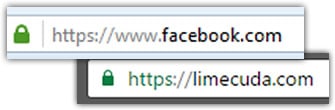
Your site either gets accessed using HTTP or HTTPS. The secure version, HTTPS will usually show a trust-gaining green lock in the browser. The “S” in HTTPS stands for “Secure” – it should all makes sense now…

ssl-wordpress-website

If you visit an unsecured website and fill out a contact form while on McDonald’s WiFi, anyone else on that network can see all your traffic and what you submitted – if the site is not HTTPS. You can see how this is a problem!

The 6 Reasons You Need to Join the SSL Pivot Point

1. Gain Better Search Rankings

In an effort to encourage best practice and protect their users,  Google sees sites being secure as a minor ranking signal. Ranking for keywords is hard, this could give you a small boost.

2. Avoid Embarrassing “Insecure Site” Warnings

The Chrome browser team recently announced that starting in January there will be insecure warnings on site login pages that aren’t SSLed. This could be a blot on your brand and isn’t a good reflection to the user. In the future it seems likely that securing an entire site will be best practice.

3. Security Contributes to Brand Trust

Having that green lock in the browser and seeing that your site is secured may help users trust you more highly if this is their first impression.

4. You Care About Your Website’s Visitors

Even if you aren’t collecting credit card details, SSNs, or private details…you want to guard your users. Sometimes little details could help a hacker build a profile on them and do something nefarious. We’ve even had clients whose customers couldn’t access an insecure site – usually for industries like military or government. If your site isn’t secure, your users’ traffic is wide open to any governments, shady monitoring outfits, and hackers.

5. Keep Your Own WordPress Admin Secure

While the WordPress Dashboard / admin area does have some security features, you are still transmitting your logins insecurely when you login and are making changes to your site.

6. Could Help Your Website Load More Quickly

I don’t need to even say why that is an awesome thing. The technologies that work with HTTPS and your browser now mean that an SSL certificate won’t slow your site down but could actually make it faster for users!


Your Next Steps to Get Secured

Migrating from HTTP to HTTPS is becoming inevitable. There is so much value in switching that it is already a no-brainer.

If your WordPress site is not secured and able to use HTTPS, reach out to us and we can create a plan to migrate. Typically the certificates cost $50-250/year. However, you can now get an SSL Certificate for free using Let’s Encrypt. We use SSL for all new WordPress hosting accounts, it is becoming a must-have feature.


Use Your Website to Boost Employee Engagement and Performance

Have you considered how your public website could be used to boost your employee engagement and performance?

At LimeCuda, we’re proponents of the idea your website can be more than just a marketing tool for your business. Used strategically, your web presence can be a tool to help promote health in all areas of your business.

Applauding Employees Boosts Performance

The Data on Employee Engagement and Performance

According to Bob Nelson, one of the top drivers for employee performance is “I have been recognized recently for what I do.”

Consider this statement from the American Psychological Association Center for Organizational Excellence:

Employee recognition efforts reward employees both individually and collectively for their contributions to the organization … By acknowledging employee efforts and making them feel valued and appreciated, organizations can increase employee satisfaction, morale, and self-esteem. Additionally, the organization itself may benefit from greater employee engagement and productivity, lower turnover and the ability to attract and retain top quality employees.


Recognizing employees and the work they’re doing can be one of the greatest ways to boost their engagement and overall performance

How can your website improve employee engagement and performance?

Celebrating successes

Your website will primarily be geared toward engaging with your potential customers. This is why you’ll have Social Media accounts, blogs, downloadable resources, as well as other avenues for engagement.

This doesn’t mean your website can’t be used to celebrate your business and the successes driven by your team.

By publicly celebrating these successes and directly attributing them to your team, employees feel that their work is making a difference and the company genuinely appreciates their efforts. This is a huge driver for loyalty and performance. Positive reinforcement experienced through recognition gets multiplied exponentially. Not only are your employees recognized by their managers, they’re now recognized by their family and community.

Imagine the feeling of knowing your spouse, your family, and your community are proud of your work? Imagine the feeling of opening Facebook to see a notification from your spouse sharing a doting message along with an article written about you by your company?

Celebrating individuals and humanity

In addition to celebrating your team and their successes, your website can be a great place to celebrate individuals and the fun idiosyncrasies of our humanity.

Your employees are part of what make your culture unique. Share a glimpse and let your clients and vendors know there are real people working there with personality and humanity.

You’re so much more than a bunch of email addresses or phone extensions.

Ideas to jumpstart your engine

  • Andrew just gained a new hard-to-acquire credential
  • Peter spoke at a local conference
  • Amanda was honored for years of volunteer work
  • Tim worked nights and weekends for a month so a local business could open on time
  • Susan and Fred just welcomed their second child into the world

Would this work for your business?

There are a lot of ways you could pursue recognizing your employees through your website. If you’re interested, we’d be happy to chat about the opportunities here for your website.

7 Helpful (but Obscure) WordPress Tricks

Did you know these 7 obscure super-secret WordPress tricks? For a while only Chuck Norris knew these!

Screen Options

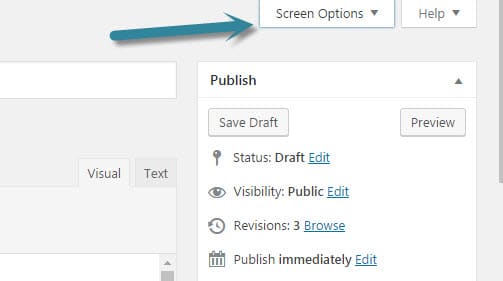
On most views within the WordPress backend there is a very subtle hidden menu named “Screen Options.” This will let you change what shows on the view and sometimes even the number of items.

  • Want to see more pages at once? When viewing all pages change it from 20 to something like 50.
  • Don’t really need to see the Custom Field, Author, or Excerpt meta boxes when editing a post? Hide them.

wordpress-screen-options

Soft Return

If you hit “enter while holding shift” it will let you go down to the next line without adding a bunch of extra space.

Resize and edit images in editor

You can drag the corners of an image in the WordPress Editor to resize the image. Use carefully as the image can be distorted and pixelated if you resize it too much past its normal size. I recommending only resizing it smaller too.  If an image doesn’t look quite right after you upload it, there are simple tools for cropping and rotating.

Easily embed YouTube (and more)

WordPress has this nifty tech called oEmbed. It lets you just paste a link (e.g. to a YouTube video of goats yelling like humans)

Full list of embeddable items.

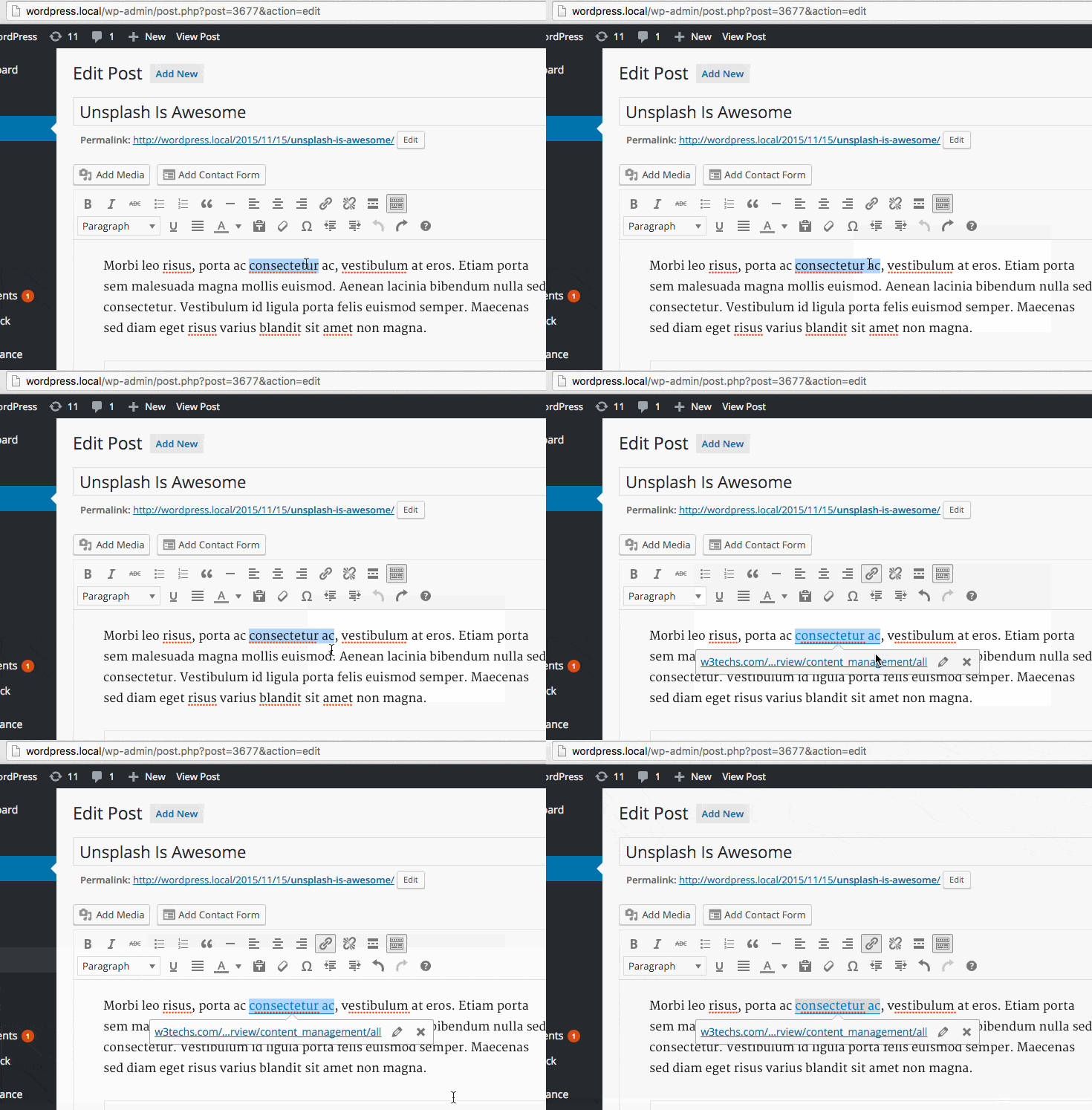
Paste a URL over Text

This one feels like magic – you just highlight some text and then paste over it if you have a link you’ve already copied. WordPress will automatically make that text a link!


Text Styling Shortcuts

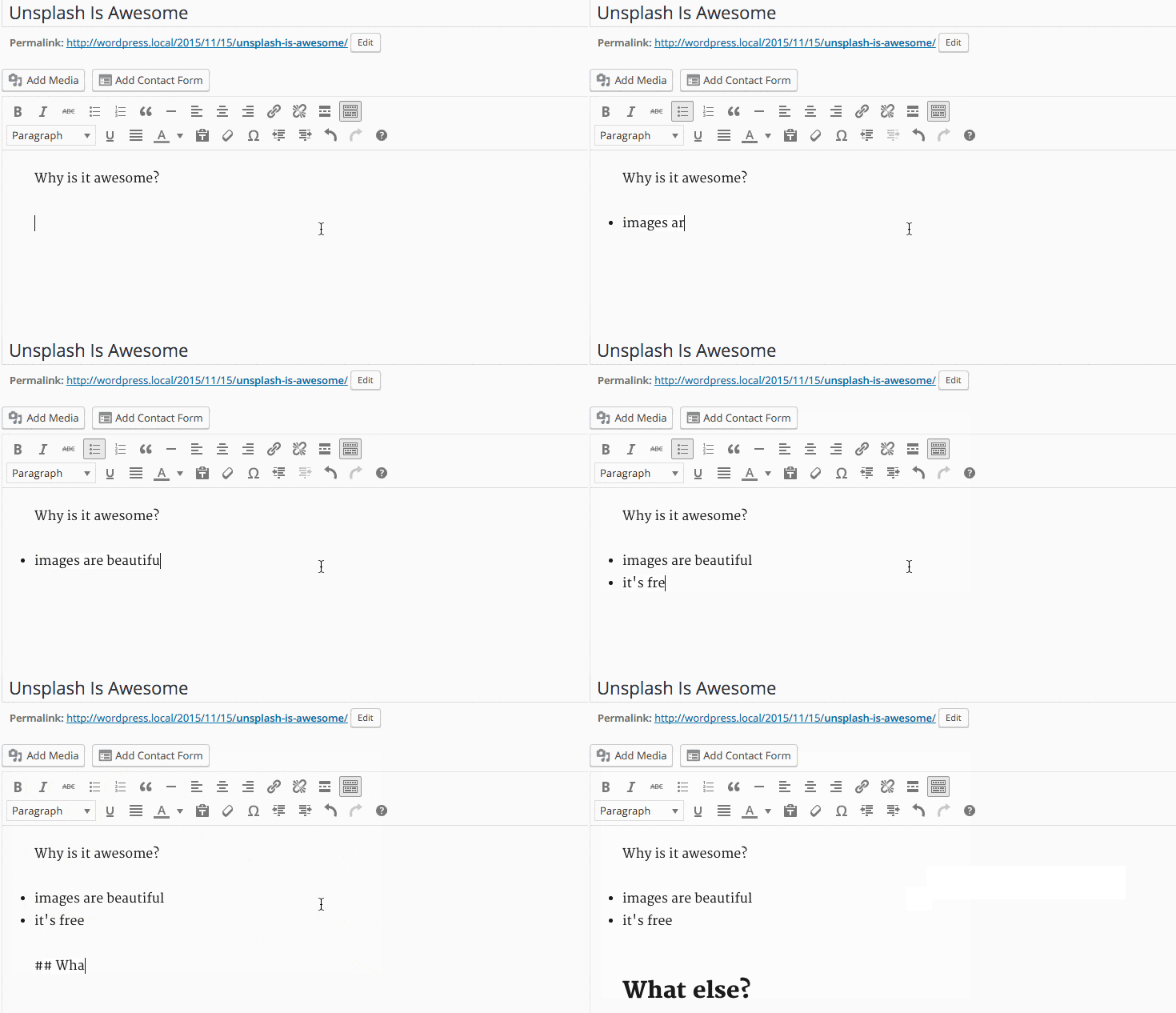
This is similar to Markdown and gives you a quick method for writing your content while adding formatting. Try typing a * and then hitting the spacebar. Magic!

Typing * or – will automatically give you a proper HTML list right away. Same for 1. or 1) Pressing backspace will undo this change. You can also use the undo button, ctrl/cmd+z or esc.

Starting your paragraph with two to six number signs # will convert that paragraph to a heading. Similarly the greater-than symbol > will convert the paragraph to a blockquote.


Bulk Post / Page Editing

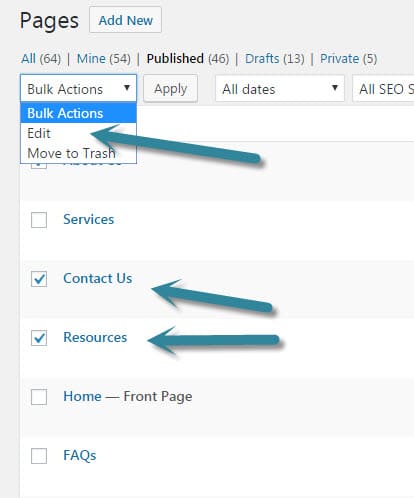
When editing posts or pages you can bulk select and edit a bunch at once. For instance, you could change the author on a bunch of posts at one time.

bulk-edit-wordpress-posts bulk-edit-wordpress-posts-make-changes


In the course of writing this post I found several posts that had the same idea. If you’ve enjoyed this one take a look at these ones for some other tips.


Made with <3 by LimeCuda

It started as a joke. Looking at the footer of a site, I thought it would be funny to reach out to Blake on chat, “Why do so many sites feel the need to tell you that they were made by fewer than three people in a certain city?” What I thought was a funny joke fell on confused ears.

GOOGLE ANALYTICS: How (and Why) to Set Up On-site Search Tracking in WordPress

Tracking on-site search is really easy with Google Analytics and WordPress. See what terms people are searching when using your WordPress site search box.

tracking-on-site-search-google-analytics

What is On-Site Search?

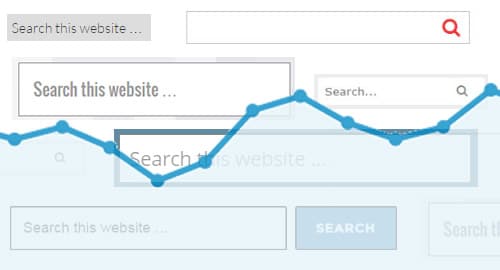
By this we mean when someone is actually browsing your site and uses your site’s search bar to search within your website.

search-bar-in-sidebar         search-bar

Setting up Google Analytics to track Search

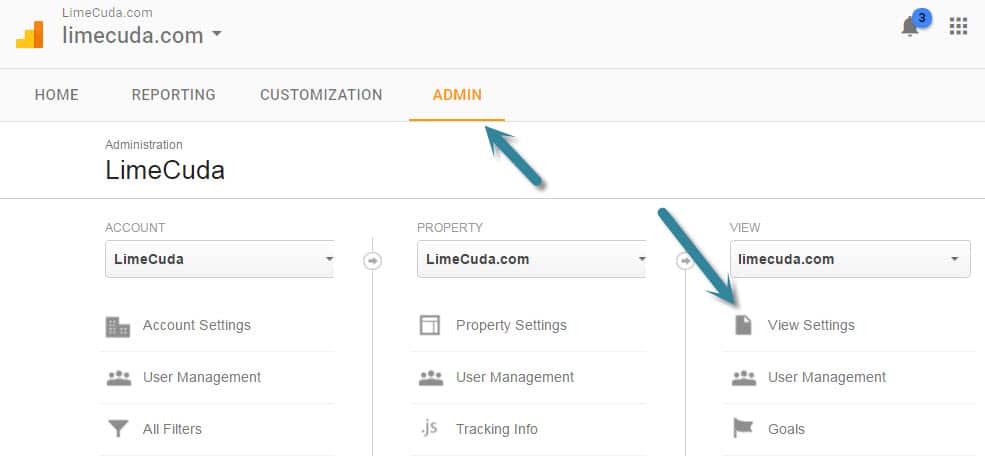
First navigate to the Admin area of your Google Analytics account. Then click the View Settings item underneath VIEW.

google-analytics-admin-search-setting

You’ll see a section towards the bottom like so. Turn Site search Tracking to “ON”. Then make sure there is a Query parameter set of just “s”. This part hooks the WordPress search bar system in to be trackable by Google Analytics.

google-analytics-on-site-search-settings

Where to See the New On-Site Search Data

It may be a couple days before you start to see the data trickling in. Do a couple test searches from other computers to give you some dummy data.

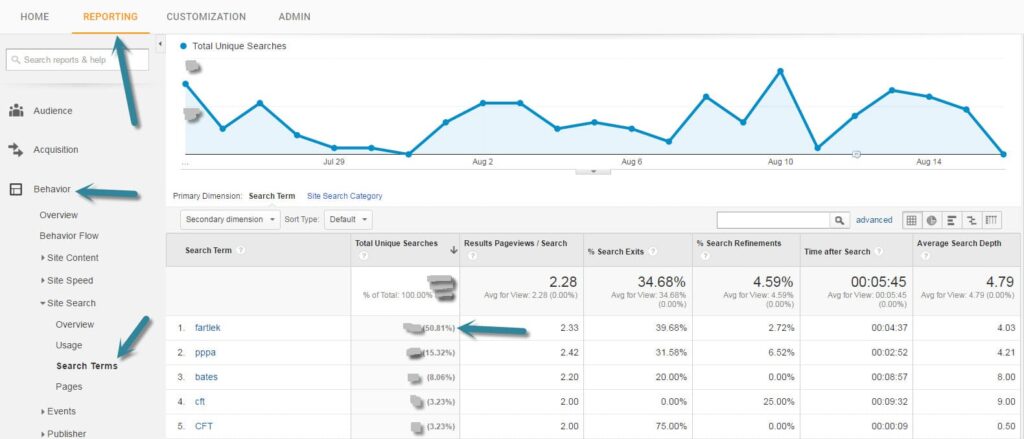
In the Reporting side of Google Analytics look under the Behavior menu item at Site Search >> Search Terms. You’ll see a list of the terms that users searched along with really great data about those visits.

Search Terms from Google Analytics tracking the On-Site Search

What is fascinating about the above report is that for this client they discovered that about half of their search terms were for one specific term (an awkward term but it is a Swedish Running Method)

Let the Search Terms Guide You

For the above project we realized a huge quantity of their users were looking for content that wasn’t easily found on the site. This realization turned into action and we added several menu items to take people directly to the content, as well as creating an entire new specialized website.

Put a reminder on your calendar and keep an eye on what people are searching for when on your site. It could…

  • Give you ideas for new content or posts to write
  • Let you know that you have a navigational issue
  • Aren’t really giving your visitors what they are looking for
Need help setting up WordPress and Google Analytics? Drop us a line and let’s see if we can help you get on the path to better insights about your users.