New cPanel Upgrade for Hosting Accounts

Those clients that host their sites with us, your lives just got ever-so-slightly better. We recently upgraded the LimeCuda dedicated servers to the latest version of WHM/cPanel. This is the software that runs on the hosting side of things and makes it much easier to manage the technical aspects of your site.

Without dragging you through the boring details just know that this means better security, improved usability, and a beautiful new interface.

cpanel-lg

Never used cPanel? Here are some of the ways it can be used…

  • Creating webmail accounts (unless you are using Google Apps for Domains as email)
  • Create subdomains
  • Create redirects
  • Edit DNS
  • Create MySQL databases and edit them with phpMyAdmin

You can log in at yoursite.com/cpanel – so basically just add a /cpanel to the end of your domain and you should be presented with this screen:

Nota Bene: Just because you can access this, it might not be a good idea to just change things unless you know what you’re doing. When in doubt check with us and we can give you some direction. 🙂

Have a question about our WordPress hosting or using cPanel? Give us a call at 724-870-4742


Looking for a web developer?

Working email support for a popular WordPress theme developer, I’ve come across a lot of inexperienced design firms that promote themselves as “experts”.  With advances in technology, the entry into the web development industry has never been easier.  A reality that has created many opportunists trying to make a quick buck.  Although it is easier to become a “web developer”, it is now much harder to be a good web developer.

This being the case, not all young web developers are bad.  There are a lot of quality web developers that can provide you a great service at a great price.  Naturally, everyone must start somewhere and we can’t condemn all newcomers as scam artists.  But, how do you determine whether someone is a quality developer or an opportunist looking for a quick buck?

A Couple Things to Keep in Mind

A single person can NOT be an “expert” at everything needed for your web strategy. 

If you are reviewing a freelancer that claims to be an “expert” at web development, web design, branding, social media, inbound marketing, and analytics… RUN AWAY!  It is a full-time job just staying up to date on one of these topics, this means that anyone claiming to be an expert at them all is most likely a hack at them all.

But this is where the trade off of cost and reward come into play.  To truly have experts in all of these areas manage your web strategy you will be spending a minimum of $20,000.  So, knowing that you only have a $2,000 – $5,000 budget for your web presence, you must determine what will get you the most bang for your buck.  Just keep in mind, people that promise everything will most likely leave you with nothing.

Note: LimeCuda has a team of experts, each well-qualified in their particular niche. Each person also understands the big picture and how the different niches must work together.

Why not get some referrals?

No matter how new someone is to the industry, if they are charging you, they should have some referrals.  It is a common thing for people to request referrals from someone providing them with a service.  This is a big step for your business, don’t hesitate to find out about the experience others have had with a certain developer.

Review their portfolio

Take a look at the websites in their portfolio and keep a couple of things in mind:

  1. What kind of businesses do they serve?
  2. Imagine yourself as that business’s customer, is the site simple and intuitive? Does it draw you in and make you want to do business with them?

If the answer to these questions is no, you might want to look at other developers.

Are you currently looking for a web developer?

If you are currently looking for someone to handle your web project, we happily invite you to take a look at:

  1. Meet our team
  2. What our clients have to say about us
  3. See some samples of our work

We would love to hear from you!


New Facebook Timeline, What You Should Know

The new Facebook Timeline layout is launching for fan pages! Are you ready?

We’ve been busy helping clients move to the new design. If you want to have a go yourself, check out the below links. Here is a particularly helpful one that has the dimensions for the new images. We switched the LimeCuda fan page over last week. Do you have a favorite example of a new page?

timeline

The following collection of links is brought to you courtesy of the social media savants at Marketing Savant

Blog Posts & Articles

E-Books, PDFs, Downloads [PDF or registration links below]

Templates & Guidelines

Bonus

  • Here’s a quick Facebook Timeline Pinterest Board that Marketing Savant put together on their Pinterest page that links to some of the better infographics, guides and resources that they’ve found for Timeline.

Philosophy of Communication, A Look Inside the LimeCuda Culture

Aj the dog, driving on his way to workThe culture a company forms for itself has massive impact on the work produced.

Stealing this unashamedly from my dad… we try very hard to be “fun, friendly, and helpful.”   This manifests itself in: the calls we have with clients,  our state-of-mind while at our desks, and how we communicate in email.

Life is hard enough, so we always try to keep a positive and upbeat attitude. You wouldn’t think, so but creating or transforming a company’s web presence can be stressful and high pressure. People entrust their businesses to us all the time; being alert and thorough is key. However, in order to not let this responsibility turn us into uptight, stressed-out, robots, we mix a healthy dose of fun, humor, and joy into our work.

Don’t be mistaken, this surface casualness is how we keep our work full of joy, meaning, and we don’t end up in padded rooms scribbling “Die Internet Explorer, Die!” We are still professionals underneath the jeans and un-tucked dress shirts.

Yada yada yada, so what do we mean?

Phone Calls

If we chat on the phone, we try to be direct and not waste your time, while being fun and interesting people. I do far too much rubbing in the face of my northern clients, the warm weather and sun that I suffer through. (sorry!)

Posts / Content

When we interact in the online world with Social Media, mailing lists, website content, and blog posts, we may be more casual and entertaining than you are used to. And that is exactly why… we would put you to sleep at your keyboard if everything from LimeCuda was “what you are used to”.  Have you ever seen the face of someone who fell asleep on their keyboard? It ain’t pretty.Guy falling asleep on keybord

Emailslimecuda-email-icon

We all get faaaaaar too many of them. We feel your pain. In our correspondence we try to be to-the-point and not waste your valuable time. You also might get some humor. We’re also certainly no strangers to the emoticons like: 🙂 or 😉 and if you are a cheekish client maybe even a 😛  (don’t be alarmed if you see an lol, only 30% of the time are we laughing at you)

Why do we engage in such frivolities? Experience. There is a very real danger when communicating with someone online as you immediately lose the  90% of communication that is non-verbal. By adding a smiley face we are trying to bring back some of the meaning and intent that is lost in written communication. This isn’t us being goofy, this is us trying to make sure you know that we aren’t mad or frustrated.

Note: in case you weren’t aware, ALL CAPS is the online equivalent of screaming, so unless you are very mad or very excited about something, don’t use it. Don’t leave us guessing what you meant when you said “THE FONT IS WAY TOO SMALL” 🙂

Now it’s your turn… Any tips you want to share for communicating online? Have a different style philosophy? Please share in the comments!

Georgia E-Commerce Taxes by County (Zip Code Breakdown)

This post deals specifically with e-commerce tax issues in the state of Georgia

Although web sales are generally thought to be non-taxable, if your client has a physical location they will have to pay sales tax for all of their in-state sales.  Not only are there state taxes to process, there are additional county-based local taxes which have to be accounted for in your e-commerce solution.  I know this sounds like a huge pain, and it somewhat is, but it is a necessary thing to consider in order to ensure that your client does not receive any unnecessary headaches while running their new e-commerce website.

There is however a kink to this process when considering online sales.  Local taxes are county based.  When was the last time you saw a “County” line on a checkout form? Since it is rather unconventional to include a “County” line on your checkout forms, these rates are typically calculated based on the zip codes provided when customers are purchasing items.

SPOILER ALERT!  The remainder of this article deals specifically with Sales Tax issues for the state of Georgia

Georgia Tax Rates for Online Sales

In reviewing this situation for a current project we are working on for a company based in Georgia, we decided to add a 7% tax for all items purchased from within the state of Georgia (4% state tax + 3% Local Tax).  Since there are only 9 counties with a lower local tax rate, we then determined (conservatively) the zip codes for all the counties that had a lower Local Tax rate (2% rather than the traditional 3%).  We then created a negative tax rate criteria for all orders from these zip codes, so when someone made a purchase from a zip code that fell within the lower rate it would reduce the tax amount by 1% (2% in the case of Whitfield County since they only have a 1% local tax bringing the total tax rate to 5%).  We’ve provided a breakdown below of all the Counties and associated zip codes with the lower rates.

Counties & Associated Zip Codes with 2% Tax Rate

Bibb County

  • 31201
  • 31204
  • 31206
  • 31216

Burke County

  • 30456
  • 30830

Cherokee County

  • 30114
  • 30115
  • 30183
  • 30188
  • 30189

Cobb County

  • 30008
  • 30060
  • 30062
  • 30064
  • 30066
  • 30067
  • 30068
  • 30069
  • 30080
  • 30082
  • 30106
  • 30126
  • 30144
  • 30152

Fayette County

  • 30214
  • 30215
  • 30269
  • 30290

Glynn County

  • 31520
  • 31522
  • 31523
  • 31525
  • 31527

Greene County

  • 30642
  • 30678

Gwinnett County

  • 30017
  • 30024
  • 30044
  • 30045
  • 30047
  • 30071
  • 30092
  • 30093
  • 30096

Counties and Associated Zip Codes with 1% Tax Rate

Whitfield County

  • 30710
  • 30720
  • 30721
  • 30740


We hope this helps you and maybe saves you a little time!  If you happen to be looking into an e-commerce solution for your own company, we would love to talk with you!  Contact us and we’ll be in touch with you shortly.


Meet Josh Mallard – New LimeCuda Creative Strategist

With party favors, celebratory drinks, and pin the tail on the donkey (yes to all but the last) we welcome Josh Mallard to the LimeCuda team.

Who is this Josh Mallard?

Josh and Blake have been friends for nearly 10 years and have worked together previously on and off the web.  Josh has been doing web design for several years, with the majority of that time spent juggling web design and a full-time job as an accountant.  After starting and running his own company full-time, Josh quickly realized the need for collaboration.  Joining LimeCuda was a natural fit and Blake and Josh both look forward to how the collaboration will push them professionally and creatively.

Josh lives in the Atlanta area, plays the drums, has a wonderful wife, and a black lab. Josh is super-creative and likes to push the limits of design.

How will he fit in at LimeCuda?

The specialties that Josh brings to LimeCuda… creative eye, proficiency with Adobe CS5 (Photoshop et al), a diversity in design approach, and an insider’s understanding of the accounting, photographer, and artist niches.


How to Set the Nameservers in GoDaddy

Nameservers are like signs that point the way from your domain to your hosting. I’ve done a quick screencast showing you how to change nameservers in GoDaddy.

LimeCuda uses these nameservers:
NS1.LIMECUDA.COM
NS2.LIMECUDA.COM

Configuring WordPress SEO Plugin on Posts + Pages

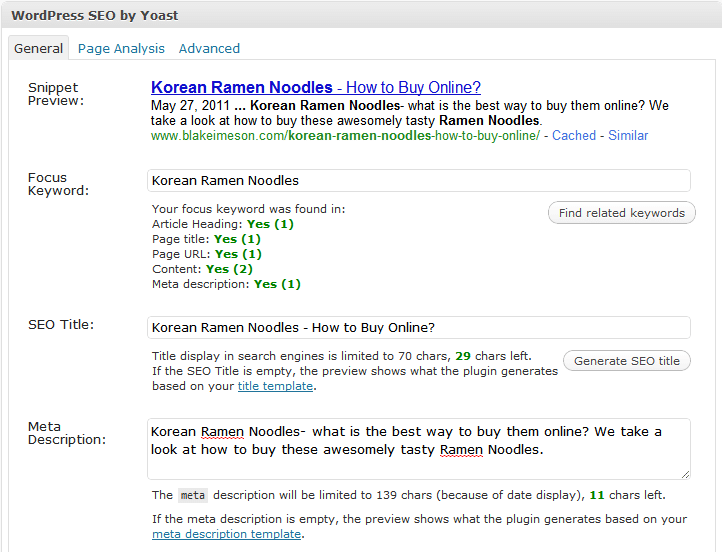
Watch as I quickly go over how to use the powerful WordPress SEO plugin by Yoast on my posts and pages.

We’ve tried many SEO plugins but none are as robust or perfect as this one by Yoast.

Learn how to use it when editing your WordPress Posts + Pages:

I’ll leave you with a couple thoughts (some were in the video)

SEO Title

[arrowlist]

  • Highest value keywords should be towards front of tag
  • Having a longer title with many keywords dilutes the strength of each keyword
  • Use separators like: | – > <
  • The default auto-generation on global settings page. I use %%title%% or %%title%% | %%sitename%%

[/arrowlist]

SEO Description

[arrowlist]

  • Has little SEO value but terms the user searches get bolded
  • Needs to entice the searcher to click thru

[/arrowlist]

Focus Keyword

[arrowlist]

  • Only for your own internal use
  • Only put one keyword/phrase
  • Use this to remind you of where you can naturally use your keyword

[/arrowlist]

Other

[arrowlist]

  • Use /%postname%/ for your permalinks (Settings>>Permalinks) or if concerned about speed and having many posts: /%post_id%/%postname%/
  • This plugin also generates XML sitemaps that you can submit to Google Webmaster Tools
  • Download plugin

[/arrowlist]

Have questions? Send us a message or comment below!

New eBook Released! (Fan Page Exclusive)

LimeCuda just released our first eBook *drumroll*… The Internet Demystified: 8 Essentials to Getting Your Business Online.

A lot of time was spent on this to make very helpful for someone who wants to take a more “Do It Yourself” approach when starting their businesses’ web presence.

The Internet Demystified takes you through the first few steps of starting a website.

limecuda-facebook

To download it just become a fan of our Facebook Fan Page.  (you can always un-fan after you have the eBook)

Enjoy!

Is Buying Links an Effective SEO Strategy?

Our clients often pass us emails from people offering to sell them links. But is link buying an effective and ethical SEO strategy?

Yes and No.

Links drive the web. Google will grant your site trust/authority based on not only the quantity of links pointing to you, but also on the quality. (See PageRank)

Quality of a link to your website depends not only on what links are pointing to the site that is linking to you but also on the relevancy of that site to yours.

If I run a blog on cooking techniques, one link from Martha Stewart is worth several thousand times more than if I have 300 links from sites in some irrelevant industry like classic muscle cars. Unless I am trying to rank for keywords in the muscle car industry but if I am trying to rank for terms in the cooking niche then links from sites already within that niche have far greater power.

pagerank linking

So the bought links may help if they are in the right niches but keep in mind that Google has stated publicly that they do not approve of this practice.

There was recently a very high-profile case of JCPenny getting penalized by Google (also Overstock.com and Forbes) for buying links featured in the NYT.

There are not many effective and safe shortcuts in SEO, while a link vendor may have 1000s of websites that could link to you, they are most likely not high-quality and are also most likely in irrelevant industries. If your site suddenly has several hundred links pointing to them from off-topic sites, then that looks very suspicious to Google. Their algorithm is way too smart to game in a safe way. At best this is gray-hat SEO but I would argue it is black-hat. LimeCuda keeps squeaky clean and white-hat 🙂 If you are looking for the sneaky, under-handed, shortcut SEO then I have a few dozen emails I get daily from those companies I can send you.

Here is what it all boils down to…

Best and safest way to rank well: get people to link to you naturally because you have an awesome product/service or helpful content that gives value.