They’ve read your blog post, now what?

What are the “next steps” we should be encouraging the users to take after they read a post?
If so, does that vary by post?

This question can impact some design and functionality but more importantly it could impact your business’s bottom line.

They’ve read the content, found it of value, now what? Do we want them to…

  • Leave a comment
  • Share on Social Media
  • Email the author
  • Go check out a product or product category
  • Sign up for an email blast
  • Join a Social community (e.g. LinkedIn, Twitter, Facebook)
  • Trade their email for a free download
  • Visit another related site
  • Become a contributor

The answer(s) to what you want a user to do after reading your content are going to be different for everyone.  BUT whatever the case, this is a very very important question to wrestle with.

A great blog post doesn’t just inform—it guides the reader toward what to do next. Without a clear next step, even the most engaging content can become a dead end. Whether it’s prompting readers to explore related articles, download a resource, sign up for a newsletter, or take action on your product or service, a well-placed call to action keeps the momentum going.

Every blog post should have a purpose beyond just being read—think of it as the start of a conversation, not the end. By giving readers a logical next step, you turn passive readers into engaged users and, ultimately, into loyal customers.

Blogging without having a “next step” lined up for a user is a wasted opportunity.


5 Solid Ways to Fine-Tune a Blog

We’ve done a lot of WordPress blog optimization work – this last year in particular. Here are 5 solid ways to fine-tune your blog.
fine-tune-a-blog


  1. Make it fast!


    Yes, users expect your blog to be fast. Faster blogs generate higher engagement, more page views, and are much better at driving that blog traffic to your primary “Calls To Action” and services.


  2. Be intentional with your blog post SEO


    Your blog is a marketing tool but how do you generate good, new traffic to your blog? This is a very weighty topic, but being intentional with your blog post SEO is key to generating more organic traffic to your blog.


  3. Interlink blog posts


    Interlinking blog posts is a great way for you to tell Google what your content is about. It helps to tell Google that this post is a valid and authoritative source of information on the “linked topic” (the text that you used as the link. Like “Interlinking blog posts” in the sentence above.)


  4. Have interesting imagery


    Let’s face it, we’re very visual creatures. Yes, the content of your blog is what’s important, however, having strong and engaging visuals helps to get people pulled in and connected with your content. Not sure where to start finding good imagery? Check out our post on how to find good blog images. (see what we did there? #2 above)


  5. Drive towards a goal.


    Why do you have a blog in the first place? For some people, the blog content engagement is the goal. To have users engage with and share the content is the primary goal of the site and layout. For example, that is the case for Rachel Shultz and her blog “On Homemaking” or Jim Cutler’s Vlog. Your site may have many secondary (but important) goals like: pageviews, ad revenue, brand exposure, building an email list, selling an eBook, etc. etc.


    For many businesses, the blog is just the starting point for the “what’s next” that they would like visitors to pursue. Not establishing and driving towards a goal is a waste of your blogging efforts. Ultimately, you want a customer, an advocate, and brand loyalty – not casual bystanders that have no push towards further engagement with you.


tune-a-post-like-a-guitar

See how easy it is to enhance your blog without adding fluff? Now that you’ve read these quick tips, take a look back over this post. Can you see how we used these exact tips to bring a little more power to this post?

Need some blog optimization done by seasoned professionals (hint hint), contact us and give us the scoop on your project. 

Finding and Using Images for Your Blog Posts

It might seem simple, search Google, find an image, and then use it… However, for the best results and avoiding legal trouble, there is a better way…

perfect-image-wordpress-post

Why use images in blog posts?

I don’t need to work hard to sell you on this. A text-only blog post is pretty dull and uninspiring.

Adding an image to a post (or page) livens them up with visual interest AND it helps someone more quickly understand what your post is about. (#humblebrag we really like what the image conveys on our recent website launch ideas post)

Why you MUST be careful about where you get your images!

Intellectual Property and “creative use” is an extraordinarily complex subject and even differs across the globe. Your best bet is only use images you are permitted to use.

We’ve had several clients who accidentally used an image they didn’t have permission to use. This can result in a strongly worded letter threatening legal action. This can sometimes feel like a bit of an extortion game to try to get you to pay up. Just avoid that mess and use a little extra effort to get legitimate images.

Where is the best place to get images?

Here are four good sources for usable images….

1. (FREE) Image Search Engine

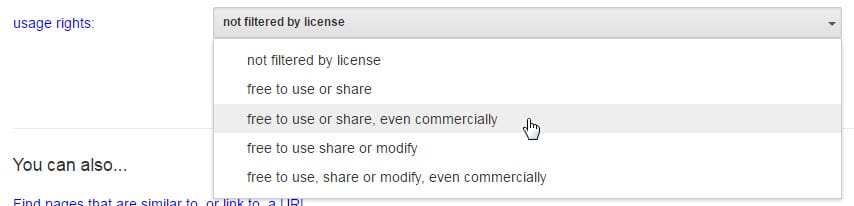
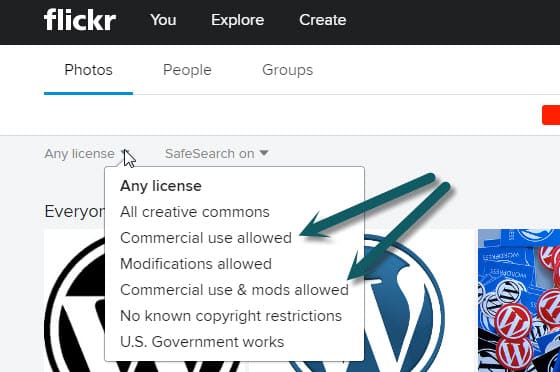
When you use Google Image Search or Flickr there are options to filter by license. Find free images already cleared to use.

Google Image Search
Click the “Advanced Image Search” when searching in Google Images. Filter by the right license and then go find that image!

google-image-search

Flickr
Like Google, Flickr has a massive collection of great images.

flickr image license


2. Stock photography sites

We have a monthly subscription to Big Stock Photo. There are quite a few great stock image sites. Be prepared they can easily be $10-40 per image but this is a small cost if the image is perfect.

Free stock photo sites: unsplash.comphotopin.com, magdeleine.co, picjumbo.comdeathtothestockphoto.com, morguefile.com, pixabay.com,

3. Have professional photos taken

This is our favorite option. Get a local professional photographer to take a bunch of pictures. Make a list of shots you know you need and also have shots take of anything that is unique or interesting – you never know what future photo needs may arise. Here are some ideas of what to get photographed:

  • Individual employee headshots
  • Team / group shots
  • Office building, signage, foyer, office space
  • Employees in action (within offices or doing whatever work you’re known for)
  • People naturally going about their day in your office environment
  • Unique art pieces or awards
  • Factory, storage areas, warehouse space, etc.

4. Ask permission to use

If there is a really great shot on someone’s website – they might be willing to let you use it. In this case, contact them and get their written permission to use it. Setting up the “ask” well can go a long way to getting clearance.

Great photos really do make-or-break a website. Take care with where you get them and choose great photos!

2 Real-World Ways to Build Thought Leadership on Your Company Blog

thought-leadership-company-blog

In a previous post, we covered what Thought Leadership is and why it is important for your business. Now, we’d like to dive in a little deeper here and give you a few tips on how you can build your reputation as a Thought Leader using your personal or company blog.

1. Answer the Questions Your Audience is Asking

In the most basic sense, someone is a thought leader because they have answers. They have experience that a specific audience is seeking to learn from.

When looking to create content for an audience, you need to first determine who your audience is and what their interests may be. Even further, if you can determine the daily, small pain points this audience experiences, you can focus your content on addressing those pain points.

One of our long term clients shares their immense collective experience in retained search on their blog. They try to anticipate the questions their clients might have and then write a helpful post to provide the answer.

Tip: You can learn the exact information your audience is looking for by tracking the search queries made on your site.

2. Give Your Audience an Opportunity to Engage

It’s an easy temptation to allow your blog to become a one way form of communication. We can sometimes rest on a feeling of safety and security by imagining we’re just dumping our content into the world for our readers to just consume as-is.

However, we must give our audience an opportunity to engage.

Thought Leaders use their content as a starting point for further engagement with their audience. The ability to actually bring experience to a conversation is key to building thought leadership – not just the ability to scream facts from your own soapbox.

A couple of ways to pursue engagement with your audience:

Give visitors the opportunity to comment on your blog posts.

For me, the best part of most informational posts is an active comment section. Many times, your post alone isn’t enough to answer the questions someone may be searching for. However, if the comments are active, it is likely someone else has engaged with you to pull more valuable information out of the topic.

Ultimately, your blog posts can be considered a way to begin initiate the conversation with your audience and the comments, your greatest opportunities to let your expertise shine.

Actively engage on Social Media

Active engagement on social media gives you an outlet for your content. It allows you to build up a community in a more personal way and engage with your audience where they are.

Also, like the considerations above for the comments sections, sharing your blog posts on social media can be a great conversation starter. And conversation and engagement is the best way to build yourself as a thought leader.

We’d love to hear from you and about your journey of thought leadership. Comment below if you like or send us a message.

Why Blog SEO Can Be Like Rolling Dice

Blogging can be a fantastic business tool. Getting rankings in Google feels like winning a major award. But it isn’t guaranteed…

seo-rolling-dice

The difficulty is – not every post is a winner. Sometimes you write something you think is great and it just flops. No rankings, no sharing, no comments. It’s painful.

But when you do hit the right nerve and the post is skyrocketing with traffic, top rankings, active sharing, everyone is commenting – it is a glorious feeling.

The Key is Persistence

You’ve got to keep writing knowing that sometimes it will be like a tree falling in the forest that no one hears. Many times you won’t be expecting a post to go anywhere and it blows you away. In a way, blogging is like rolling dice, occasionally you hit the jackpot. So keep rolling!

I thought it would be fun to share a few very unexpected “jackpots” we’ve hit.

Korean Ramen Noodles

spicy-korean-ramen-noodles-150x150

On my personal blog I wrote a blog post sharing delicious Korean Ramen Noodles that I’m crazy about. Some Korean friends in college got me hooked on this spicy ramen. I wrote about it and how you can buy it on Amazon. Before I knew it I was getting traffic for all kinds of Korean Ramen related searches!

Takeaway: Share your passions and loves.  

Accidentally Changed WordPress Site Address

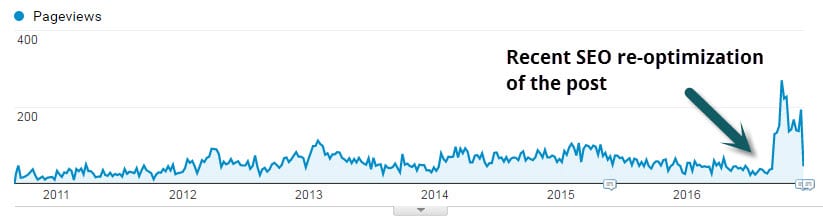
This is my most commented post ever. Published over 6 years it has gained over 150 (grateful) comments and over 18k pageviews! It was born out of a very scary incident when I accidently took down my employer’s popular blog. In my post I shared the solution for if you’ve “accidently changed your WordPress site address“. Turns out people are still making this mistake haha.

seo-reoptimization-wordpress-post

Takeaway: Share problems you’ve faced and solutions you’ve found. 

WordPress Hosting and Maintenance

This is a recent one and frankly unplanned. We provide WordPress Hosting & Maintenance as a key ancillary service. This is a very competitive space and we’re playing with some very large companies. That aside, with a bit of work our hosting page is actually ranking on page 1 for “WordPress Hosting & Maintenance“!

wordpress-hosting-and-maintenance-plans

Takeaway: Even if you are a small player you can rank for longtail keywords. 

One of the most fun parts of our efforts with clients is helping them gain rankings that affect business! Keep blogging!

What is “Thought Leadership” and Why Does it Matter?

What is “thought leadership”? Blake alluded to this concept when discussing finding your industry heroes. Let’s take a deeper dive into what “thought leadership” means and why it is important to you.

public-speaker

Thought leaders are the informed opinion leaders and the go-to people in their field of expertise. They are trusted sources who move and inspire people…

Denise Brosseau

This is an excellent definition of “thought leadership”. I love the above quote from Denise Brosseau of the Thought Leadership Lab. It not only defines what a thought leader is, it also shows why being considered a thought leader in your industry is a huge asset for your business.

Becoming a Thought Leader to Build Trust

“They are a trusted source…”

If people like you they’ll listen to you, but if they trust you they’ll do business with you.

Zig Ziglar

Thought leaders have earned the trust of their target audience. They’ve taken their existing assets of wisdom, time, and experience and transformed them into one of the most valuable assets you can have in the sales process and business relationships – trust.

Becoming a Thought Leader to Drive Action

“They are trusted sources who move and inspire people”

Selling can sometimes feel like the dirty part of doing business. We’ve gotten into our industries and built our businesses because we truly believe in what we’re providing – we know we have value to bring to the table. The core of selling is communicating that value.

By becoming a thought leader, you organically create the desire for your solution within your target audience. You become the driver for informing your audience on what they need. In turn, they trust your opinion and judgment. They trust your opinions on your own products or services but ancillary aspects of your industry.

How Does One Become a Thought Leader?

At this point, you may be thinking “That’s great! But how does that help me and my business. I’m not a thought leader”

This is where I get to be a bit of a buzzkill. There isn’t a guaranteed process or a checklist that you can complete to make you successful.

However, there are actionable steps you can start taking today that will help in building your reputation within your industry and help you in the pursuit of becoming a thought leader.

1. Create Content

The greatest thing you can do is to create content that specifically addresses the problems and pain your target audience is experiencing. This can be done via your own blog, guest posts on popular sites within your industry, writing e-books or publishing a traditional book – the list goes on.

This is also not just limited to written content. You can create videos or your own podcasts to allow your audience to digest the wisdom you’re sharing in the way that is most convenient for them.

2. Participate on Social Media

Even if you think your industry is boring, there is still a target audience for your voice on most Social Media networks. Don’t just generate and share your own brilliant thoughts but generously re-share other people who are contributing great thinking.

3. Public Speaking

Are there any industry conferences that you could speak at? Are there opportunities to speak to groups of your industry peers? These can be great opportunities to get your name out there and establish yourself as an authority within your industry.

4. Be Generous with Your Expertise

There is a counterintuitive reality that those who give generously are usually rewarded generously. Don’t be stingy with your counsel. There are appropriate times to charge for your expertise but adopt a position of freely sharing the wisdom you’ve gained.

We love seeing real-world examples. Share with us your “thought leadership” niche in the comments.

Cross-Posting Your Blog Content on LinkedIn or Medium

LinkedIn and Medium can be great audience-reaching platforms… but you may already be publishing great content on your own website. Should you Cross-Post the same piece on both?

cross-posting

Any Linkedin member can self-publish a piece of content that gets exposure in LinkedIn’s system. Same goes for Medium; people love it for its easy-to-use interface and platform exposure.

What is Cross-Posting?

Cross-Posting is simply taking a piece of content and publishing it on two separate sites or platforms. Could be a great way to get your wise words in front of a bigger audience.

Keep in Mind with Platform Posting…

Will it Rank? (Search Engine Optimization)

If you are going to cross-post you may want to think about the potential for ranking in Google. Decide if ranking is key and if it is then how you approach posting needs to be strategic.

There is no Google penalty for duplicate content. However, certainly the piece Google views as a copy or less authoritative will have a harder time ranking. Definitionally, both posts are competing against each other as well.  Ironically (and irritatingly), when researching for this post I stumbled on an article posted on several different platforms.

Analytics and Tracking are Minimal

When you post on LinkedIn or Medium you get precious little in terms of analytics.

linkedin-analytics-blog-posting
medium-cross-posting-analytics

May Limit Strategic Site Goals

If a reader is on LinkedIn or Medium, they aren’t on your site! Your ability to keep them navigating around and digging deeper is limited to the content within the post. The navigation, related articles, distracting ads… they’re all the platform’s, not your site. You’ll also need to decide which post you share and promote on other Social Media like: Twitter, Google+, and Facebook.

Your Network Has Power

If you have hundred of followers on Linkedin or Medium then it is likely the content will get some love. If you have a minimal network you could just be shouting into the abyss. If the piece is well-written and considered worthy it could even get promoted to LinkedIn Pulse or Medium’s Editors’ Picks.

5 Tactics to Cross-Post Correctly

1. Time-delay the Second Posting

Delay the second posting. Perhaps by a week or two. This will give Google a bit of time to find and assess the first post and clearly understand that it came first in time.

2. Link to the Other Post

Towards the beginning or the end have a line that says something like “This post originally appeared on…”.

I like to use italics and have some keywords linked. e.g

This article Your Obligation to People Visiting Your Web “House” was originally posted on LinkedIn.

3. Rewrite and Reuse

If you take the post and rewrite it sufficiently it may be seen by Google as unique content. You could perhaps tailor each post to the audience and platform.

It’s a great idea to rewrite the title and the content to target a slightly different keyphrase.

4. Give an Excerpt

You may want to use the secondary posting as a teaser to drive traffic to the first. You could put half of the article on LinkedIn for instance and give a link at the end to keep reading on your website. Give away enough good thoughts to keep them interested and coming to your site.

5. Use Your Blog’s Canonical Tag

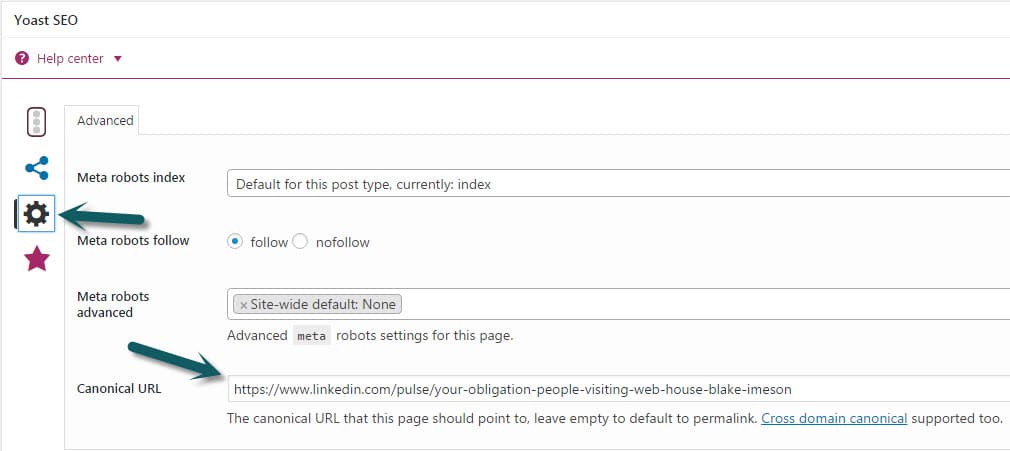
If you’ve decided to let the LinkedIn post be the Search Engine golden boy then set the canonical tag for your own site’s post to be the LinkedIn post’s URL

linkedin-canonical-seo-tag

My Recommendation for Cross-Posting…

Cross-Post in moderation. Some pieces will work really well on a secondary platform and some will not. For LinkedIn it seems to me business-related pieces of a more philosophical or anecdotal nature do really well.

If ranking is important, my preference would be first publishing to your own website and then waiting to publish on the platform with a link to the original post.

4 Quick Tips for Getting into That Elusive Blogging Groove

We’ve been blogging on LimeCuda’s blog every Tuesday for almost 3 months now. Add in our personal blogs, Social Media, and our new favorite child, Fewer Than Three – and that’s a lot of posts! (30+ by my count).

In the spirit of “here’s what’s working for us” I’m sharing 4 tips for getting in that elusive blogging groove.

getting-in-blogging-groove

1. Make it a regularly scheduled “habit”

We’ve committed to publishing a new post on LimeCuda EVERY Tuesday. We share the load yes, but sometimes we’re fighting over who gets to publish as much as we’re fighting over who has to fulfill this duty. Knowing this is a non-negotiable for us has helped us “own it”.

For you this might mean daily (aka Chris Lema Beast Mode), weekly, monthly, or 4 times a year.

Make it a regularly scheduled non-negotiable! 

2. Always be capturing ideas for new blog posts

Get  in the frame of mind where you are constantly looking for new stuff your audience might benefit from. I find myself scribbling post titles on a piece of note paper during client calls. We have at least a dozen partial drafts sitting in our WordPress dashboard right now.

Or, if you want to go even further… when inspiration strikes, take a few minutes and just jam out a post while it is fresh in your head!

3. Not every blog post needs to be long or earth shattering

Don’t avoid blogging because you don’t think you can write “enough”.

A powerful thought shared succinctly is better than that same thought spread over 20 rambling paragraphs. 

Don’t avoid blogging because you’re worried about not contributing an “original thought”. First, those are as rare as unicorns – Second, it might be new information for your audience! Just the practice of forcing yourself to share will mean you better grasp a subject.

For instance…

I took time over the weekend and wrote an absolutely enthralling post on the nuances of migrating a WordPress site to HTTPS. Granted, what is enthralling to some is mind numbing to others…that aside, while forming a teaching tutorial on something I’ve done dozens of times it helped me better understand the process and my own skill was bolstered.

4. Obsess over the analytics

I take this to an unhealthy level but there isn’t an addiction support group yet…

But seriously, reward yourself by watching your traffic grow. Make it a guilty habit to monitor your Google Analytics. This is the long game, don’t be upset if it takes 3 months to see results. Rarely does any worthwhile success happen overnight!

Please share your big and little tips in the comments.

Use Your Website to Boost Employee Engagement and Performance

Have you considered how your public website could be used to boost your employee engagement and performance?

At LimeCuda, we’re proponents of the idea your website can be more than just a marketing tool for your business. Used strategically, your web presence can be a tool to help promote health in all areas of your business.

Applauding Employees Boosts Performance

The Data on Employee Engagement and Performance

According to Bob Nelson, one of the top drivers for employee performance is “I have been recognized recently for what I do.”

Consider this statement from the American Psychological Association Center for Organizational Excellence:

Employee recognition efforts reward employees both individually and collectively for their contributions to the organization … By acknowledging employee efforts and making them feel valued and appreciated, organizations can increase employee satisfaction, morale, and self-esteem. Additionally, the organization itself may benefit from greater employee engagement and productivity, lower turnover and the ability to attract and retain top quality employees.


Recognizing employees and the work they’re doing can be one of the greatest ways to boost their engagement and overall performance

How can your website improve employee engagement and performance?

Celebrating successes

Your website will primarily be geared toward engaging with your potential customers. This is why you’ll have Social Media accounts, blogs, downloadable resources, as well as other avenues for engagement.

This doesn’t mean your website can’t be used to celebrate your business and the successes driven by your team.

By publicly celebrating these successes and directly attributing them to your team, employees feel that their work is making a difference and the company genuinely appreciates their efforts. This is a huge driver for loyalty and performance. Positive reinforcement experienced through recognition gets multiplied exponentially. Not only are your employees recognized by their managers, they’re now recognized by their family and community.

Imagine the feeling of knowing your spouse, your family, and your community are proud of your work? Imagine the feeling of opening Facebook to see a notification from your spouse sharing a doting message along with an article written about you by your company?

Celebrating individuals and humanity

In addition to celebrating your team and their successes, your website can be a great place to celebrate individuals and the fun idiosyncrasies of our humanity.

Your employees are part of what make your culture unique. Share a glimpse and let your clients and vendors know there are real people working there with personality and humanity.

You’re so much more than a bunch of email addresses or phone extensions.

Ideas to jumpstart your engine

  • Andrew just gained a new hard-to-acquire credential
  • Peter spoke at a local conference
  • Amanda was honored for years of volunteer work
  • Tim worked nights and weekends for a month so a local business could open on time
  • Susan and Fred just welcomed their second child into the world

Would this work for your business?

There are a lot of ways you could pursue recognizing your employees through your website. If you’re interested, we’d be happy to chat about the opportunities here for your website.

WordPress 3.0 released. Upgrades on the way.

Quick note that the latest version of WordPress has been released.

For our clients who are running WordPress look to be upgraded in the next week or two.

We have been running the 3.0 alpha, beta, and release candidates on the LimeCuda site for a few months now and haven’t had any real issues and love the new features.

Only minor compatibility issue so far is with the Page Management Dropdown plugin not working but that is minor and just a minor backend tweak we like to use.