What to Think About Before Building a New Website? Part 3: Rankings & Strategy

In this final post of the series we dive into the rankings and strategy of building a new website. Part 1 was on Branding & Design, Part 2 was on Sitemap & Content.
seo-ranking-tracking

Rankings & Strategy

SEARCH ENGINE OPTIMIZATION
We recommend starting to think about the phrases for which you should be ranking in Google. When identifying keywords think about…

  • Competition – are there other big sites already ranking for the term?
  • Volume – how often the term might be searched
  • Relevance – the more specific the keyphrase the lower the competition but the lower the volume as well (generally)

Especially early on, we recommend striving to rank for the most relevant and specific keywords. There will be less traffic, true, but it is better traffic! The competition should be lower as well so gaining traction with rankings is doable.

SOCIAL MEDIA
Are there Social Media pages to which you need to link? Should you be encouraging your content to be shared anywhere? e.g. LinkedIn, Facebook, Twitter, Instagram, Pinterest, etc.

EMAIL MARKETING
Email is still the most effective tool in most online marketing toolkits. You may need to consider how you will collect email signups and what service you will use to send and track bulk email.

One of our favorite tools for email marketing is MailChimp.

STRATEGY
Hopefully you started this whole journey considering the website’s purpose and strategy; that determines all the above and a lot of what we went over in our two previous posts. (Part 1: Branding & Design, Part 2: Sitemap & Content.

The final step is figuring out what you are going to consider a “conversion” or success on the site. A good technique is to ask yourself “what would success on the site look like 5 years from now?” and then work backwards so you have somewhere to start working and an idea for what to track.

Assemble a list of what you will consider a success / conversion. Here are some ideas:

  • Submitting a Contact Form
  • Signing up for email list
  • Calling and speaking to someone
  • Liking a Social Media page
  • Downloading a whitepaper or an E-Book
  • Filling out some sort of form

There is much to think about when building a new web presence from the ground up. It is exhilarating but can be daunting. Take it in small bites and consider it a continually evolving tool.

Looking for experts to come alongside you? Contact us, we love assembling potent web strategy plans.

[SEO STRATEGY] Interlinking Your WordPress Content and Gaining Rankings

Rankings are the holy grail and goal of SEO. A great (overlooked) tactic is interlinking between your own content. We’ll show you a technique to make your SEO interlinking more effective.

The What and Why of Interlinking

When you link to a page, Google not only sees that as an indication of trust it gives them an idea on the subject matter of the page.

If we have a page on our site all about our “WordPress Expertise” and we intentionally linked to it with that phrase or variations of it – Google would get the idea what that page was all about! (should be noted that linking to that “wordpress expertise” page within this post is so meta and a perfect case-in-point 😉 !)

Now, getting these links from other websites is even better but you can and should be interlinking within your own site! There is a “PageRank damping factor” that won’t let you just keep escalating the power of interlinking on your own site, but you should still interlink when it makes sense and do it with SEO intentionality.

How to Make Interlinking Manageable

If interlinking isn’t easy, you won’t do it!

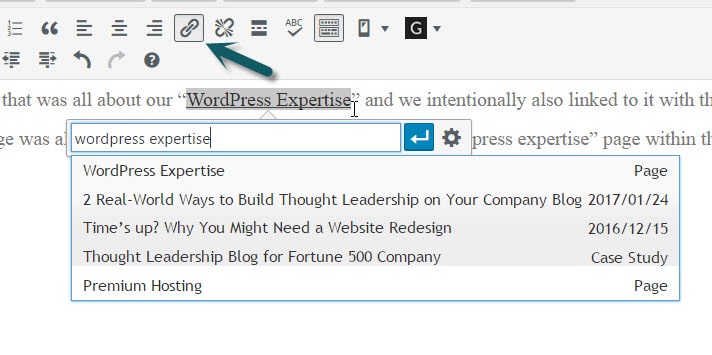
In WordPress adding a link to a piece of content within the same site is stunningly easy.

Highlight the text you want linked, type Ctrl+k (Command+k on Mac) or click the link icon. Then start typing a part of the title or URL for the content you are wanting to link.
interlinking-easy-in-wordpress

Assign Keywords and Keep Track to Interlink Like a Pro

If you only have 5 keywords that map to 5 pages, then it may be manageable within your head. However, if you have dozens of keyphrases you are pursuing or you are working within a team of content writers then you need a better method.

Here’s the Keyword Interlinking Strategy that works for us…

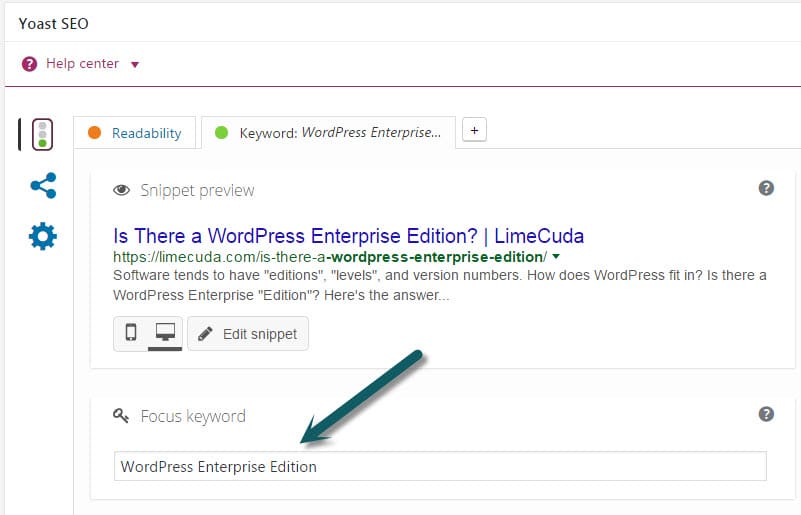
1. Assign a Focus Keyword to Each Post
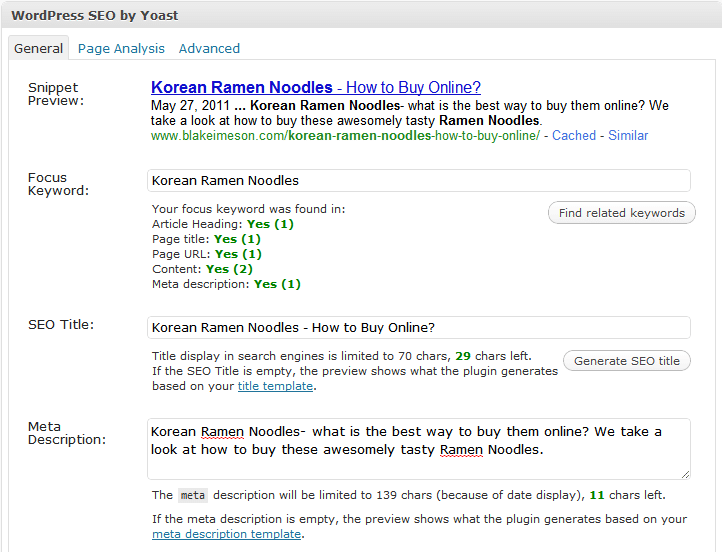
In the Yoast SEO tool this is easy and hopefully you’ve been doing it as you go along. If not, go back through and assign a focus keyword (think keyphrase) to each post.

wordpress-focus-keyword-yoast

2. Export a List of Your Posts
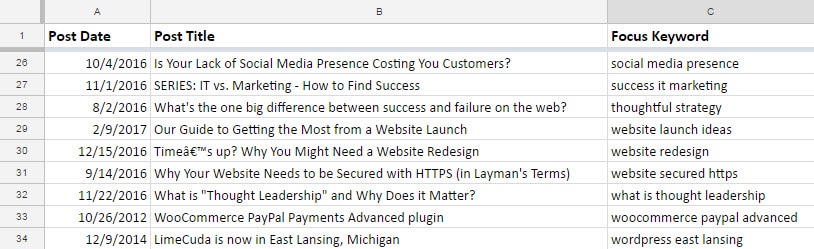
Use a tool like WP CSV to export a CSV file of all your posts. This file contains a column named “cf__yoast_wpseo_focuskw”. This “custom field” value is what contains your SEO Focus Keyword. So now you have a list of all your posts with the keyword mapped to each.

We recommend importing this CSV into a Google Sheet. Then you can easily share it with your team and keep it updated over time. If you only occasionally add posts it may be worth it to just manually add new Post Titles and Focus Keywords to your Sheet as time goes on.

seo-focus-keyword-tracking-for-posts

3. Use the Spreadsheet when writing content
When you are writing a post (before and after) reference your spreadsheet and see if there are natural (and helpful!) ways you can link to these posts – using the keywords!

Over time you can have a nice interlinked blog system that keeps users reading your content and Google understanding and ranking it!

Why Blog SEO Can Be Like Rolling Dice

Blogging can be a fantastic business tool. Getting rankings in Google feels like winning a major award. But it isn’t guaranteed…

seo-rolling-dice

The difficulty is – not every post is a winner. Sometimes you write something you think is great and it just flops. No rankings, no sharing, no comments. It’s painful.

But when you do hit the right nerve and the post is skyrocketing with traffic, top rankings, active sharing, everyone is commenting – it is a glorious feeling.

The Key is Persistence

You’ve got to keep writing knowing that sometimes it will be like a tree falling in the forest that no one hears. Many times you won’t be expecting a post to go anywhere and it blows you away. In a way, blogging is like rolling dice, occasionally you hit the jackpot. So keep rolling!

I thought it would be fun to share a few very unexpected “jackpots” we’ve hit.

Korean Ramen Noodles

spicy-korean-ramen-noodles-150x150

On my personal blog I wrote a blog post sharing delicious Korean Ramen Noodles that I’m crazy about. Some Korean friends in college got me hooked on this spicy ramen. I wrote about it and how you can buy it on Amazon. Before I knew it I was getting traffic for all kinds of Korean Ramen related searches!

Takeaway: Share your passions and loves.  

Accidentally Changed WordPress Site Address

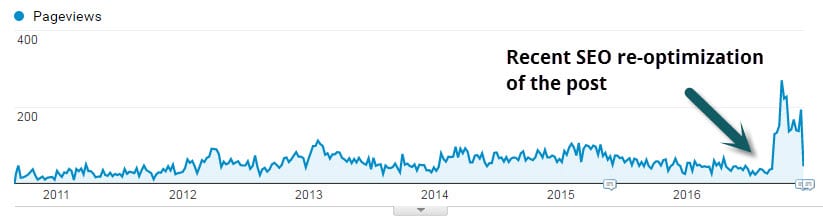
This is my most commented post ever. Published over 6 years it has gained over 150 (grateful) comments and over 18k pageviews! It was born out of a very scary incident when I accidently took down my employer’s popular blog. In my post I shared the solution for if you’ve “accidently changed your WordPress site address“. Turns out people are still making this mistake haha.

seo-reoptimization-wordpress-post

Takeaway: Share problems you’ve faced and solutions you’ve found. 

WordPress Hosting and Maintenance

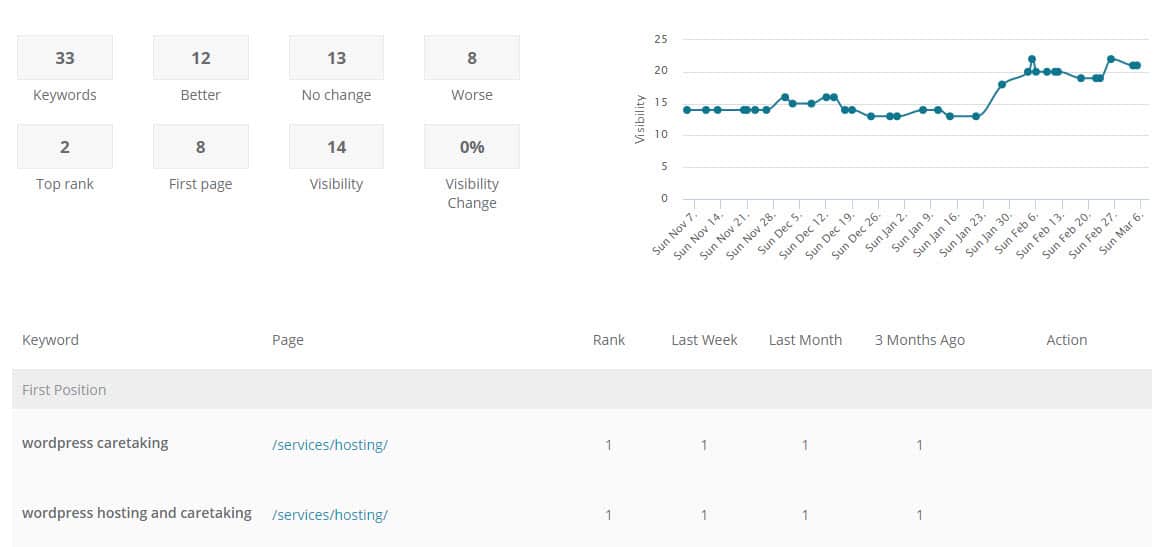
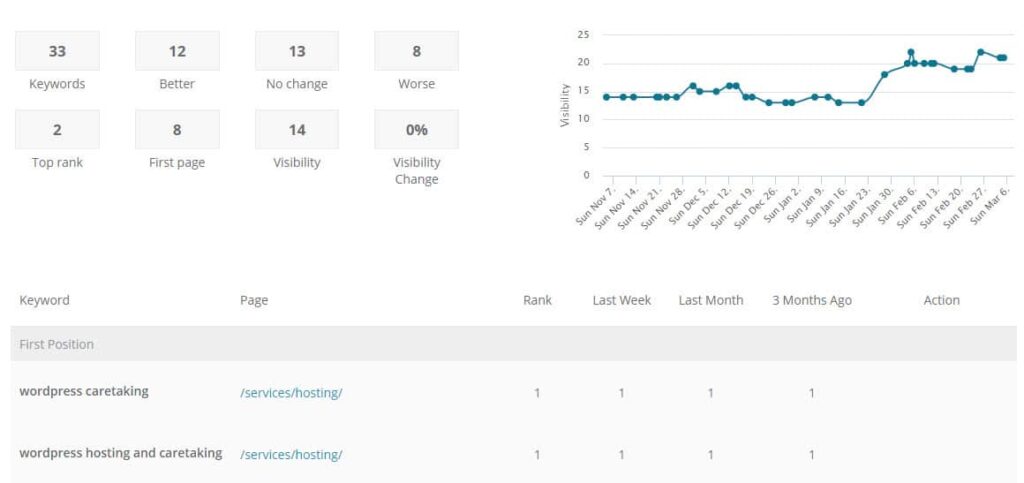
This is a recent one and frankly unplanned. We provide WordPress Hosting & Maintenance as a key ancillary service. This is a very competitive space and we’re playing with some very large companies. That aside, with a bit of work our hosting page is actually ranking on page 1 for “WordPress Hosting & Maintenance“!

wordpress-hosting-and-maintenance-plans

Takeaway: Even if you are a small player you can rank for longtail keywords. 

One of the most fun parts of our efforts with clients is helping them gain rankings that affect business! Keep blogging!

Cross-Posting Your Blog Content on LinkedIn or Medium

LinkedIn and Medium can be great audience-reaching platforms… but you may already be publishing great content on your own website. Should you Cross-Post the same piece on both?

cross-posting

Any Linkedin member can self-publish a piece of content that gets exposure in LinkedIn’s system. Same goes for Medium; people love it for its easy-to-use interface and platform exposure.

What is Cross-Posting?

Cross-Posting is simply taking a piece of content and publishing it on two separate sites or platforms. Could be a great way to get your wise words in front of a bigger audience.

Keep in Mind with Platform Posting…

Will it Rank? (Search Engine Optimization)

If you are going to cross-post you may want to think about the potential for ranking in Google. Decide if ranking is key and if it is then how you approach posting needs to be strategic.

There is no Google penalty for duplicate content. However, certainly the piece Google views as a copy or less authoritative will have a harder time ranking. Definitionally, both posts are competing against each other as well.  Ironically (and irritatingly), when researching for this post I stumbled on an article posted on several different platforms.

Analytics and Tracking are Minimal

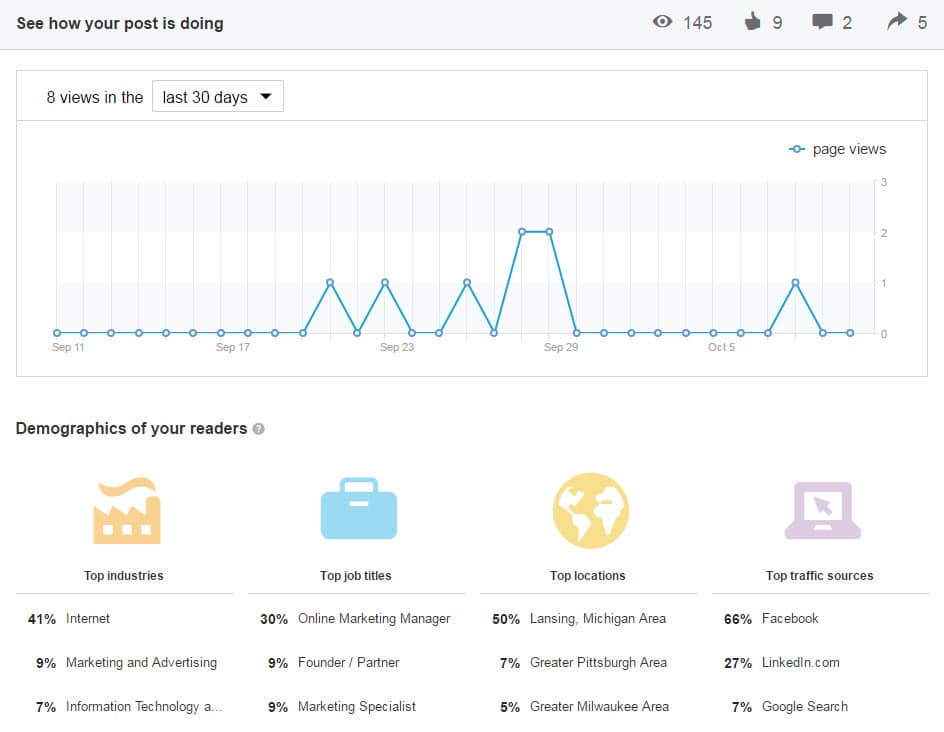
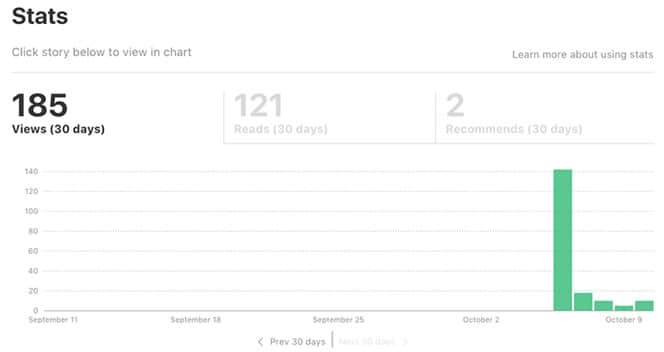
When you post on LinkedIn or Medium you get precious little in terms of analytics.

linkedin-analytics-blog-posting
medium-cross-posting-analytics

May Limit Strategic Site Goals

If a reader is on LinkedIn or Medium, they aren’t on your site! Your ability to keep them navigating around and digging deeper is limited to the content within the post. The navigation, related articles, distracting ads… they’re all the platform’s, not your site. You’ll also need to decide which post you share and promote on other Social Media like: Twitter, Google+, and Facebook.

Your Network Has Power

If you have hundred of followers on Linkedin or Medium then it is likely the content will get some love. If you have a minimal network you could just be shouting into the abyss. If the piece is well-written and considered worthy it could even get promoted to LinkedIn Pulse or Medium’s Editors’ Picks.

5 Tactics to Cross-Post Correctly

1. Time-delay the Second Posting

Delay the second posting. Perhaps by a week or two. This will give Google a bit of time to find and assess the first post and clearly understand that it came first in time.

2. Link to the Other Post

Towards the beginning or the end have a line that says something like “This post originally appeared on…”.

I like to use italics and have some keywords linked. e.g

This article Your Obligation to People Visiting Your Web “House” was originally posted on LinkedIn.

3. Rewrite and Reuse

If you take the post and rewrite it sufficiently it may be seen by Google as unique content. You could perhaps tailor each post to the audience and platform.

It’s a great idea to rewrite the title and the content to target a slightly different keyphrase.

4. Give an Excerpt

You may want to use the secondary posting as a teaser to drive traffic to the first. You could put half of the article on LinkedIn for instance and give a link at the end to keep reading on your website. Give away enough good thoughts to keep them interested and coming to your site.

5. Use Your Blog’s Canonical Tag

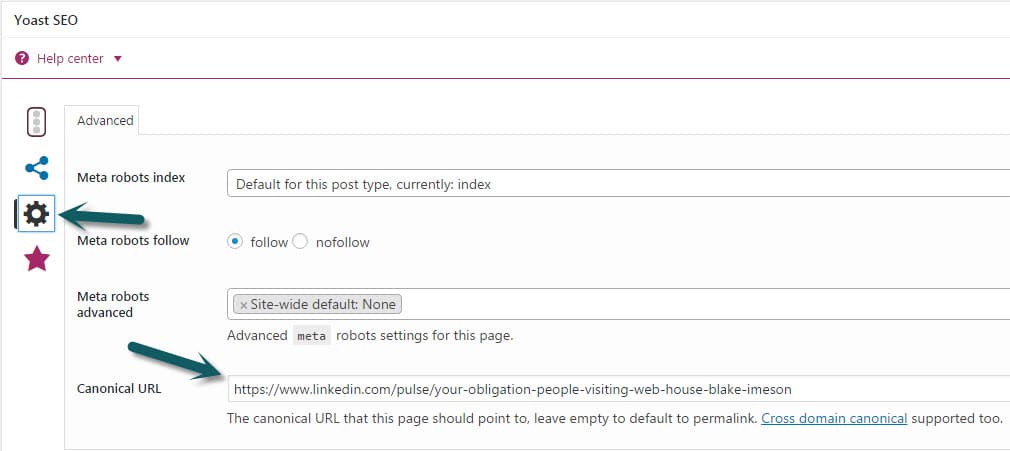
If you’ve decided to let the LinkedIn post be the Search Engine golden boy then set the canonical tag for your own site’s post to be the LinkedIn post’s URL

linkedin-canonical-seo-tag

My Recommendation for Cross-Posting…

Cross-Post in moderation. Some pieces will work really well on a secondary platform and some will not. For LinkedIn it seems to me business-related pieces of a more philosophical or anecdotal nature do really well.

If ranking is important, my preference would be first publishing to your own website and then waiting to publish on the platform with a link to the original post.

SEO Over-Optimization?

Keeping you in the loop on some interesting SEO changes from Google; we’ve got your back Jack.

Google search/spam guru, Matt Cutts, recently threw the SEO world into an upheaval when he said…

So all those people who have sort have been doing, for lack of a better word, “over optimization,” or overly doing their SEO, compared to the people who are just making great content and trying to make a fantastic site, we want to sort of make that playing field a little more level.

This is related to the so-called Penguin update to Google’s search algorithm that happened on April 24, 2012.

Should you be concerned?

If we have been guiding your SEO, you will be just fine. Here’s why… 

  • We have always emphasized user-centric SEO – if your content looks spammy, you are doing it wrong
  • One of the main purposes of our SEO is to accurately convey to machines and users what your content/site are all about
  • We never engage in shady or low-quality link-building tactics and those are part of what is getting hit hardest

This update may actually help many of you as it will level the playing field some.

Further Reading:

(are you a fan of us on Facebook? Like our page to keep up-to-date on new changes in the Web industry)

Configuring WordPress SEO Plugin on Posts + Pages

Watch as I quickly go over how to use the powerful WordPress SEO plugin by Yoast on my posts and pages.

We’ve tried many SEO plugins but none are as robust or perfect as this one by Yoast.

Learn how to use it when editing your WordPress Posts + Pages:

I’ll leave you with a couple thoughts (some were in the video)

SEO Title

[arrowlist]

  • Highest value keywords should be towards front of tag
  • Having a longer title with many keywords dilutes the strength of each keyword
  • Use separators like: | – > <
  • The default auto-generation on global settings page. I use %%title%% or %%title%% | %%sitename%%

[/arrowlist]

SEO Description

[arrowlist]

  • Has little SEO value but terms the user searches get bolded
  • Needs to entice the searcher to click thru

[/arrowlist]

Focus Keyword

[arrowlist]

  • Only for your own internal use
  • Only put one keyword/phrase
  • Use this to remind you of where you can naturally use your keyword

[/arrowlist]

Other

[arrowlist]

  • Use /%postname%/ for your permalinks (Settings>>Permalinks) or if concerned about speed and having many posts: /%post_id%/%postname%/
  • This plugin also generates XML sitemaps that you can submit to Google Webmaster Tools
  • Download plugin

[/arrowlist]

Have questions? Send us a message or comment below!

Is Buying Links an Effective SEO Strategy?

Our clients often pass us emails from people offering to sell them links. But is link buying an effective and ethical SEO strategy?

Yes and No.

Links drive the web. Google will grant your site trust/authority based on not only the quantity of links pointing to you, but also on the quality. (See PageRank)

Quality of a link to your website depends not only on what links are pointing to the site that is linking to you but also on the relevancy of that site to yours.

If I run a blog on cooking techniques, one link from Martha Stewart is worth several thousand times more than if I have 300 links from sites in some irrelevant industry like classic muscle cars. Unless I am trying to rank for keywords in the muscle car industry but if I am trying to rank for terms in the cooking niche then links from sites already within that niche have far greater power.

pagerank linking

So the bought links may help if they are in the right niches but keep in mind that Google has stated publicly that they do not approve of this practice.

There was recently a very high-profile case of JCPenny getting penalized by Google (also Overstock.com and Forbes) for buying links featured in the NYT.

There are not many effective and safe shortcuts in SEO, while a link vendor may have 1000s of websites that could link to you, they are most likely not high-quality and are also most likely in irrelevant industries. If your site suddenly has several hundred links pointing to them from off-topic sites, then that looks very suspicious to Google. Their algorithm is way too smart to game in a safe way. At best this is gray-hat SEO but I would argue it is black-hat. LimeCuda keeps squeaky clean and white-hat 🙂 If you are looking for the sneaky, under-handed, shortcut SEO then I have a few dozen emails I get daily from those companies I can send you.

Here is what it all boils down to…

Best and safest way to rank well: get people to link to you naturally because you have an awesome product/service or helpful content that gives value.

Questions You Need to Ask Your Web Designer / Developer!

Christina, an awesome SEO from the fantastic internet marketing firm, LunaMetrics, just wrote a really fun and poignant post on questions to ask a web designer.

Sign #1 That Your Web Designer Knows Bubkus About SEO:

During the web designers sales pitch, you say “I’m concerned about the Search Engines’ ability to access and properly index my site. Consequently, I’d like to know what kind of code you’ll be using to render the major design elements of my site.” and they answer:
a. Flash
b. Javascript
c. It doesn’t matter
d. I am be coding very well, it’s ok.

Read the rest…

5 Signs Your Web Designer Knows Nothing About SEO

Search Engine Optimization for Beginners – Learn SEO

As a small business owner you often will want to learn things in order to give your business the best chance to succeed. SEO is one of those things that can with some effort you can understand and grow your traffic.

If you read only one thing about SEO, read this guide from SEOmoz. They are the most highly respected SEO firm and educator. If you want more, read this 3 part series from Hongkiat.

[arrowlist]

[/arrowlist]

Remember that SEO alone won’t make you succeed. What SEO gives is traffic. That traffic must be the right kind of traffic and you must be able to convert that traffic.