Hosting and Maintenance for Enterprise WordPress Sites

We previously looked at what it means to extend WordPress via plugins and custom coding for enterprise websites. However, this is only a small part of the “battle” when it comes to working with enterprise websites.
wordpress-enterprise

The 5 Key Aspects of Enterprise WordPress Hosting & Maintenance

Enterprise websites are never “set it and forget it” properties. They need to be regularly backed up, monitored, updated, and maintained.

Use this post to do an audit and determine if your site is on stable ground.

There are many great solutions out there. We carefully tailor a hosting setup for each client that involves sometimes dozens of tools working in harmony to create an optimal hosting and maintenance setup for WordPress.

1. Hosting Security

It all begins with a properly architected server setup. This is basic – just like having deadbolts on your doors and locking your windows.

Things we look for (and provide) in our enterprise WordPress-specific hosting:

Security Practices of Major WordPress Hosts

2. Keeping WordPress Updated

The biggest security risk in WordPress is not having the codebase updated to the latest versions. This includes the WordPress core, plugins, and the theme. In recent security reports, the majority of WordPress-related hacks are due to sites using outdated versions of WordPress or outdated plugins that have had vulnerability patches publicly available for well over a year.

We use site management tools that let us update all our client sites at once and within minutes of a security patch being released.

3. Regular Site Maintenance

In this case, for “maintenance” we’re not referencing retainer-type work where active feature improvements are being made to the site. Think of maintenance as the aforementioned regular updates being performed but with a careful eye to making sure the site keeps working as it should.

Conflicts are pretty rare but in an enterprise-context, a key feature failing could mean serious lost revenue or at a minimum a black eye on the brand reputation.

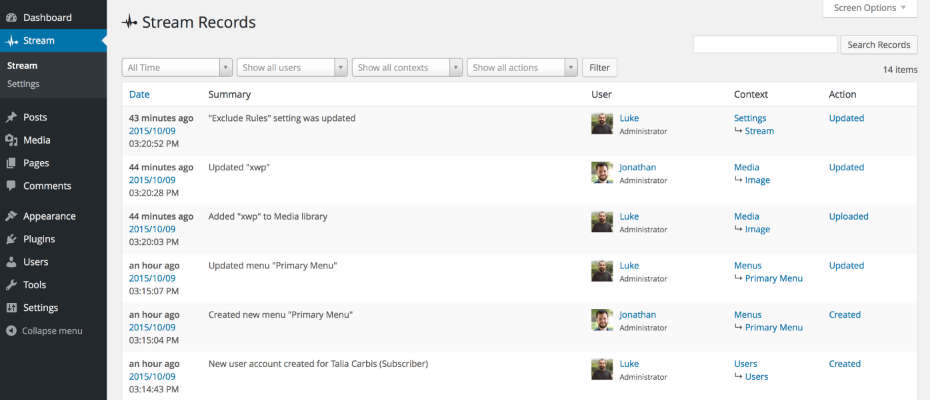
We use a brilliant plugin called Stream that is basically a black box for WordPress. It records all the stuff that happens on the backend of the site. This is really useful for tracing back what went wrong. It let’s you see who-did-what-and-when.
stream-plugin

Scheduled and Quality-Assured update intervals

A security update should usually be applied immediately. Non-critical updates and feature releases are better applied at set intervals (like once a month or every two weeks) That way these can be done on a staging site, or when the site has low traffic. Once a batch of updates is applied it is then efficient to go through an extensive QA list to ensure the sites look and functionality is still perfect.

Tip:
Do you have a staging area that you’re able to test your plugin updates to make sure everything is going well before running those updates (or migrating your staging) on live?

4. Site Backups and Restoration

Regular, full, off-site, and redundant backups need to be maintained with the ability to restore a site at any point in time.

If something ever goes wrong you need a quick way to restore! 

How often a site is backed up will be dependent on the type of site you’re hosting. For example, a corporate blog with daily posts would probably be adequately served by a daily backup. However, a high-volume, e-commerce site really needs a real-time backup solution to protect a complete list of customer transactions.

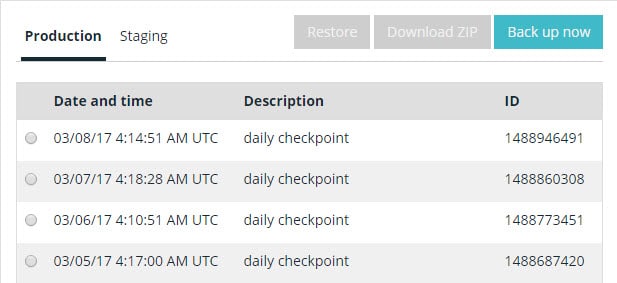
We use a couple backup solutions but at a minimum we utilize WPENGINE’s daily automatic backups.
wordpress-backups-wpengine

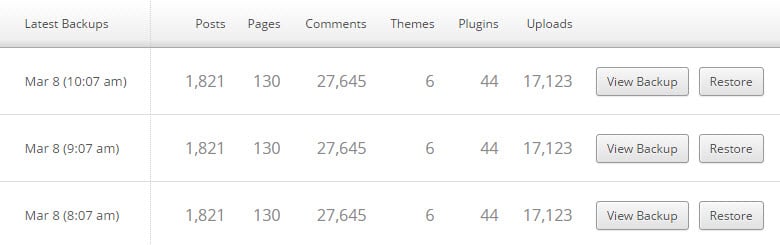
VaultPress has a great real-time backup feature for business-critical / E-Commerce sites. Additionally there is constant malware detection and this is a sweet deal.
vaultpress-ongoing-backups

5. Keeping a close eye on the website

For enterprise websites on WordPress, there are four types of monitoring:

  • Uptime monitoring
  • Security monitoring
  • SEO / Analytics
  • Performance / Speed

Uptime Monitoring

For uptime monitoring, the aim is always 100% uptime. But we live in a very complicated world with many moving parts and human error. (see recent Amazon S3 downtime due to a wrong keystroke)

Uptime Robot is a good monitoring tool that lets you send alerts to emails, texts to phones, RSS, updates in Slack, etc.

uptime-robot-dashboard

Security Monitoring

We use a combination of tools but an absolute key is to have the site being tracked in Google Search Console. This is free and it will email you if your site is ever suspected to be compromised. Google is very careful about sending search traffic to malware-infested sites. (Pro Tip: connect Google Analytics and Google Search Console).

If you are needing a one-off check to see if your site is clean, try the Sucuri SiteCheck tool.
Sucuri also has a good plugin to manage WordPress Security

SEO / Analytics

There are tons of great tools and ways to do this. (Google Analytics of course) Analytics and traffic measuring tools can also be used to alert you to all kinds of problems with your site being down or having malware.

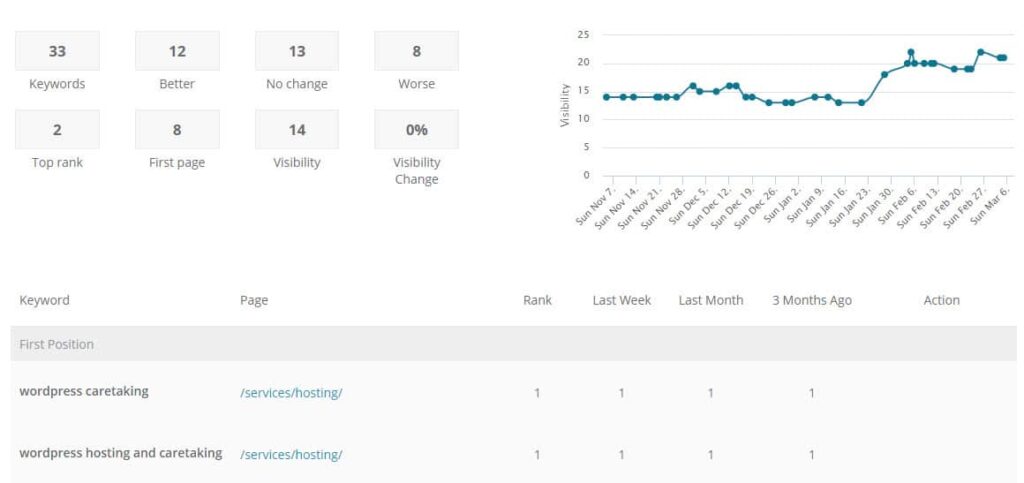
Being able to see keyword rankings can also be key to monitoring the site’s ongoing success.
seo-ranking-tracking

Performance / Speed

It isn’t enough to know that your site is up – it also needs to be loading quickly! We have alerts to head off any issues if a site starts loading sluggishly.

A good quick test for site speed is the Pingdom Website Speed test.

WordPress can be a great tool for enterprise needs but it must be hosted correctly and properly loved! Have a question or something to add? Comment below…

What Does “WordPress for Enterprise” Really Mean? – Extending WordPress

wordpress-enterprise

We previously addressed the fact that there isn’t exactly a WordPress Enterprise edition. However, you will regularly see people talking about “WordPress for Enterprise”. What does this mean? How does this differ from “WordPress for bloggers”?

In this post, we’ll look at how you would approach extending WordPress for an enterprise site.

A Different Approach to How WordPress is Extended

When using WordPress to develop your website, the core software can be extended in two ways:

  1. Via plugins
  2. Via your active theme

This extension of capabilities is the same for both blogs and large enterprise websites. However, there is a key difference when approaching extension for enterprise websites – the intentionality of the extension.

Intentional, Custom Development

It would be a gross misuse of resources to custom-develop every feature built for an enterprise website on WordPress. However, custom development is far more common for enterprise-level websites.

For these sites, we don’t want to piece together a feature that is “kinda what you need” using a variety of different plugins. We want to build exactly what you need in the cleanest way possible. This greatly reduces the potential points of failure for the ongoing maintenance of your site and means running your site is much more enjoyable.

Custom Development Security

When doing custom development, there should always be an intentional review for security best practices. For example, when developing any sort of user interaction, a careful review of every action should consider:

  • Capability – Does the user have permission to perform this action?
  • Intentionality – Is the user intending to perform this action?
  • Validation / Sanitization – Am I getting the type of content that I’m expecting?
  • Escaping – Is the content I’m outputting safe to display?

Tip: There are some great engineering standards that I’ll commonly reference when building out features for client projects. 

Careful Vetting of Plugins

There will also be free, open-sourced plugins (there are almost 50k free plugins!) as well as premium plugins used on an enterprise website. For a typical WordPress website, this can be a pretty haphazard process. Search for the feature you want and install the plugin!

But, for enterprise websites, the plugins used will be carefully vetted. Among other factors, a few key things need to be considered:

  • Popularity of the plugin (e.g. how many times has it been downloaded)
  • Reputation of the plugin (what does a Google search reveal)
  • Reputation of the plugin developer 
  • Update history of the plugin (how often and when was the last update)
  • User review history of the plugin
  • Plugin support history (take a look at the support tab threads – is the developer responsive? Are there many problems?) 

The goal is to have all code that extends the default WordPress functionality on your site to be secure and performant. This is a crucial foundation to have set when we start to factor in the considerations needed for hosting and maintaining WordPress for Enterprise.

Sign up for the LimeCuda Zest to learn more about…

Considerations for Hosting and Maintaining WordPress for Enterprise Websites.

Is There a WordPress Enterprise Edition?

Software tends to have “editions”, “levels”, and version numbers. How does WordPress fit in? Is there a WordPress Enterprise “Edition”?

wordpress-enterprise-edition


The most confusing part is… there are actually two types of WordPress…

1. WordPress.com / Hosted Platform

This is the flavor of WordPress you can sign up for at wordpress.com. It is a powerful, free tool you can sign up for and be off blogging within minutes. Unless you upgrade, your site domain name will end in “.wordpress.com” This type of WordPress is not ideal for business or enterprise use. There are some good upgrades available but you don’t have server access and the ability to configure function and aesthetics is relatively limited.

2. WordPress.org / Self-hosted / Software

The other type of WordPress is WordPress the software, this is found at wordpress.org. A flavor of this software actually runs the WordPress.com example above. This is the Open Source software that can be run on a server you control.

This is the software we develop on top of and what we mean when we say “WordPress”. This Content Management System (CMS) can flexibly adapt and be a great fit for enterprise needs. It can be a blogging tool, a marketing site, a member portal, a dynamic application – or any combination. It is immensely powerful and well-suited for enterprise use.

Is There a WordPress Enterprise Edition?

No, when speaking of WordPress there is only one software edition. There is a multisite variant of WordPress but it is still all part of the same WordPress. The blogger sharing stories of their travels for their family to read and the Fortune 100 website running WordPress are on essentially the same platform. Granted, there are many ways the software can be extended to make it more suitable to the specific needs of large enterprise companies.

What About WordPress Version Numbers?

Much like operating systems where you have “Windows 7” or “Mac OS X”,  WordPress has version numbers and is constantly improving. For example, WordPress is currently at version “4.7.1”. WordPress iterates rapidly with about 3-4 major releases a year.  These updates generally break down into…

Major Update Releases

This would be 4.7 or 4.8 – this type of update usually has great new features and advancements.

Point Releases / Bugfix / Security Releases

These would be like 4.7.1 or 4.7.2 – they usually fix little bugs or in very rare cases patch a security vulnerability.

Fun fact, each WordPress release is named in honor of a jazz musician.

wordpress-4.6

WordPress is a terrific platform for enterprise use. It has the features, security, scalability, and corporate adoption to make it a terrific contender for blogs, a CMS, or even an Application Framework.
Even though there isn’t a WordPress Enterprise Edition per se, WordPress can be easily tailored to the particular needs of large enterprise companies.